
Participant
August 8, 2021
Question

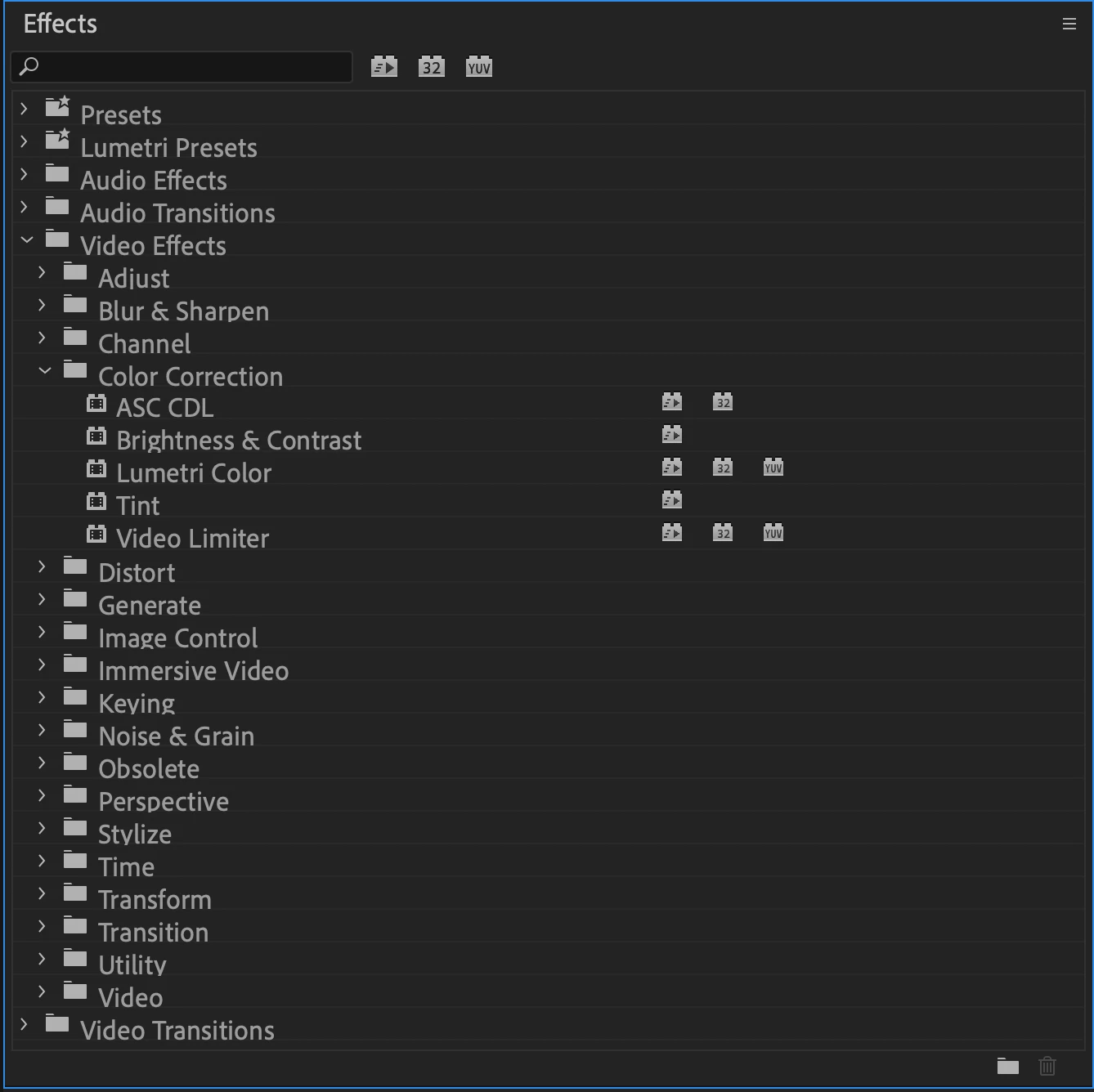
Change to Colour option not showing in colour correction effect in Imac

  • August 8, 2021
  • 4 replies
  • 1459 views

Hi Community,

I've recently installed Adobe Premiere Pro version (15.4.0) on iMac 24" with M1 chip. The change to color and various other options are not showing up in the Color Correction menu. Any idea how to get it? Is this option not available on iMac?


This topic has been closed for replies.

4 replies

Participant
June 22, 2024

In case anybody finds out this unfortunate news as I have today... The best substitute Is  'Ultra Key' and under 'Color Correction' change 'Hue'.

BillionaireEric
Participant
January 5, 2023

I have a M1 Mac and can't find it either... is there an effect that is similar to this effect that mac users can use?

Feels baloney that I should be restrained from using effects because of my choice of computer. 

R Neil Haugen
Legend
January 5, 2023

Change to color is an old and (respectfully) poorly written effect, it's 8 bit so using it with any 10-bit media downgrades the entire clip to 8 bit, it's not GPU accelerated nor using even somewhat newish color math. Personally, though it is still available on my PC, I neither use it nor suggest that anyone on the planet do so.


And the reason you can't get that ancient code is because it's been considerered "obsolete" for several years now. As that M1 requires completely different code than any other computer, they would have to recode ... essentially rebuild ... an effect that they have said FOR YEARS is only left in the Effects panel out of politeness. None of the obsolete effects will ever get a rebuild.


The HSL tab of the Color workspace/Lumetri panel is the code that's replaced this effect in use. It is processed in the full bit depth of the clip, is GPU accelerated and has decent math behind it.


Neil

Everyone's mileage always varies ...
Legend
January 5, 2023

And if you have to access this, you might try running the intel version of Premiere...  No promises, but worth a shot.  Since I'm not working on an M chip apple now, I don't remember how to do this, but google is your friend, if you can't find the answer on this forum...

@mj
Community Expert
Community Expert
August 8, 2021

Hi @Poonam5FB8 ,


That is wierd.


Did you try a search as @R Neil Haugen suggested?


You may want to post on the Premiere Pro user voice page too.


https://adobe-video.uservoice.com


Let us know how you go

mj

R Neil Haugen
Legend
August 8, 2021

Did you search for it? I think that is in the Obsolete folder in all versions now. Although a couple of the Obsolete items have already been discontinued it seems for the M1 Macs.


Neil

Everyone's mileage always varies ...
Jeff Bellune
Legend
August 8, 2021

It's in the Obsolete folder on my 2019 Intel MBP.