
Participating Frequently
May 10, 2019
Answered

Changing a project name, Premiere Pro, 13.1.2 on a Mac.

  • May 10, 2019
  • 3 replies
  • 36963 views

Hi. This is driving me crazy. I don't seem to be able to change a project name. Is it possible? Some older pages suggest it might have been, but I can't work out how it's done now, previous tips just don't seem to relate to what I'm seeing on the screen in front of me. I'm a relative beginner, but working, but accident, at quite a high level, so my skills are very much mixed ability. The best solution I've been able to find, that works, is to delete the project completely and start over, which for obvious reasons is less than ideal. Thanks in advance for any help anyone can give me...

Rohan .
    This topic has been closed for replies.
    Correct answer Meg The Dog

    Change a Project Name or a Sequence Name?

    If a Project Name, go to the Menu File > Save As . . . and save it under the new name you want.

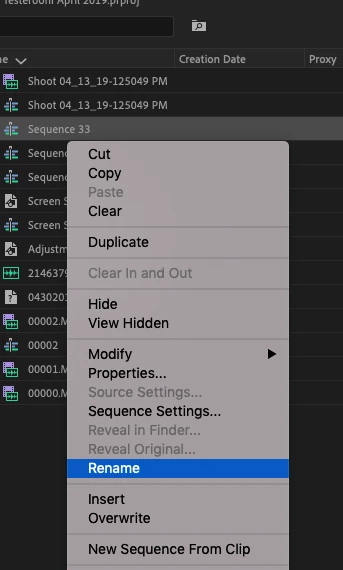
    If a Sequence Name, then right-click on the Sequence in the timeline and from the drop down menu, choose Rename.

    MtD

    3 replies

    Peru Bob
    Community Expert
    Community Expert
    May 10, 2019

    You can also change the project name in Windows Explorer.

    jenniferl61992745
    Participant
    May 26, 2024

    That would be the smarter thing to do because "Save As" makes a copy and eats storage

    Ann Bens
    Community Expert
    Community Expert
    May 26, 2024

    Save as also means you have a unique back up copy in case things go haywire.


    Participating Frequently
    May 10, 2019

    Ha. Thank you Meg The Dog, I'm laughing at my own stupidity. I had got stuck up on the following route: File > Project Settings > General and then trying to just change the Project name in the box there, which, of course I can't do. Thanks for your help. I can switch my brain off for a rest now.

    Rohan.

    Meg The DogCorrect answer
    Inspiring
    May 10, 2019

    Change a Project Name or a Sequence Name?

    If a Project Name, go to the Menu File > Save As . . . and save it under the new name you want.

    If a Sequence Name, then right-click on the Sequence in the timeline and from the drop down menu, choose Rename.

    MtD