
Participant
January 31, 2024
Question

Channel Mixer - Same settings different results

  • January 31, 2024
  • 2 replies
  • 701 views

The image below is using the Channel Mixer in Premiere 2017 vs 2024


The channel mixer settings are the same but why are the results so different? Is this a bug? (After Effects 2024, colour mixer produces the same effects as Premiere 2017)
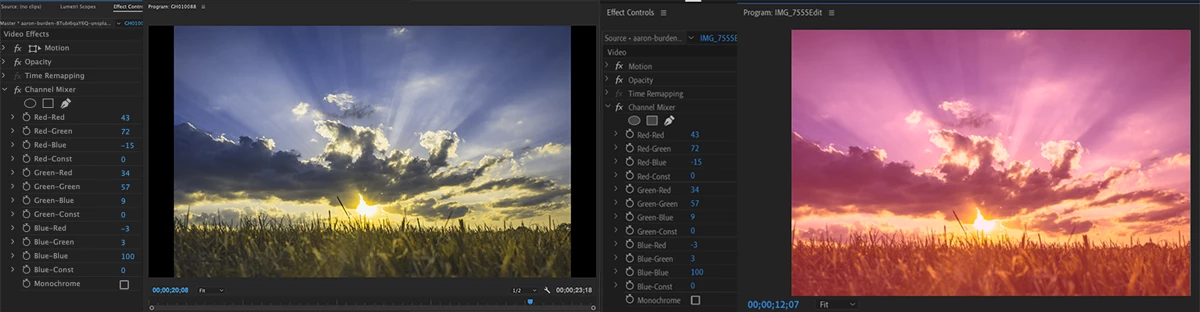
 

This version of Premiere is 24.1.0 (build 85) on Windows 11

This topic has been closed for replies.

2 replies

R Neil Haugen
Legend
January 31, 2024

I work for/with/teach pro colorists, and have been working between Adobe apps and Resolve for over a decade. The colorists I work with did not ever trust the Channel Mixer's math. That effect, and a couple other of the "obsolete" color effects, could be made to break an image pretty easily.


So I'm with Ann. It's in the "obsolete" bin for a reason, a very good reason.


I do wish we had a good replacement for it though. Ah well.

Everyone's mileage always varies ...
Participant
February 1, 2024

Thanks for the added info, I hadn't seen it was in the obsolete bin, as I was just loading it from an older project. 


Using the colour mixer in Photoshop and then exporting that as a LUT and importing that into Lumetri works for my project, but it's not exactly a simple process. 

Kevin-Monahan
Community Manager
Community Manager
February 8, 2024

Thanks for your help Kevin, I haven't heard of mogrt before, this is something I'll have to look into and test out.


Thanks for your help!


Hi @Richard3347844703cu

You are most welcome! Let me know if you need assistance with creating this .mogrt. It's a fun process. Try it out.


Thanks,

Kevin

Kevin Monahan - Sr. Community and Engagement Strategist – Adobe Pro Video and Audio
Ann Bens
Community Expert
Community Expert
January 31, 2024

Best is to use Lumetri. Channel Mixer is an obsolete effect.

Participant
February 1, 2024

Ok, cool. I can make a LUT and load it through Lumetri. That works!