This topic has been closed for replies.
Correct answer John V Knowles

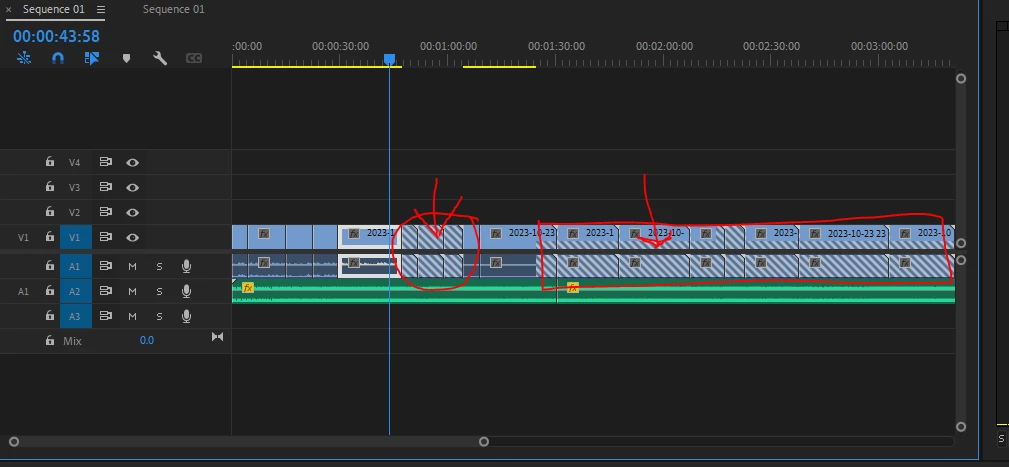
These "danger stripes" are an indicator that there is no footage to fill the original clip length. This typically happens when you've relinked to the wrong media. Did you recently move or rearrange the source clips? Do you have a lot of clips named the same? Try offlining these clips and relinking to the correct ones.

1 reply

John V KnowlesCommunity ExpertCorrect answer
Community Expert
October 25, 2023

These "danger stripes" are an indicator that there is no footage to fill the original clip length. This typically happens when you've relinked to the wrong media. Did you recently move or rearrange the source clips? Do you have a lot of clips named the same? Try offlining these clips and relinking to the correct ones.

-------------------------------------------------------------------------JVK | Editor/Designer/Software Instructor. Pr, Ae, Ch, Ps, Ai, Id
Participant
October 25, 2023

the clips are in an hr plus recording so i'd have to go back in and recut all of them which is fine if thats what i need to do, i renamed the videos to "done 1" "done 2" "done 3" becuase i was gonna come back and edit more later and didnt want to accidentally reuse the same clips, kinda figured it was something along those lines, will probably just restart thank you!

Community Expert
October 25, 2023

Did you rename the clips at the Finder/Explorer level? I would avoid doing that as it breaks the relationship to the clips in the program. You can always see where you resued a clip by turning on the Duplicate Frame markers (wrench menu in the timeline).

-------------------------------------------------------------------------JVK | Editor/Designer/Software Instructor. Pr, Ae, Ch, Ps, Ai, Id