
Legend
April 10, 2022
Question

Choosing the Right Editing Source | Premiere

  • April 10, 2022
  • 4 replies
  • 1103 views

To the whole community, respect.

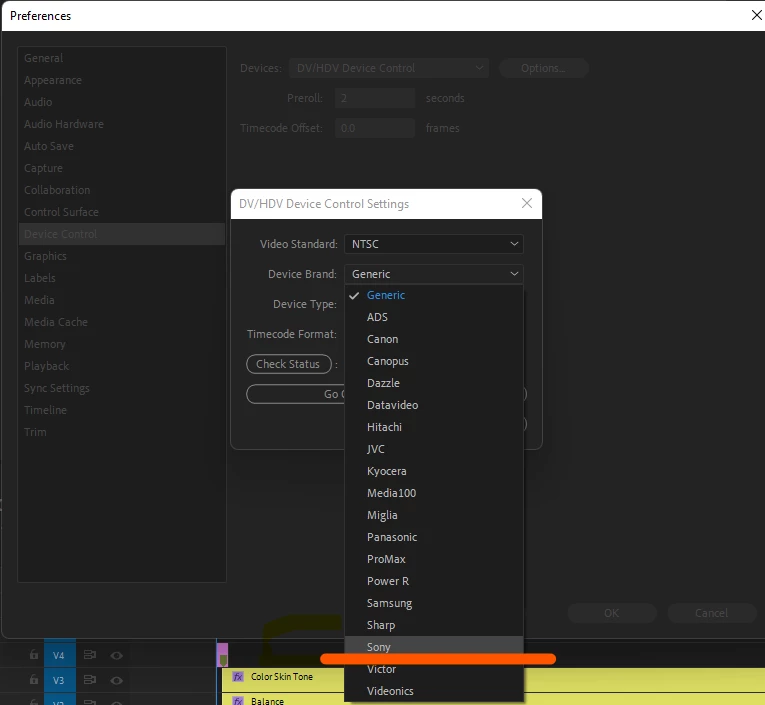
It is necessary to clarify what this setting in Premiere is responsible for in the screenshot below, with regard to various camera sources. This function is directly related to which camera source the frames were received from and, if the camera is selected appropriately, does this give an advantage in working on the timeline? What is it for? Can this affect the quality with the material from the source?
This topic has been closed for replies.

4 replies

Baffy19Author
Legend
April 11, 2022

Thank you for the clarity in this matter. Just a thought crept into my head for what it's in Premiere. Respect to all 🖖

@mj
Community Expert
Community Expert
April 11, 2022

Dear @Baffy19 ,


Messages like yours make a person's day.


I'd like to say thank you for being a great person.


Respect to all, especially you 🖖


Best

mj


Baffy19Author
Legend
April 11, 2022

🖖

@mj
Community Expert
Community Expert
April 10, 2022

Hi @Baffy19 ,


This is for analog capture from DV tape as stated by @Ann Bens and @R Neil Haugen.


So, unless you're working in these older formats, there's no benefit in a digital capture workflow.


Hope this helps.  https://helpx.adobe.com/premiere-pro/using/capturing-dv-or-hdv-video.html


Best

mj


Mohammed Jogie |
Institute of Media, Stretegy and Design |
Adobe Certified Associate |  Expert | Instructor |
Adobe Community Professional | Creative Ambassador | User Group Manager |
Member International Society of Typographic Designers | Lifetime Friend International Council of Design | Interaction Design Association Local Leader |
Member Pan Afrikan Design Institute | Ambassador Visual Arts Network South Africa | Central Executive Committee Member Printing SA |


R Neil Haugen
Legend
April 10, 2022

Note that Ann was talking about tape capture ... to be clear, if you're working with video media from your computer's drives, you don't work with that panel. You simply add the media via the import process in the Media Browser or Project panels.


Neil

Everyone's mileage always varies ...
Baffy19Author
Legend
April 11, 2022

Neil, so can remove her from Premiere. I don't think anyone uses this feature. A cleaner product is the key to stability )

R Neil Haugen
Legend
April 12, 2022

Here is the answer to your question really? Tell me, what is the percentage of people using this feature from all Premiere users? The Premiere app is outdated. Are you continuing to argue now or explain? This damn program is overgrown with mud and look how much it weighs today. This is only one program. If we compare it with DaVinci, then heaven and earth, although three Adobe products are sealed there at once. I am in favor of making the product lighter and more stable from here.


This is one of those discussions that gets bizarre. Especially when someone who complains about the need for 3rd party plugins starts advocating dumping 'current' operations of the app ... suggesting this use should require 3rd part apps be developed to help the users out.


I've got plenty on my list of things I want changed to talk about with the devs in Vegas at NAB... this ain't gonna make the list. Not hardly.


Neil

Everyone's mileage always varies ...
Ann Bens
Community Expert
Community Expert
April 10, 2022

Its a list of tape camera brands (some brands I have never heard off though).

The PAL list makes more sence to me.

Dont think it has anything to do with quality rather with the transport controls when capturing DV or HDV.

You will find the same dropdown menu in the Capture window.