
Inspiring
August 28, 2022
Answered

Choppy image of a video I just imported

  • August 28, 2022
  • 4 replies
  • 1723 views

Hello,


I downloaded a video from a website and when i import it on Premiere Pro 2022, "New Sequence From Clip" => the image is not fluid : 


Here are some informations about the video (tell me if you need a translation) :
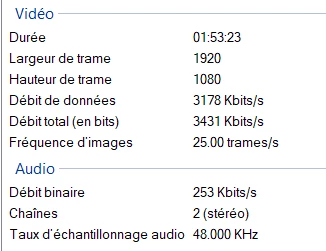
 

How can I solve this problem ?

Correct answer Glutamate

It didn't work in my case. I finally managed to solve the issue by uploading the video on youtube, and downloading it from youtube... 

4 replies

Participating Frequently
November 21, 2024

Sending your media file in Premiere Pro to Media Encoder and outputting from there might be easier than sending it to YouTube and downloading it again.

Participant
April 20, 2025

This worked for me, thank you!


Inspiring
August 29, 2022

Try using Handbrake to convert the video from VFR (variable frame rate) to CFR (in your case, 25 fps).   If you open the video in Handbrake, it should be labeled as VFR or your see a non-standard frame rate like 32.   Usually this manifests itself as out of sync audio but I've learned that Premiere hates VFR and  does all sorts of unexpected things.


Also, it's always best to have your sequence match the frame rate of your source material as much as possible.

Averdahl
Community Expert
Community Expert
August 28, 2022
quote

...the image is not fluid


How can I solve this problem ?


By @Glutamate


Download Shutter Encoder encoding|converting video FREE PC|Mac and rewrap the source file using the settings in the image below.


This will generate a new file and thats the file you should use in Premiere Pro. This will probalby solve the issue that the MPEG-Importer in Premiere Pro struggles with. The process will take a maybe 30-60 seconds and the new file is not re-encoded.


GlutamateAuthorCorrect answer
Inspiring
August 29, 2022

It didn't work in my case. I finally managed to solve the issue by uploading the video on youtube, and downloading it from youtube... 

Warren Heaton
Community Expert
Community Expert
August 29, 2022

You effectively transcoded to a lower bitrate movie while taking a compression generation loss.


While it may seem great that this file plays well inside of Premiere Pro, it isn't.


GlutamateAuthor
Inspiring
August 28, 2022

I forgot to say that when I read it on VLC, the image is fluid.

GlutamateAuthor
Inspiring
August 28, 2022

Screen from Premiere Pro : 

Averdahl
Community Expert
Community Expert
August 28, 2022
quote

By @Glutamate


Read my answer below this post.