rmexpress22
Inspiring
December 29, 2019
Answered

Color artifacts in Premiere OpenCL Radeon RX 5700

  • December 29, 2019
  • 12 replies
  • 7946 views

This seems to be a common issue that pops up every once in a while. I'm running Premiere Pro 2020.


I have a newly installed Radeon RX 5700 and I get weird color artifacts during playback with Open CL. I notice that they come up in deep blacks and highlights. So, pretty much anything that is clipped.


Here's a sample.
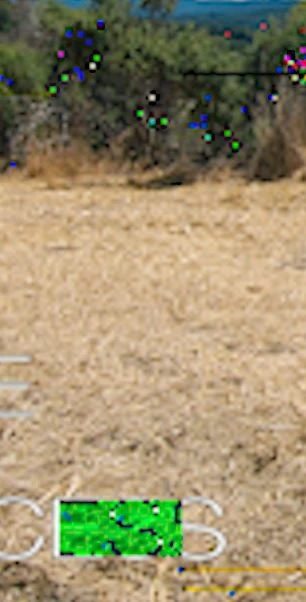


This happens with GoPro 7 Black files, jpegs files that are dropped into the timeline, but not M6 2 files. It doesn't make a difference if the files have processing or not. I tried a new project with M6 2, GoPro, and jpeg files and experienced the same issue.


Rendering with AME has some artifacts, but less than the playback in Premiere Pro. Rendering from Premiere Pro is fine since it uses software rendering.


I've used several different AMD video drivers and they all have the same issues. 


My software performance is abysmal and I only get 1 frame every couple of seconds and when I a jpeg with text plays it takes about 5 seconds to switch to and from a single frame of the clip. Premiere is unusable when using software only. I have a Ryzen 1700 now and a 3900x coming on Monday but I don't see how that's going to help much. Plus, using software defeats the purpose of the RX 5700.


This topic has been closed for replies.
Correct answer rmexpress22

Never mind. I found something that helped. My jpegs still have issues but my GoPro footage is fine. I don't need to color grade the jpegs, only the video, so I can live with that for now. I bet if I used another image format it'd be fine but I'm not going to bother. I don't mind doing software exports for now since these are smaller < 5 minute clips and the 3900x should help.


I found this post:


https://community.adobe.com/t5/premiere-pro/quot-why-does-my-footage-look-darker-in-premiere-quot-color-q-a/td-p/4788414 


That's checked by default on Premiere for me. I unchecked the box. My curve didn't change, but the issue I had is now partially gone.


Being a stubborn IT person helps. It also wastes a lot of time.

12 replies

rmexpress22
Inspiring
October 29, 2020

I didn't receive any notifications to this so I had no idea anyone had stumbled upon this, but I'm glad it helped some people.

Just to reaffirm, this is probably not going to be fixed ever. I can confirm the issue persists with the current Premiere Pro version, which is 14.5.0 Build 51.


Since I found this fix, I've kept "display color management" turned off in General settings.


I have adjusted my workflow and I only use TIFFs now.

rmexpress22
Inspiring
April 6, 2021

This issue was finally fixed sometime in the first quarter of 2021. Jpegs no longer artifact. 

Participating Frequently
April 6, 2021

Thanks for the update! I just ended up returning the 5700XT and getting a 2070 Super, and then an RTX 3070. It's insane to me that it took so long to fix this issue though, I guess AMD cards aren't on the top of their list of bug priorities. 

Participant
September 14, 2020

September 2020. Still an issue. 

I have a Ryzen 3900X and a RX5700 XT. Only way I found is to downgrade to Premiere 13 (2019) or use images without an icc color profile embedded. 

Annoying 

Participant
September 14, 2020

UPDATE: Adobe says the rx5700 is not on the recommended graphic cards, then it is not their problem. And this error maybe is never fixed.

BubbaGaeddert
Participant
September 3, 2020

Yes, please fix this Adobe. I don't want to replace images or render with MPE.

Participating Frequently
July 9, 2020

Having this EXACT issue, the artifacting is identical, and persists once the file is rendered. Changing to software rendering for the export works, but you don't buy a beefy graphics card to do software rendering. I also have the 5700xt. Photo attached of the glitch.

April 29, 2020

Converting jpg to psd works

Participant
April 29, 2020

Same issue here:

Turning off GPU acceleration and going for software rendering removes the aliasing. So far I've only seen this behavior on a JPG image sequence as well. My HD footage from other sources is just fine.

I just built a Ryzen 3900x system with a 5700xt as the graphics card.

JPGs look fine in both lightroom and preview. They were exported from lightroom in my case... which is an adobe program which you would think would provide greater support in terms of decoding.

I have had no issues with the 5700xt in other regards, other than perhaps running HDR native in windows (it looks genuinely awful).

Participant
April 29, 2020

Forgot to mention, I rendered the video just to see if it was preview issue only, and it's definitely not. It persists into the render.

Mind boggling, especially given that I rendered the video with no GPU acceleration in Media Encoder.

March 31, 2020

same problem here RX 5700XT also with Radeon Pro Enterprise drivers 

March 31, 2020

R Neil Haugen
Legend
January 31, 2020

For anyone with this issue, go to the UserVoice site and search for other users with similar problems. Upvote the post, and then come back here and post the link so others can go vote.


Adobe lives by metrics. Give them some.


Neil 

Everyone's mileage always varies ...
johnr11384947
Participant
January 30, 2020

i have the same thing with my 5700xt and premiere 2020! adobe find us a fix!!