
Participant
November 13, 2021
Answered

Color Balance (HLS) not showing

  • November 13, 2021
  • 4 replies
  • 14248 views

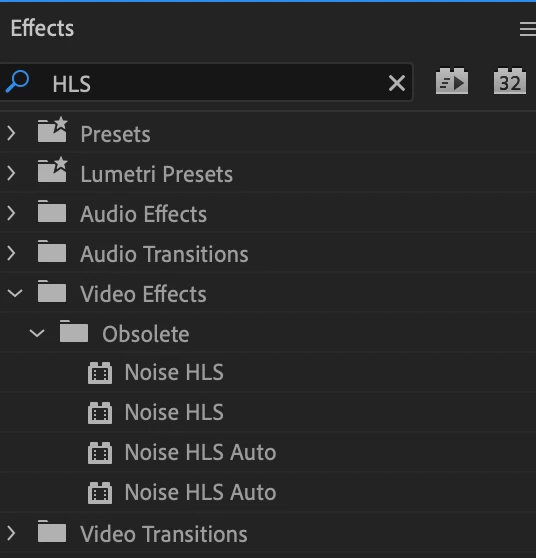
I have gone to use a effect on a video i'm creating and the "color balance (HLS)" effct isn't coming up. I have tried on someone elses laptop and i can find it but not on mine. We also have the same V.22. If any one can help me that would be greatly appreceated. In the image below it should also have an effect called (Color Balance HLS)  under video effects Obsolete.
Correct answer R Neil Haugen

Are you on an M1 Mac? I think those have had some of the old effects removed as they aren't spending any time re-coding an effect that is "obsolete" and the use of them on an M1 would require re-coding.


Use the Lumetri panel's HSL Secondary tab. And the Creative tab's Curves, quite a few great tools therein.


Neil

4 replies

Participant
December 25, 2024

I tink they deleted it, but I found an alternative to it! its called "ProcAmp" It's in Video Effects>Adjust>ProcAmp. It has pretty much the same things Color Balance (HLS) had

Participant
January 28, 2025

thanks! this actually works! i am on a mac and pr 23.6


Participant
January 12, 2024

this issue is still happening even though i have NO color corrections or effects applied

R Neil Haugen
Legend
January 12, 2024

What issue is still happening? This thread is on the presence ... or not ... of a particular effect showing in the Effects panel listing for "obsolete" effects. Which of course as noted, will not ever show on M-x model Macs.

Everyone's mileage always varies ...
R Neil Haugen
R Neil HaugenCorrect answer
Legend
November 14, 2021

Are you on an M1 Mac? I think those have had some of the old effects removed as they aren't spending any time re-coding an effect that is "obsolete" and the use of them on an M1 would require re-coding.


Use the Lumetri panel's HSL Secondary tab. And the Creative tab's Curves, quite a few great tools therein.


Neil

Everyone's mileage always varies ...
Participant
October 19, 2022

yeah but you cant create a time stamp and have it change over time!!!!

R Neil Haugen
Legend
October 19, 2022

You can't change the key, there aren't keyframes for changing the key itself.


But you can certainly keyframe the CHANGES applied to that key in the Lumetri HSL tab. I've done that quite a bit.


Keyframing is of course handled through the ECP, the Effects Control Panel. And most Lumetri controls, when viewed in the ECP, have the stopwatch icons denoting the setting of keyframes. I've had a job or three where I was keyframing HADES out of a lot of controls across Lumetri's tabs.


Neil

Everyone's mileage always varies ...
Legend
November 13, 2021

Color Balance HLS type in the search bar of the effects panel.

StevenKavAuthor
Participant
November 14, 2021

i have done that but it still isn't coming up