
Known Participant
September 17, 2020
Answered

Color Correcting Help

  • September 17, 2020
  • 6 replies
  • 1205 views

I shot a video that I had mistakenly not white balanced properly. I also didn't light it correctly becuase I didn't remember that I had boosted the brightness on my camera's monitor when I had last shot outdoors, which made it look properly lit until I got it on a computer. Rookie mistakes.


I tried to color correct and brighten the footage in Premiere, but I can't seem to get it to look right. I'm not that good at color correcting yet.

I've attached a short clip of the video. I wanted to see if someone can color correct this clip and let me know how they did it so that I can do it for my edit. 


Thank you
 

This topic has been closed for replies.
Correct answer Byron Cortez

The truth is that it is not so bad I thought it had been something catastrophic.


Try the following:

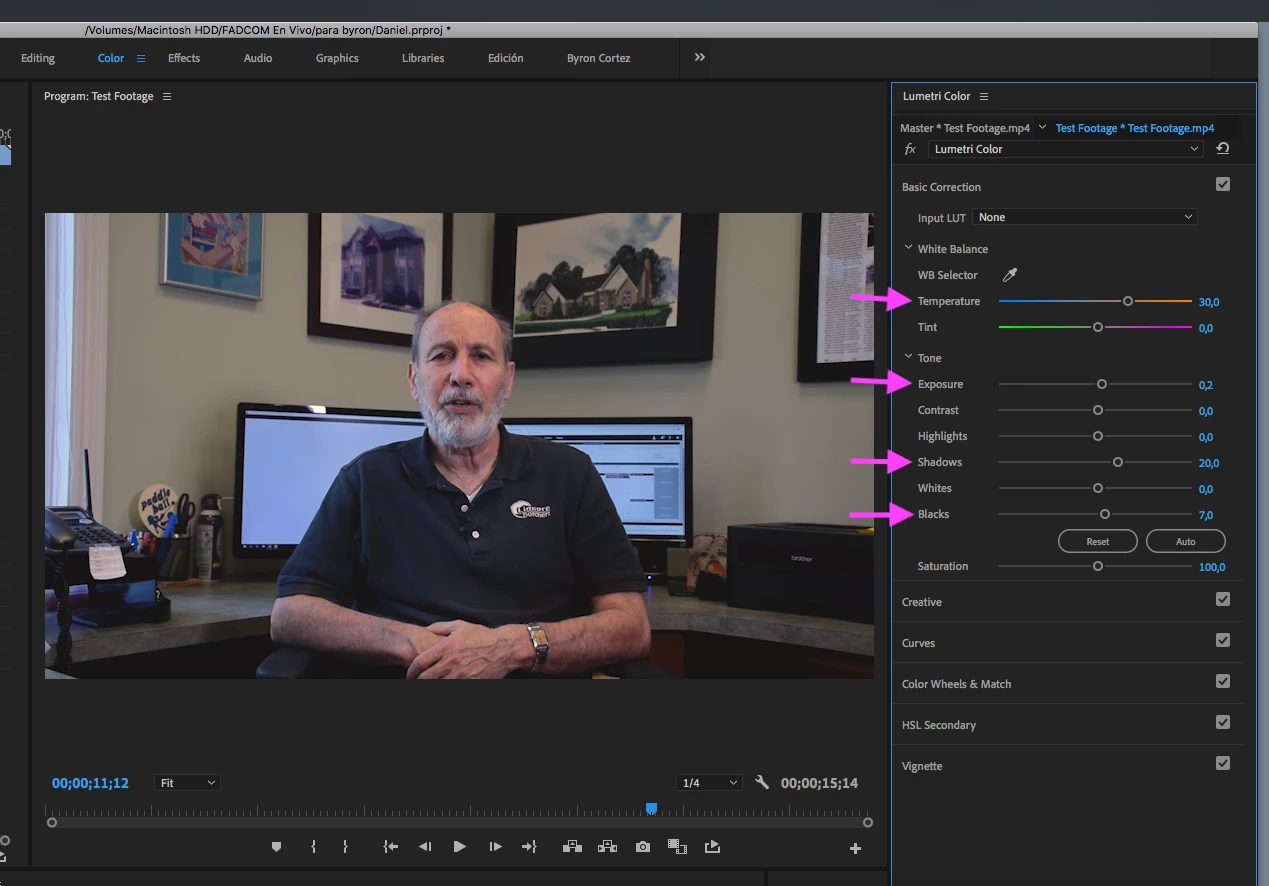
Go to the Color workspace. In the Basic Correction tab, use the options that I indicate in my screenshot. Make modifications to your liking.

6 replies

Inspiring
September 17, 2020

Thanks you guys.. I feel better re: the challenge thing. I'm not wired that way ( to win ). To me it's fun to interact in general without that competitive spirit that dictates 'winning is everything'.

Anyway, NO, I wouldn't turn off monitors cause then they'd be black and you wouldn't have the separation between talent shirt and background. Just shoot 56k and let the LED stuff do it's stuff...maybe dial them up to 56k too.... if they aren't already. Skin tone should be good then, computers slightly blue ( which everyone in world is used to seeing already ).


🙂

Thanks again for nice post.


JeggliAuthor
Known Participant
September 17, 2020

Good point on the monitor thing. I didn't really even think about it in terms of a backlight.

Inspiring
September 17, 2020

I suppose it's important to mention something else about color and cameras vs. eyeballs and brains.

Cameras see things differently than eyes due to color temperature ( measured in Kelvin ).

In pro film work ( motion picture ) there are 2 basic settings for cameras and lights.

32k ( tungsten)

56k ( daylight)

People who shot with film cameras ( 35mm film ) probably remember buying 'indoor' film and 'daylight' film. That was to match the color temps.

Your eyes see things differently than cameras, based on this color temp stuff.

Fact of life... just the way it is.


Knowing this helps people to understand why the WB is important based on the KEY lighting etc.


I'm looking at my laptop now in this forum while I type this message and the screen looks white. If I shot it with my camera it would look blue.  Unless I made the WB 65k.  It's a fact of life.


JeggliAuthor
Known Participant
September 17, 2020

I had no idea that indoor film/outdoor film was a thing back in the day. So with monitors, maybe it's better to keep them off for videos like this? I feel like in the video that I shot, the monitors are more of a distraction. 

Inspiring
September 17, 2020

OMG, Bryan and poster, I DID NOT MEAN CHALLENGE in a negative or flippant or bad way AT ALL.

OMG>.. I'm SO SORRY !

I thought it was really fun to help and I'm so sorry to mislead you guys with that totally stupid suggestion... I apologize and pray to god you will forgive me !


To be more concise about what's up I'll just blabber on about what I think happened... so others will understand it better maybe.


To Poster... aside from LCD screen misleading you there are sometimes histograms on cameras that can help get exposure more close to what the chip is seeing ( foot candles, F stop, etc. )

You probably had WB around 32k ( tungsten in old days before LED and HMI ) which would make daylight ( hitting edge of window ) blue. The computer monitors are probably 65k ( more blue ).

So basically ( you probably already know this cause you said 'rookie mistake' ) you are correcting from 32k to 56k as best you can, while keeping flesh tones reasonable.


I found in  my quick correction that moving color from blue to yellow/orange introduced a little green so played with that a little bit to get waveform kinda lined up but I did this real quick and just dealt with Y (luma) of lift gamma gain and offset and basics.

I did NOT select the window edge and get more into adjusting specific ranges... 

I also just used my laptop ( not color corrected ) ...which is sRGB, but worked in Rec 709 in editor on laptop. I didn't use my editing computer which is under dust covers now.


Please forgive me for suggesting we could have fun and also help and explain stuff !!!!!!

🙂


JeggliAuthor
Known Participant
September 17, 2020

I wasn't upset at all that you wanted to make a challenge out of this. I was acutally excited about it when I read that because I figured that the more people who do that, the more I can learn about their various methods of color correcting. I like the idea.


I apprecaite you going into detail with this. I'm out of practive so there's a lot that I didn't think about when filming this. I know that I used a WB card of mine, which makes me wonder why the WB was so off. I used the natural light from the window and an adjustable color temp LED on the right side as well as the warm overhead lights. In hindsight, I maybe should have turned the overheads off and made the LED the same temp as the outdoor/natural light. 

Inspiring
September 17, 2020

hehe, that was fun. Thanks for the post and question.  Here's my sample...


down and dirty.


we can make it a 'challenge'... see who comes up with the best guess to match what you want in the shortest amount of time !


🙂


Community Expert
September 17, 2020

This is not a challenge, we just want to help you. Let us know when you have fixed it.


Good luck.

Byron.
Byron CortezCommunity ExpertCorrect answer
Community Expert
September 17, 2020

The truth is that it is not so bad I thought it had been something catastrophic.


Try the following:

Go to the Color workspace. In the Basic Correction tab, use the options that I indicate in my screenshot. Make modifications to your liking.

Byron.
JeggliAuthor
Known Participant
September 17, 2020

Thank you. This is helpful and along the lines of what I'm looking for. It does seem a little blue overall and a little dark for what I'm looking for, but it looks far more natural than the edits that I was able to do on my own. I'm going to try to use your suggestions as a base and then modify a bit to try to get it to look like it did in real life.

Inspiring
September 17, 2020

can you upload a sample to youtube or vimeo ( small sample ) that shows what you've managed to do using your own color controls ??

That way if anyone plays with your mp4 sample they can compare what they get with what you got so far.

🙂


JeggliAuthor
Known Participant
September 17, 2020

Here are screenshots of the original, color correcting 1, and color correcting 2. Let me know if you need an actual video clip if the screenshots aren't enough.