
Color issues when export movie or frame
Hey guys, i need some big help here.
I always used Premiere from 2016 till 2020 in the company´s account.
Recently i signed up for myself.
i normally edit videos from my wife´s iPhone (.mov) and i always draged images or other videos .mp4/h264 in the same timeline and never had an issue with the color. Never had any incompatibility in all these years.
i am facing 2 specific situations now, which i believe it´s related with any incompatibility because it is only happening on my .mov edits.
1. once i am editing a .mov file once i press ctrl + shif + e or try to export the video this is what i am getting, look like it´s has a 100% of exposure.. or any effect.
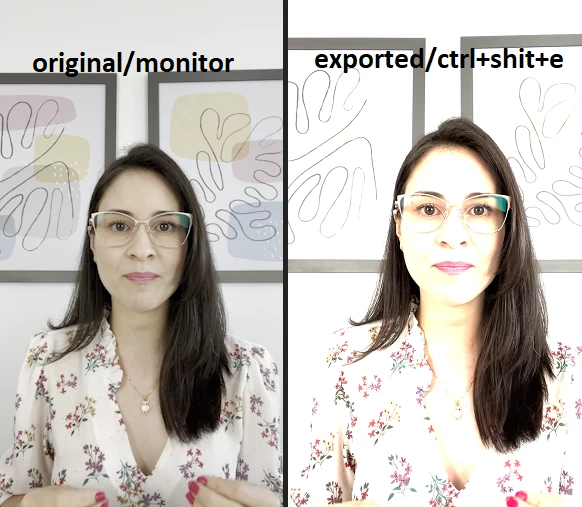
let´s say that i survive and don´t export the file, and start to add any other pictures in the same timelime..
instead of having a normal picture, it gets darker ,, like this,.
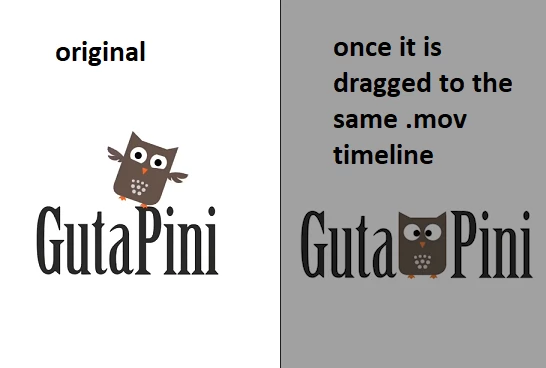
i really don´t know what to do.
If i do the oposite start the setup as a h264 mp4.. and them add a .mov, the .mov gets this full exposure color. i am using the same PC i always did.
even in my notebook the same issue is there, and started to happen once i signed up myself for thie annual signature.
Would someone help a desperate friend?
Intel(R) Core(TM) i7-4790 CPU @ 3.60GHz 3.60 GHz
GTX 980
16GB
Windows 10.
 AdChoices