nickc16015228
Known Participant
January 11, 2021
Question

Color issues with the new M1 MacBook Pro

  • January 11, 2021
  • 6 replies
  • 4953 views

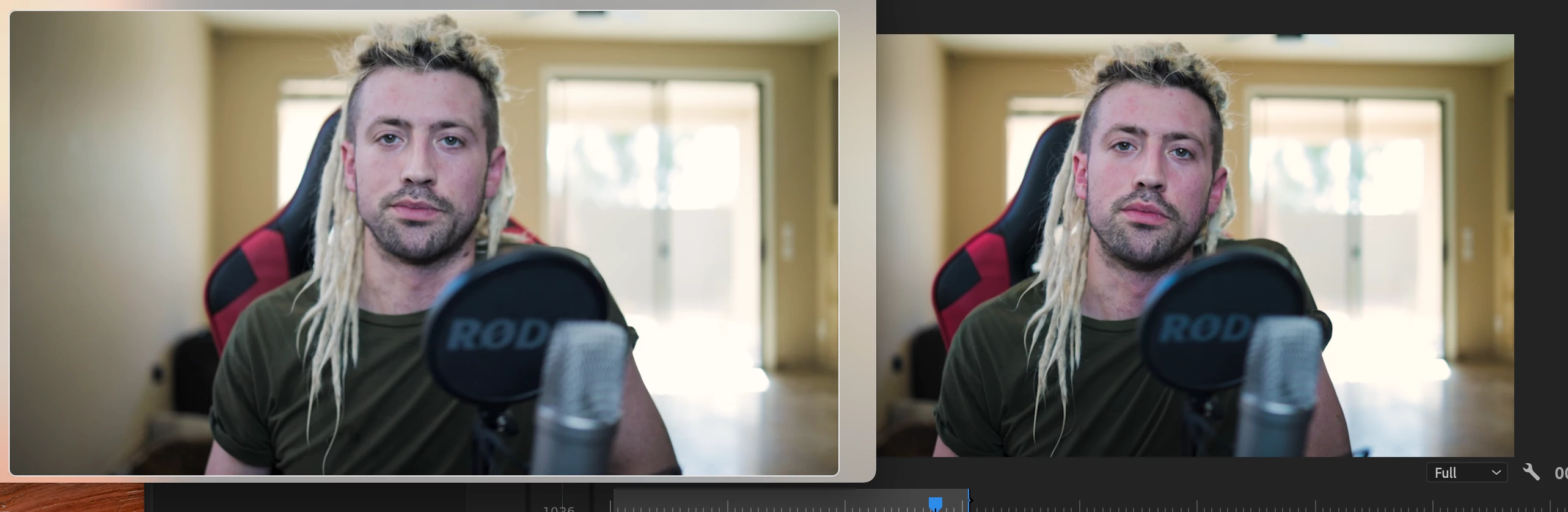
I can not for the life of me figure out why my rendered videos look so much different then what I am color grading in adobe. I have never had this issue and unless I missed it, I haven't seen many people talking about this which is making me think maybe it has something to do with running on the translated version via M1?


The exported version is a regular .265 export, same settings I have used for years... Is there something major I am just missing or oblivous to? I appreciate the advice in advance, thanks. 


This topic has been closed for replies.

6 replies

nickc16015228
Known Participant
May 7, 2023

I am still reguarly running into this issue 2 years later, has anyone found a solid fix for this? Pretty sick of it! 

MyerPj
Community Expert
Community Expert
May 7, 2023

AFAIK Apple hasn't fixed their end of it, yeah, I'd be pretty sick of the way Apple has ignored this is (too) 🙂

Participating Frequently
November 5, 2021

I'm noticing the exact same thing and I can't figure it out either

Participating Frequently
February 17, 2022

I really don't get why Adobe is not able to answer that Question. They always point out on the community.


So: I fixed it after 2 hours of looking for the problem because of a deadline, and i really feel dead on support for 60 bucks a month.


Right click the file in your project.

Navigate to interpret footage.

On the bottom go to colorspace and set Rec709 or whatever colorspace it was shot in.

Fixed.


Why Adobe? Pointless. thanks for the extra hours without my family.

R Neil Haugen
Legend
February 17, 2022

It sounds like your problem had to do with HLG clips on a Rec.709 timeline?


That issue is from the massive rebuilding of Premiere's color systems this series.


There's also tge problem with SDR/Rec.709 files outside of Premiere on a Mac dur to Apple choosing to use non-standard settings for Rec.709 media.


The first issue is something on Adobe, the second one is on Apple.


Both are frustrating of course.


Neil

Everyone's mileage always varies ...
Averdahl
Community Expert
Community Expert
January 11, 2021

There is a beta version of Premiere Pro for the M1 Mac available. I would try that if i had a M1 Mac. It is available via the Creative Cloud app.


More info: DISCUSS: Premiere Pro on Apple Silicon M1

Participating Frequently
November 5, 2021

I tried the beta version but ran into the same issue. also tried exporting directly from PP as compared to Media Encorder but still the same. Have tried all sorts of different settings. Going to try to move the files to a different computer and see what happens.

R Neil Haugen
Legend
November 5, 2021

Kevin,


First, there are new color management options in PrPro that are confusing to many users. Both for media in the bin in the Project panel and also for Sequence Settings for timelines. Check those to make sure they are correct for the project you are in.


Next, the Mac OS has the house-built ColorSync color management app. That app was for some odd reason designed to mis-apply the Rec.709 pro broadcast standards. It's a total mess, I work daily with a ton of pro colorists who are royally ticked about it. They're of course mostly Mac based.


What Colorsync does wrong, is it leaves out the required display referred transform of Rec.709/Bt.1886, and also for some weird reason applies a gamma of 1.96 rather than the 2.4 specified for all Rec.709 setups.


Between the two, a proper Rec.709 file will appear a little low in saturation, and the shadows will be lifted giving a "low contrast" look to the file. It's not that the file is wrong ... it's that the display of the file is wrong.


And there's not really a way around it. BlackMagic has Resolve offer a "Rec.709-A" export option which gives the file a different NLC tagging. Which they realized ColorSync will then see and actually apply correct Rec.709 standards to.


Unfortunately, that tagging means that on full-on Rec.709 systems ... and many PCs and Android devices ... the file will be interpreted too dark and over-saturated. Right.


On most systems and especially Macs, users should have the PrPro Preferences option of "display color management" option turned on.


Now, one further thing ... no one ever sees exactly what a pro colorist sees on their highly calibrated kit. They can't even perfectly match two screens in-suite. They can visually come close. But as soon as you take that file on other kit in other viewing environments, the image will be different. Some subtle things, some actually pretty major.


So that's the first thing anyone exporting media for other viewers needs to understand. The "out there" is a Wild Place ... and you have no control whatever. Every screen will show your media differently, and no one will ever see the exact same image you do.


Neil

Everyone's mileage always varies ...
MyerPj
Community Expert
Community Expert
January 11, 2021

Cool, glad you can see that. Actually it's PP that is displaying them correctly. Quicktime or some other players display them typically with modified gamma and other undesireable qualities. Same with YouTube. You can only make yours as good and close to color standards and then whoever views them, in hundreds of different ways and various hardware/software, etc will see it as they can also.

nickc16015228
Known Participant
January 12, 2021

Weird becuase I never experienced this before, videos always pretty much looked the same in adobe primere as youtube/playing from desktop. How do I fix/make up for this new found issue because it looks awesome in adobe and I look like a purple dead ghost in the render lol. 

MyerPj
Community Expert
Community Expert
January 11, 2021

I just saw this note when looking for PP hardware requirements.

Note:

Premiere Pro 14.7 supports macOS 11.0 (Big Sur) on Intel CPUs. Native support for Apple M1 CPUs is not yet available but you can run Premiere Pro in Rosetta 2 emulation mode on Apple M1 devices. For more information, see Do Adobe apps work on Apple computers that use the M1 chip?

nickc16015228
Known Participant
January 11, 2021

The funny thing is that in runs GREAT as in fast and it crashes less then my windows desktop. 


That was a great suggestion, I imported the rendered clip like you mentioned and to my surprise it looked exactly the same as the project in adobe primere! The color difference was gone! So it's as if the colors I am seeing in adobe primere are not true.... hummm What's going on here. 

MyerPj
Community Expert
Community Expert
January 11, 2021

Try importing the export in PP and compare/view it there. Are you seeing the same issue