artbas91
Participant
December 23, 2018
Question

Color mapping in Adobe Premiere on iMac or MacBook

  • December 23, 2018
  • 4 replies
  • 1827 views

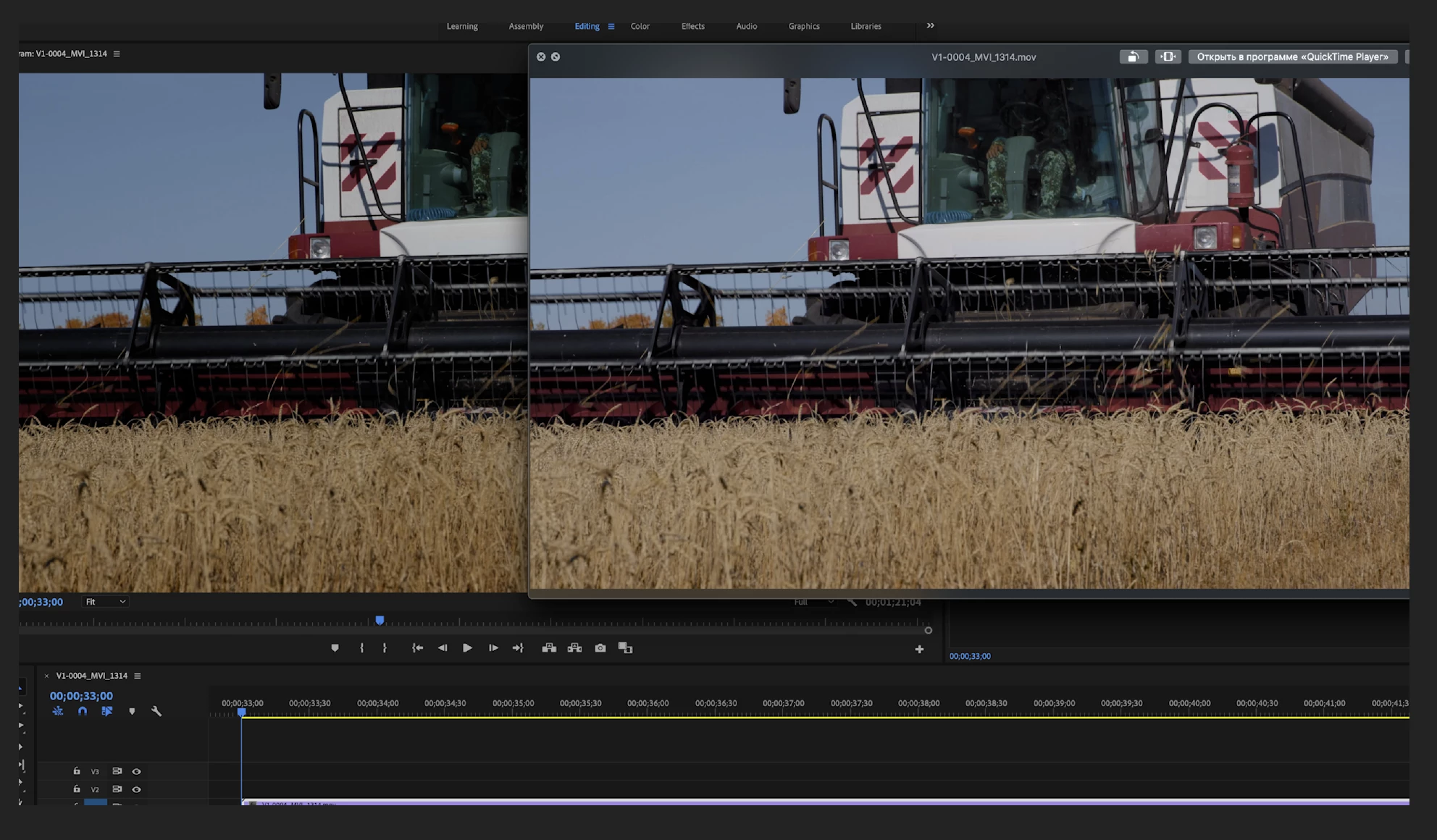
Image is very contrast and saturated in Premiere CC 2019 on iMac Pro!

I check “Enable Display Color Management” (in Preferences - General), color of the video has become natural, but the contrast has remained very strong.

In the video player, the image is correct when I look before or after export of video. In DaVinci Resolve there is same problem.

Just recently switched to iMac from Windows. Is this a software problem or an operating system problem?

Help me understand and solve this problem.

This topic has been closed for replies.

4 replies

Legend
January 9, 2019

"Variants of this question have been covered to death on this and every other color grading forum. The answer is always the same.  The only way to get a [proper] image you can trust is to run SDI [or HDMI] out to an accurately calibrated reference monitor.  Grading by viewing the image in the GUI just doesn't work."  - Jamie LeJeune

B&H Photo Video

artbas91
artbas91Author
Participant
January 12, 2019

This is not a problem of monitor calibration. Color is correct in internet browser, QuickTime and iMovie, color is wrong and contrast in DaVinci and Premiere (with the display of the monitor profile). Problem persists when connecting other calibrated monitors.

Maybe this problem in display of color space or range? (because Adobe Photoshop color is much better)

R Neil Haugen
Legend
January 12, 2019

I sincerely doubt color is correct in internet browsers and wrong in both Davinci Resolve and Premiere Pro ... for a very simple technical reason: Resolve and Pr are attempting to actually use appropriate color space/profile "norms" to display the contents of that video file.

The browsers don't care a crap about color tagging, spaces, or types.

You are operating from a completely false starting assumption, pure and simple. If your display (monitor or TV) is not set up and calibrated to a norm, a standard, and then fed a signal intended to work with and through that standard, you cannot see the "correct" color ... period.

No computer on the planet ... no monitor ... no TV ... shows "correct" color/tonality without specific setup on the part of the operator. And your iMac is set up to specifically break the norms, the standard, for pro video production. Your monitor is almost assuredly one of the P3 ones ... correct?

That is a very different ... and far vaster ... color space than the video sRGB of Rec.709, which 98% or better of all current video media is created for within the cameras producing it. If you do not have a device to properly send video into that monitor, probably an external box by BlackMagic, AJA, or Kona ... you got a problem there.

Neil

Everyone's mileage always varies ...
Kevin-Monahan
Community Manager
Community Manager
January 9, 2019

artbas,

Did you try chrisw's fix? Let us know.

Kevin

Kevin Monahan - Sr. Community and Engagement Strategist – Adobe Pro Video and Audio
R Neil Haugen
Legend
December 23, 2018

Pr works entirely in the pro standard of Rec.709, which is specified as requiring a monitor set to video sRGB and gamma 2.4 at 100 nits brightness. Getting a proper look requires a good calibration to that standard.

If your monitor is not set to and profiled for that, you will have trouble seeing things properly.

That's not the fault of Pr, but of your setup being outside of standard.

One thing that would help is if we had more user controls to tell Pr what our monitors are set to so that we saw better within Pr.

That would not fix the problem that outside of Pr your system doesn't show video properly of course.

Neil

Everyone's mileage always varies ...
chrisw44157881
Inspiring
December 23, 2018

The problem is, the web is srgb 2.2 and premiere with color management on is BT1886(with it off its rec. 709 but ignores your monitor's profile). you could use a temporary viewing lut to offset grade in a faux srgb 2.2. firefox would match the best unless you'd want to fiddle with chrome's color profile tags. i'd use VLC over quicktime. quicktime is kinda all over the place with color depending on old atom tags from 2005 and custom luma levels.

here's two luts depending on if your going from FCPX to premiere or premiere to web/VLC/firefox. one darkens, other lightens. its a viewing lut only, so you'd disable prior to exporting.

if anyone says it don't work, i'll stop posting, but I haven't heard anything negative yet.

bt1886 to srgb/rec709 2.2 and srgb to bt1886

https://drive.google.com/open?id=1HHxxaOWifI3TEhBwEyGSl139x2jRM9dO