
annk303
Participant
March 7, 2024
Answered

Color match not working on Premiere Pro 2024

  • March 7, 2024
  • 1 reply
  • 935 views

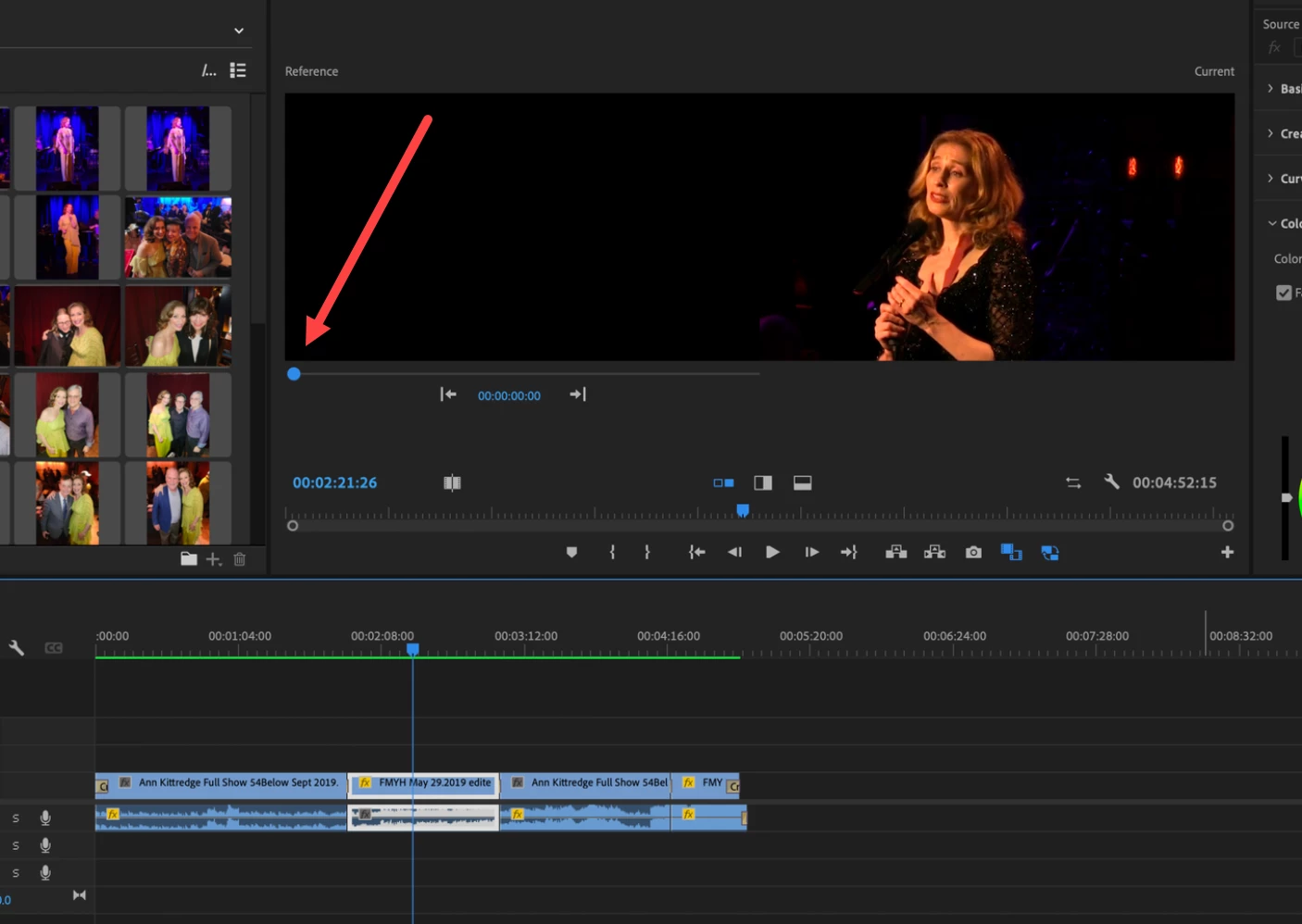
Hello out there!!!!! I watched mulitple videos to color match video clips in my project, but it's not working. On the videos, once you "select" a clip, then press comparison view, you're supposed to get a split screen of the two clips, but for me, when the screen splits, I get a black screen and the selected clip. Instead of the next video clip and the selected clip.


Help, anyone?
 

This topic has been closed for replies.
Correct answer Ann Bens

I don't see anything wrong.

Left window is on the first frame in the timeline which is most likely black.

https://helpx.adobe.com/premiere-pro/using/color-match-comparison-view.html


1 reply

Ann Bens
Community Expert
Ann BensCommunity ExpertCorrect answer
Community Expert
March 7, 2024

I don't see anything wrong.

Left window is on the first frame in the timeline which is most likely black.

https://helpx.adobe.com/premiere-pro/using/color-match-comparison-view.html


annk303
annk303Author
Participant
March 7, 2024

I'm a bit embarrassed. Yes, I see now, I just need to move that. I'm not sure why it looks like that and I saw nothing like it in any of the videos I watched, but you are right, It's working.  Thank you!