

Color mattes become DARKER after export
Hi all,
I use a black color matte in videos I create where theres white text so that the text is readable. It's meant to be a subtle darkness and not call any attention to it. So I'll create the mask, adjust the feathering & opacity untll I've achieved the desired level of darkness behind the text, but then the problem is that after I export the video, those masks are coming out way darker than I had made them in Premiere, effectively ruining all the work I did to make it subtle and unnoticeable. I've attached a photo to demonstrate what it looks like after export, and what it looks like in the project itself - the difference is crazy. This problem exists across all projects with different clips and mask adjustments.
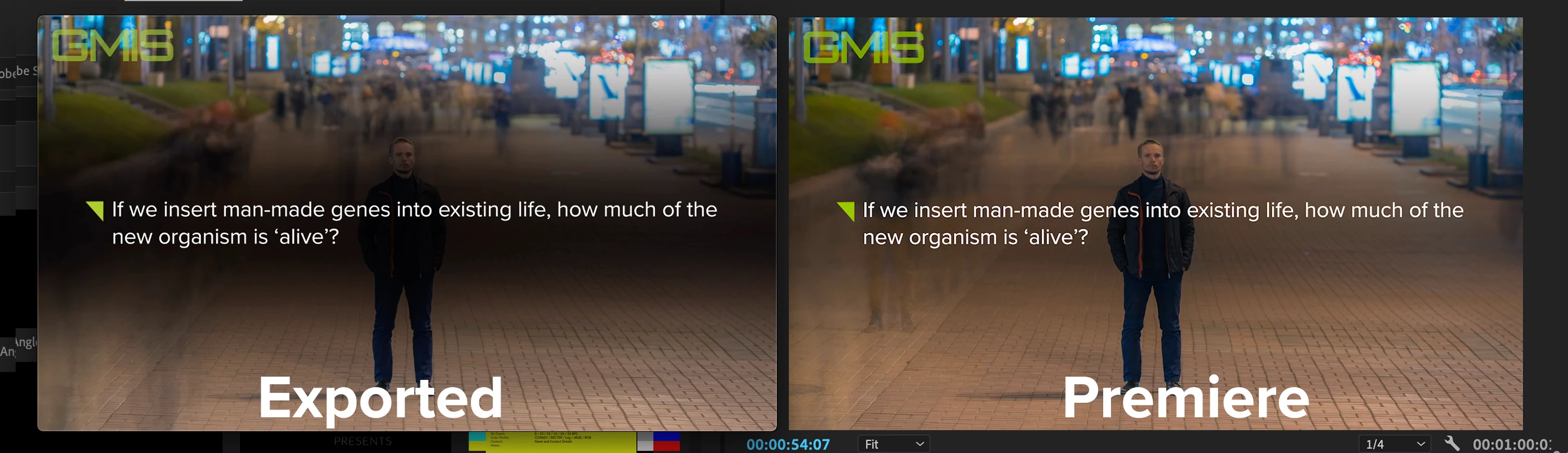
I realize that one workaround might be to just lower the opacity inside of premiere so i can compensate for the added darkness but this doesn't solve the issue considering I don't have time to do trial-and-error exports to see how much it's affecting it. Also because every clip is different and I have to adjust feather/opacity accordingly to make it work for the specific clip.
Just thinking out loud here - would it help if I adjust the main opacity of the color matte instead of adjusting the mask opacity?
I'm really hoping there is a solution since this is a very annoying issue with a very tedious workaround.
 AdChoices