Inspiring
December 20, 2024
Answered

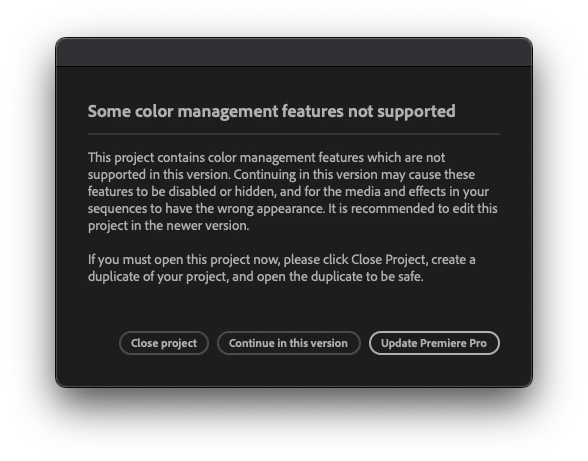
Colormanagement features not supported?

  • December 20, 2024
  • 4 replies
  • 1002 views

What is this? No more information avaliable? I cant update because Im already using the latest version 25.1.0 (build 73). I just continue in this version i guess.


kind regards

Mikael
Correct answer Kevin-Monahan

Hi @Mikael_RDF,

I read your post. I see that you got a color management warning dialog box. I have seen that before. Were you using the color management in the Beta version of 25.1 or 25.2 previously? If so, that is likely the reason. You're right, continuing on with the 25.1 version might be the best path forward. Sorry for the hassle.


Thanks,
Kevin


4 replies

Participant
March 27, 2025

I've just received this exact message in the latest version as well (25.1.0 B.73) but I've been editing in this project for weeks and haven't used any beta version at all. This was the first time I've received this message.

I added the Lighting Effects to a clip and have since been unable to save. I found a way to comfortably save, close Premiere and reopen it -- that's when I received this message. Nothing seems different in the timeline or within any of the clips, though, so I'm confused why I'm getting the message, especially after reading it usually comes from using a beta version.

Participant
March 15, 2025

I had the same problem. I found the solution.
1) Open the project in premiere pro (usual version, not beta)
2) Pres "open project in this version"
3) Create new sequence
4) Copy all elements from old sequence to new sequence
5) Delete old sequence created in beta
6) Seve project

MyerPj
Community Expert
Community Expert
December 20, 2024

I've seen it too. Like Kevin says, it's from using the Beta, and going back to the release version.

Inspiring
December 31, 2024

This issue was first raised here on October 14, 2024.

Can anyone advise if there are any changes we can make to the affected projects from within the Beta to make the projects "release version" friendly?

I've tried "Disable Color Management" in the sequence color setup under Lumetri Settings for all sequences, but that doesn't help.

Kevin-Monahan
Community Manager
Kevin-MonahanCommunity ManagerCorrect answer
Community Manager
December 20, 2024

Hi @Mikael_RDF,

I read your post. I see that you got a color management warning dialog box. I have seen that before. Were you using the color management in the Beta version of 25.1 or 25.2 previously? If so, that is likely the reason. You're right, continuing on with the 25.1 version might be the best path forward. Sorry for the hassle.


Thanks,
Kevin


Kevin Monahan - Sr. Community & Engagement Strategist – Pro Video and Audio
