
Participant
July 4, 2019
Question

Colors look wonky and washed out in Premiere's sequence window?

  • July 4, 2019
  • 2 replies
  • 3109 views

Hi all. So, I've been having a problem with Premiere lately. It's been affecting the colors of the media I import into it. The colors display correctly on the Source panel but not on the Sequence panel. As an example, I imported a video clip from Queensryche's Operation: Mindcrime into the sequence, and as you can see, they look incredibly off, particularly with the reds. There are no color effects applied on the sequence.
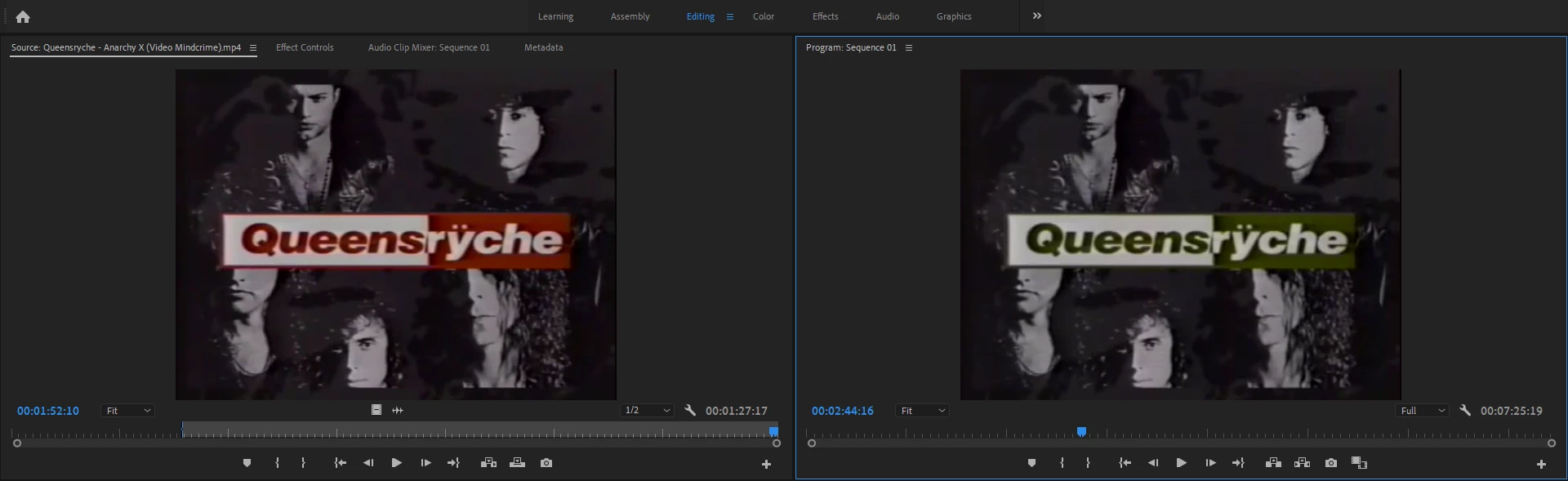
Does anyone know why this may be happening and how I can fix it?

Thanks in advance.

2 replies

Known Participant
September 22, 2022

I was having the exact same problem. For what it's worth, what fixed this for me (on Windows) is going to Sequence > Sequence Settings > Video > Working Color Space > and changing the dropdown value to "Rec. 709". 

Peru Bob
Community Expert
Community Expert
July 4, 2019

Try resetting the preferences:

FAQ: How to reset preferences in Premiere Pro?

If that doesn't work, try resetting the Workspaces:

Reset a workspace

Reset the current workspace to return to its original, saved layout of panels.

  1. 1. Do one of the following:
    • Click the Workspace menu icon and select Reset to Saved Layout.
    • Choose Window > Workspace > Reset to Saved Layout.

from here:

https://helpx.adobe.com/premiere-pro/using/workspaces.html

  If that doesn’t work ,try updating or rolling back your graphics driver directly from the video card manufacturer’s site

Participant
July 5, 2019

Hi Bob,

None of what you suggested worked. Oddly enough, however, changing the sequence preferences did seem to work--I can't figure out why for the life of me, but the colors are back to normal now.

Thanks, though! I'm glad I did check all of those regardless--that could have messed me up in the future.

Participant
September 21, 2022

Exactly the cure. Thank you I was beginning to panic until you pointed me to sequence