

Colours are terrible on Premiere Pro using iPad Pro through Apple Sidecar
I recently bought a Mac Studio and iPad Pro to replace my M1 Max MacBook Pro which was delayed another eight weeks on top of the six weeks I'd already waited for it.
Was it a stupid idea? I didn't think it was that dumb until I started trying to colour grade using Premiere Pro today. I have the program monitor on the iPad Pro using Apple Sidecar, and the colours are utterly HORRENDOUS. Totally unusable. There's an extreme warm cast.
I know it isn't the iPad that's the issue, because when I play the same file exported from Premiere Pro still through Sidecar, the colours are normal:
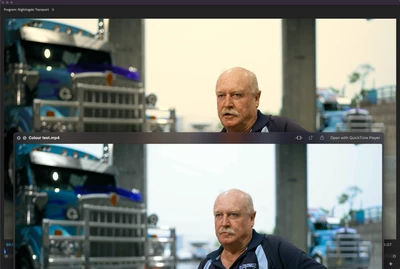
I have tried toggling Display Color Management on and off with basically no change.
This HAS to be fixed. Please, I'm a working professional now without a colour accurate monitor.
How could Adobe get this so wrong for a device many professionals are using for colour accurate viewing?
 AdChoices