

Answered
Combining Sequences in Premiere Pro CC 2020 is different
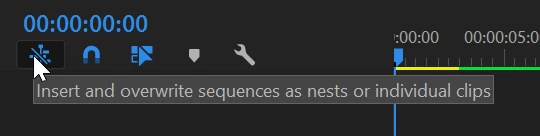
When attempting to combine multiple sequences into one final sequence in Premiere Pro CC 2020 I get the "un-nested" sequence with all the separate clips, transitions, audio tracks and effects when I drag and drop the sequence into the new timeline. What's the point of editing separate sequences if they are not nested when I move them to my final combined sequence? This was seamless in previous versions without pre-rendering. I've tried rendering the work areas of my separate clips but I still get the "editable" sequence when I try to combine in a new sequence. Is there a new step that I'm missing with the new version?
 AdChoices