Inspiring
March 23, 2022
Answered

Comparison View Color Error in Ver 22.0

  • March 23, 2022
  • 2 replies
  • 1285 views

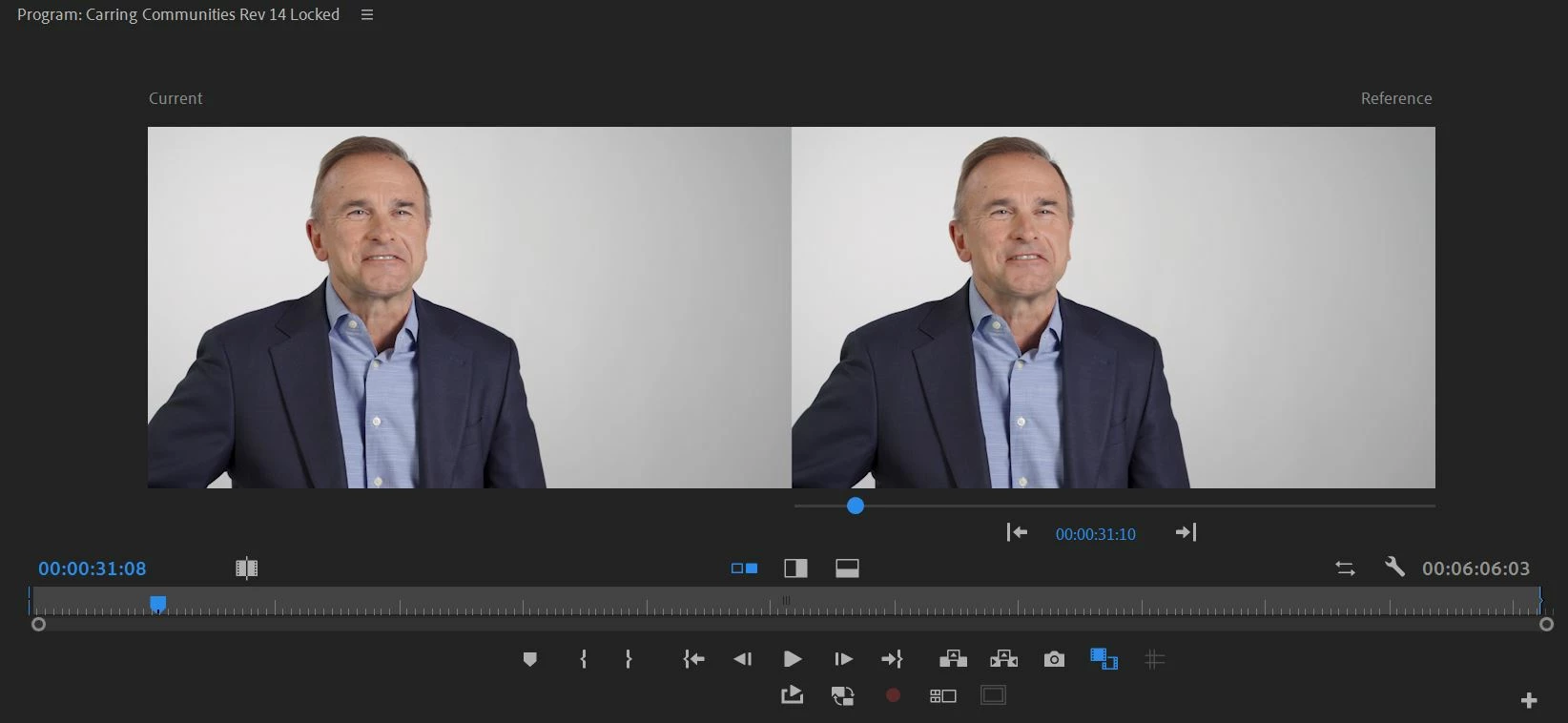
The comparison view does not match in Ver 22.0. The exposure and color are off even though the timestamp is exactly the same. See attached photo.


This comparison view is comparing the same two frames to eachother. They should match exactly and do not. 


This topic has been closed for replies.
Correct answer visual_captive

Interesting. I am even more confident that this is a bug. 


  1. Using the wipe feature, you cannot see a difference. 
  2. In a comparison view, I can see the right-hand side of the frame is definitely darker in one of the images than the other. Confirmed on multiple displays, mac, pc. 
  3.  If I hit the button that flips the comparison and changes which image is on the left or right, the problematic darker image stays on the left of the comparison view. This means that the issue is not with the clip or color management, but somehow with how the left frame of the comparison view is programmed. 


Is there a way to escalate this to the dev team? 


We can actually close this issue. It's my brain and eyes playing tricks on me....


On another forum someone got me thinking to try and move the images into photoshop and change how I am comparing them. When I overlay the images, they do match exactly. When they are side by side, my brain interprets one of the images as being darker. Weird... 


Thank you for the help everyone! 

2 replies

R Neil Haugen
Legend
March 23, 2022

I'm struggling to see what difference I'm supposed to see here.


And I hope you have your scopes up, it's pretty useless to do color corrections without them.


How about a screengrab with RGB Parade showing along with the two images. That would show exactly what each image is showing.


Neil

Everyone's mileage always varies ...
Inspiring
March 23, 2022

Compare how the shadows on the white wall are darker on the left image than on the right. It's a subtle difference, but it is there. It is easiest to see on the right side of the frame. 


I've added screenshots with the scopes. You can see the issue by looking at how the non-rgb waveform is brighter in the highlights. The overall level looks about the same, but the graph is more bright white on the top edge. It's very subtle, but these two should match exactly.  


I always use scopes, but you also have to use your eyes on a calibrated monitor. 


Inspiring
March 23, 2022

What difference are you seeing? I can't see any difference whatever in the images or in the scopes.


Have you tried the wipe, as that of course gives you the split at any point across the image.


Neil


Interesting. I am even more confident that this is a bug. 


  1. Using the wipe feature, you cannot see a difference. 
  2. In a comparison view, I can see the right-hand side of the frame is definitely darker in one of the images than the other. Confirmed on multiple displays, mac, pc. 
  3.  If I hit the button that flips the comparison and changes which image is on the left or right, the problematic darker image stays on the left of the comparison view. This means that the issue is not with the clip or color management, but somehow with how the left frame of the comparison view is programmed. 


Is there a way to escalate this to the dev team? 

Ann Bens
Community Expert
Community Expert
March 23, 2022

As no additional info is provided, you might want to read this doc:

Premiere Pro V22 - Understanding Color Spaces, HDR, and what that might mean to you - YouTube

Inspiring
March 23, 2022

Happy to provide additional information, but my issue is not related to color management/color space or interpreting the footages color space. 


The reason I kept my post simple is a comparison view, of the exact same clip, at the exact same timestamp, should appear exactly the same. The left and right images in my screenshot should not be darker or brighter than each other, they should match perfectly and they do not.


The point of a comparison view is to help color match between clips and this bug means that a user may be matching to a non-accurate output. 


Side note: I also edit through a calibrated monitor that uses a decklink and outputs Rec.709. Both my calibrated display and non calibrated show this issue. I also see this issue on a Mac and PC. 

Ann Bens
Community Expert
Community Expert
March 23, 2022

I think its an optical illusion.

Left image borders on the right to a light color

The right image borders on the right to a dark color.