
braydon
Inspiring
August 19, 2024
Answered

Confusion about timeline paste inconsistencies

  • August 19, 2024
  • 2 replies
  • 573 views

I have a question, maybe a silly question. Probably I'm doing something wrong.


Sometimes when I copy-paste a clip from one sequence to another, and I haven't unlinked the clips but don't want the audio to paste, just the video, I can turn off all audio target tracks and just the video portion of the clip will paste - which is the outcome I desire.


But sometimes, even with all the audio tracks "de-targeted" it still pastes the audio into Track 1. 


The inconsistency is the same with video track targetting - sometimes if I only want the audio and all the video tracks are de-targeted, it will paste the video, sometimes it won't.


I can't get my head around this behaviour. Does anyone know why?
This topic has been closed for replies.
Correct answer MyerPj

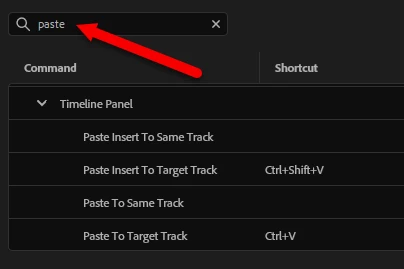
Take a look at Paste keyboard shortcuts, there's 8 options under "Paste" Here's half of them.


2 replies

MyerPj
Community Expert
Community Expert
August 20, 2024

As far as the paste, you can turn all the track targeting off, and it will still paste.

When the new paste features came out, Adobe suggested we check and set the paste options as what works for us.

You should try the various ones.


braydon
braydonAuthor
Inspiring
August 20, 2024

Yes, I changed my shortcuts about a year ago, after that shocking-executed remapping of everyone's paste function to "Paste to Same Track". Screenshot below. What I'm trying to say is, that's just not the issue.


quote

As far as the paste, you can turn all the track targeting off, and it will still paste.

By @MyerPj


Yes, this is what I wanted to know. So, you're saying it's supposed to paste even if no tracks are targetted? Interesting. That's typically not the case for me. Generally, if no tracks are targetted, the paste content doesn't land on the timeline. Except, sometimes it does. Curious.


MyerPj
Community Expert
MyerPjCommunity ExpertCorrect answer
Community Expert
August 20, 2024

Take a look at Paste keyboard shortcuts, there's 8 options under "Paste" Here's half of them.


braydon
braydonAuthor
Inspiring
August 20, 2024

Thanks MyerPj. Those options don't really address my question. Why does Premiere sometimes paste content into a timeline when there are no tracks targetted, and sometimes doesn't? I thought it should only paste into a targeted track, and if there's no targetted track, it just doesn't paste anything. That's what usually happens. But sometimes when no tracks are targetted, clips get pasted into Track 1. Sometimes, but not always.

Is my fundimental understanding of track targetting not correct?