Exit
  • Global community
    • Language:
      • Deutsch
      • English
      • Español
      • Français
      • Português
  • 日本語コミュニティ
  • 한국 커뮤니티
0

Control Timeline control's width

New Here ,
May 01, 2020 May 01, 2020

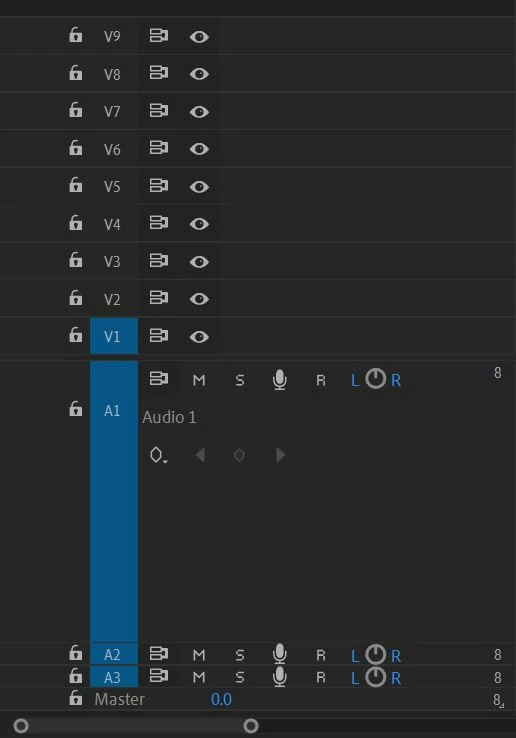
Hi, is there a way to control the width of the controls in the timeline panel? I need it thinner so I have more space to see the actual clips. Thanks.timeline controls.JPG
TOPICS
How to , User interface or workspaces
208
Translate
Report
Community guidelines
Be kind and respectful, give credit to the original source of content, and search for duplicates before posting. Learn more
community guidelines
LEGEND ,
May 01, 2020 May 01, 2020

Width or height? You want to reduce the amount of space the controls take up horizontally (width) of the vertical space the track takes up (height)?

To reset the height:

Screen Shot 2020-05-01 at 11.25.54 AM.png

MtD

Translate
Report
Community guidelines
Be kind and respectful, give credit to the original source of content, and search for duplicates before posting. Learn more
community guidelines
LEGEND ,
May 01, 2020 May 01, 2020
LATEST

As Meg points out, you can change the vertical space used but the width of the control header block is static. You can easily and rapidly zoom in/out of the timeline with keyboard shortcuts. You can also rearrange workspaces. My main editing workspace is setup so the timeline goes all the way to the right edge of the main monitor. My color workspace has a fairly short timeline area, as I'm only needing a few clips visible at any moment.


Neil

Translate
Report
Community guidelines
Be kind and respectful, give credit to the original source of content, and search for duplicates before posting. Learn more
community guidelines
