
Participant
June 13, 2019
Answered

Converting 3.2k 16:9 to 2k 2.39:1

  • June 13, 2019
  • 1 reply
  • 2500 views

Hi,

I have footage that my DP told me we could cheat into anamorphic by downscaling. We shot on an ARRI Amira & have 3200 × 1800 Timecode, Linear PCM, Apple ProRes 422 HQ.

I'm looking for a simple process inside of Premiere that will allow me to downscale/crop my current footage to a 2k anamorphic dimension set. Perhaps 2048 x 858 ?

Furthermore, is there a way where i can easily toggle my frame?
This topic has been closed for replies.
Correct answer Sumeet Kumar Choubey

Hi joshuap89929568,

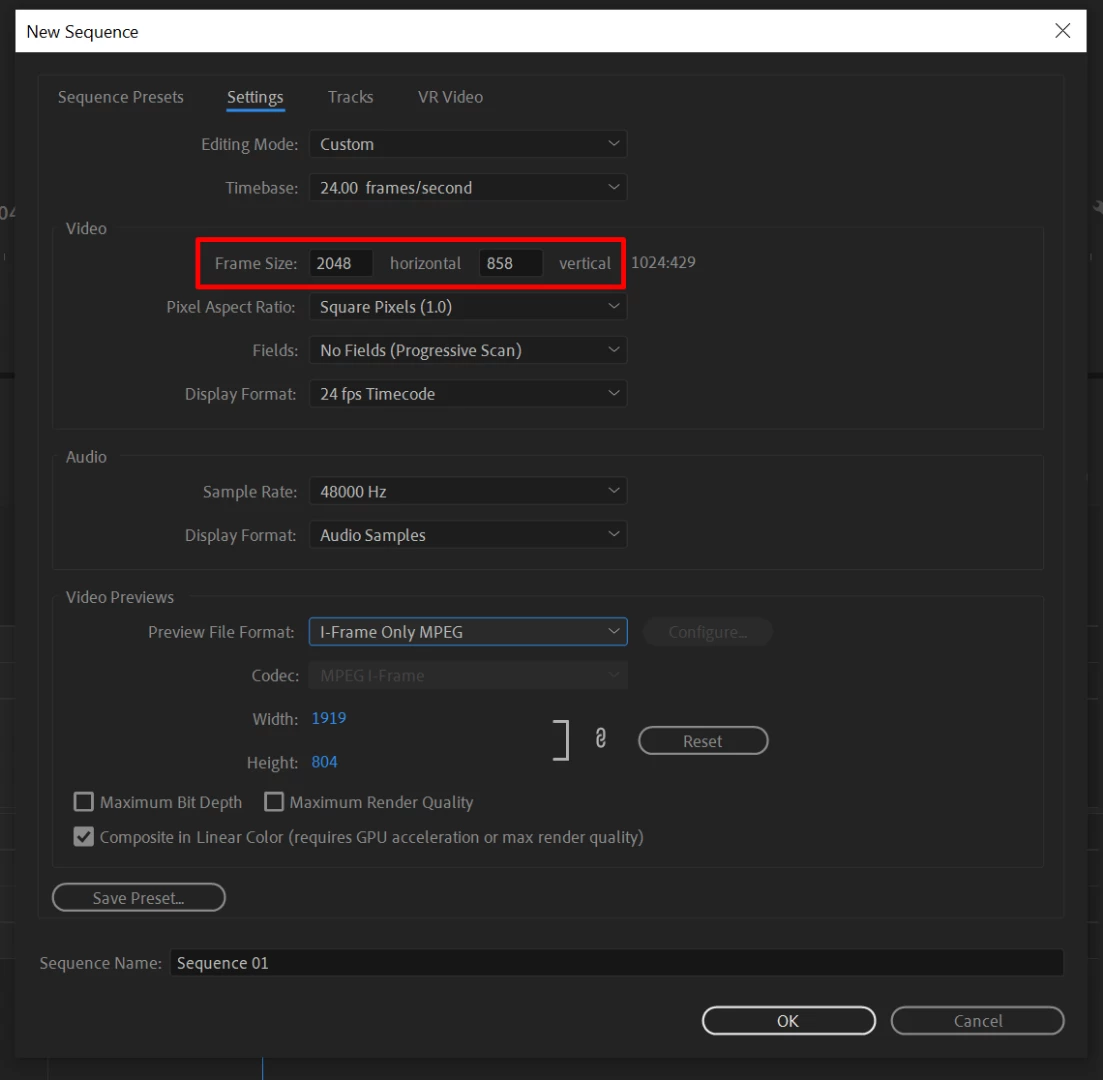
You may set your sequence settings according to the frame size you want.

  • Go to File > New > Sequnece.
  • Click on the Settings tab and change the Editing Mode to Custom
  • Set your Frame size as 2048 x 858
  • Depending on how the media was captured on ARRI Amira set the Pixel Aspect Ratio.

Click OK and your sequence with desired frame size will be created. You may then import your media files in this sequence and it should result in an ultra-wide preview.

Hope this helps.

Thanks,

Sumeet

1 reply

Sumeet Kumar ChoubeyCommunity ManagerCorrect answer
Community Manager
June 14, 2019

Hi joshuap89929568,

You may set your sequence settings according to the frame size you want.

  • Go to File > New > Sequnece.
  • Click on the Settings tab and change the Editing Mode to Custom
  • Set your Frame size as 2048 x 858
  • Depending on how the media was captured on ARRI Amira set the Pixel Aspect Ratio.

Click OK and your sequence with desired frame size will be created. You may then import your media files in this sequence and it should result in an ultra-wide preview.

Hope this helps.

Thanks,

Sumeet