Participating Frequently
January 22, 2019
Resuelto

Converting a 1080p timeline to 480p

  • January 22, 2019
  • 2 respuestas
  • 7111 visualizaciones

I have a gig where I have to burn DVDs. I have the cloud, but am finding it difficult to solve my problem. Shot the video in 1080p. 

My instructions are:

-Files should be h.264 format in the Quicktime (mov) container.

-Audio in video files is PCM with a 48 kHz rate.

-Files have a size of 853x480 anamorphic.

Please help!

Este tema ha sido cerrado para respuestas.
Mejor respuesta de SAFEHARBOR11

Thank Jeff. I just realized how confusing I was being. I just sent Ann a note that explains it better I hope  


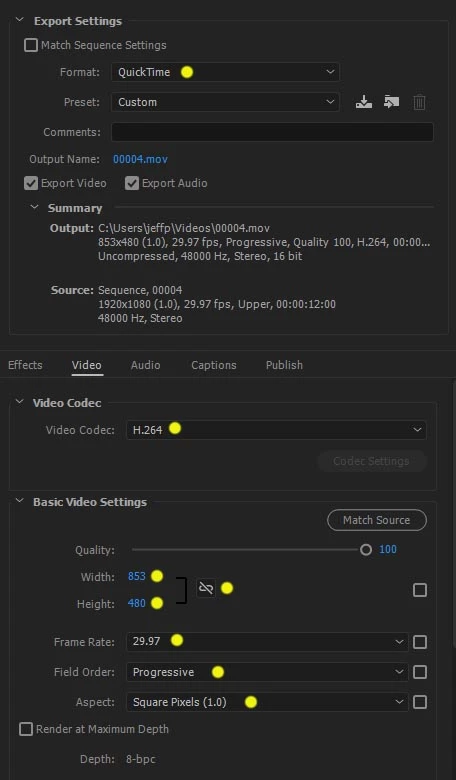
Okay, here's an example of setting up Export to give client what they want. Choose QuickTime as Format, and select DV NTSC Widescreen as Preset.

Then modify settings for Video Codec = H.264, 853x480, Progressive, Square Pixels (1.0) (making any changes causes Preset to say Custom then).

2 respuestas

Stan Jones
Community Expert
Community Expert
January 22, 2019

Ann's instructions should get you sorted if you are burning the DVDs using Encore. but I have to ask: what "instructions"?

Also, using Ann's instructions avoids the issue of square pixel size. This topic always confuses me, but I believe the 853x480 was the "old" square pixel equivalent, and the new one (since CS4) is 864x480.

Ann Bens
Community Expert
Community Expert
January 22, 2019

You cannot have pcm in a h.264 file.

If 2 files is not a problem:

export video to H.264 and audio to Waveform.

(ps i deleted the double post to Stan, he can read the one addressed to me )

Participating Frequently
January 22, 2019

Okay, here's an example of setting up Export to give client what they want. Choose QuickTime as Format, and select DV NTSC Widescreen as Preset.

Then modify settings for Video Codec = H.264, 853x480, Progressive, Square Pixels (1.0) (making any changes causes Preset to say Custom then).

This is great. Will this allow to switch audio files to PCM?

Ann Bens
Community Expert
Community Expert
January 22, 2019

I am guessing you want a video dvd and not a data dvd?

DVD files are exported with a mpeg2-dvd preset (720x480). H.264 get encoded again when authoring the dvd.

Burned to DVD with Encore installed along with Premiere CS6 which you can download from the cloud.

So in short: export from Premiere with mpeg2-dvd preset, import the 2 files (audio and video) into Encore,

Make menu then burn or make iso and burn with Imgburn.