
Participating Frequently
March 26, 2020
Question

Creating Proxies

  • March 26, 2020
  • 3 replies
  • 350 views

I'm creating H.264 proxies. I'm on Premiere Pro 13.1.5 and using Media Encoder 13.1.5

Each time I do this, my proxy ends up with the very first frame copied at the beginning, shifting the entire clip over one frame. ie. 

A,A,B,C,D,E,F,G,H etc..


Why is this happening?


Source is:

Iphone X

24 fps

4030x1704


My encode settings are:
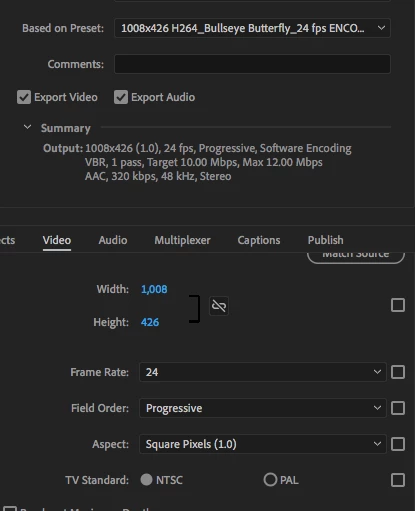
 

I've already attempted to use ProRes for my proxies, but the result was choppy and unusable. Same with CineForm.

This topic has been closed for replies.

3 replies

Legend
March 26, 2020

are you sure it's not vfr.  use media info to check

https://mediaarea.net/en/MediaInfo/Download

drag a sample video file into the mediainfo window and then hover over the video area and you'll see a list of specs including whether it's vfr or cfr.

R Neil Haugen
Legend
March 26, 2020

I would guess on account of that original file being VFR ... variable frame-rate ... which will be a bear to work with in a proxy process.


Before importing it into Premiere, use the free Handbrake applet to convert the file to a fixed CFR ... constant frame-rate ... state.


Neil

Everyone's mileage always varies ...
avril68Author
Participating Frequently
March 26, 2020

Sorry again, to be more specific, the footage was shot in Filmic Pro and is 24 fps, not VFR.

avril68Author
Participating Frequently
March 26, 2020

Sorry, I should specify, this doubling of the first frame happened when I encoded to ProRes and to CineForm as well.