
Known Participant
August 18, 2012
Question

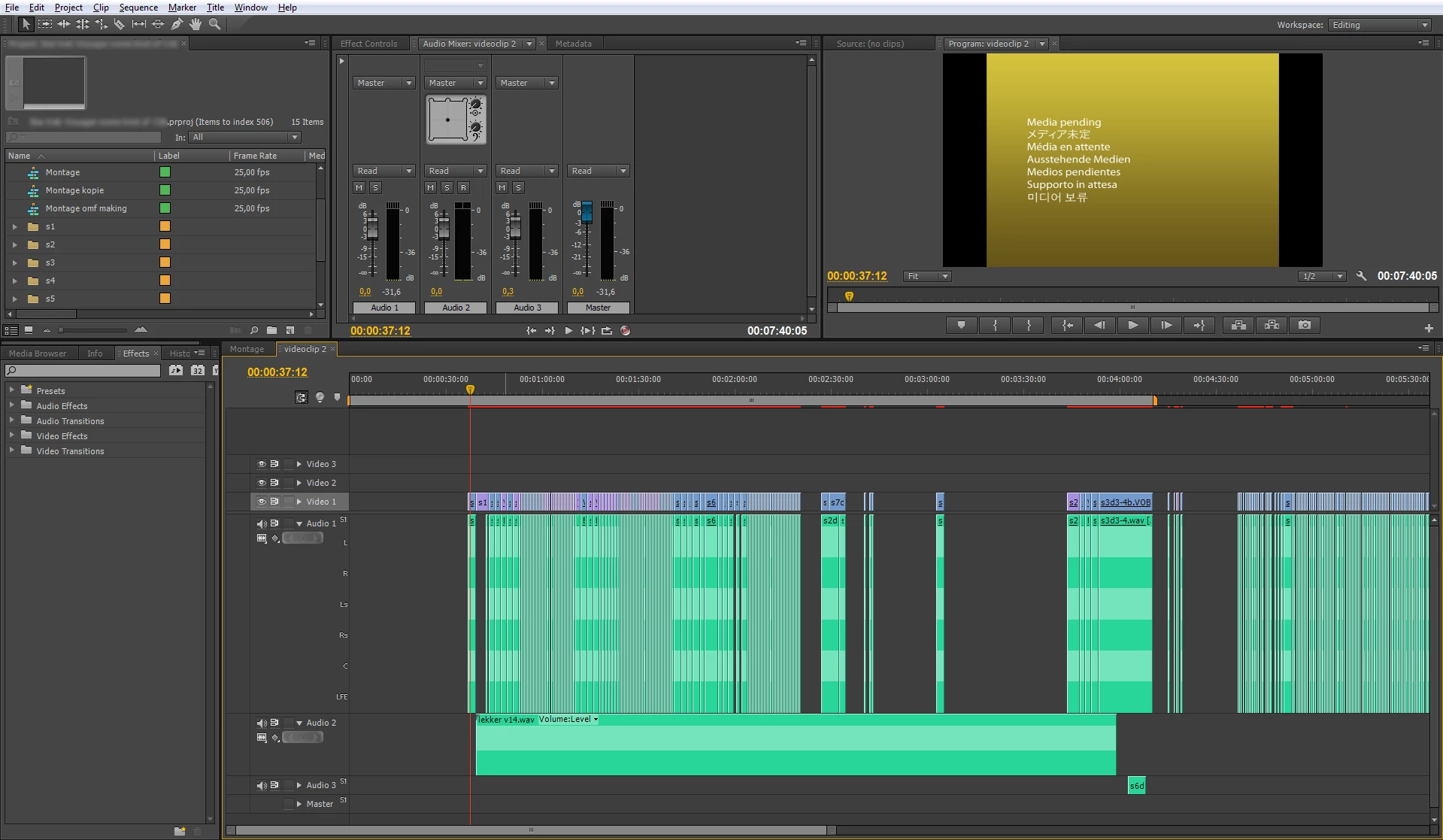
CS6: black or shows 'media pending'

  • August 18, 2012
  • 3 replies
  • 42563 views

This is a project specific problem:

The video screen remains black or shows 'media pending'. But no HD is at work to find the media.

The audio does play, however, the plot is not visible as can be seen in the provided screenshot.

The program freezes when closing this project.

Project info:

- I am working with VOB (DVD) files.

- The project contains cuts of over 124 hours of DVD video and additional 5.1 audio exports that are linked to the videos again.

- The project files are on an external USB 3 disk.

- 'Save cache files next to originals' is enabled to not eat up internal disk space. When switching to CS6 I deleted all cache files and let Premiere recreate them.

System:

CS6, Windows 7 64bit, 16GB RAM.

Plenty of RAM free when the project is opened. Intel i7 CPU is around 12% continuesly.

I would really like to finish this project that I started in CS5...
    This topic has been closed for replies.

    3 replies

    Known Participant
    November 14, 2013

    I had a very similar problem with a large project after I had applied the warp stabilizer in Pr Pro CC. Quick solution - there was an autosave version of my project prior to the warp stabilizer being used that opened and worked just fine. From that point, I re-added the stabilizer and rendered the finished media easily.

    October 10, 2012

    I was having this exact same problem: Working on a project without a problem. Then the next day I come back to work, turn on the computer, open the same file and half my media is pending and wont load. (also any new media I import doesnt play in the timeline or source window either).

    FOUND THE CAUSE: I tend to 'Save Project As' quite a lot every time I achieve a tough edit. As you know, PPro makes a  folder for the preview files of your project. Problem is, if you save as a copy, PPro will make a new 'Adobe Premiere Pro Preview Files Folder' for that new version of your project and all your preview files (MXFs and XMPs) will be in different folders. Therefore, if you open v04 of your project it won't find/index the preview files from v01, and so on...

    FIX: Quit PPro. Copy all the preview files into your latest 'Adobe Premiere Pro Preview Files' project version folder. Relaunch. Back to normal.

    Of course this takes more of youre HD space - I figure you can delete the files form the other folders but then if you need to go back to an earlier version of your project you'll need to re-copy the preview files to that versions preview folder. And its a pain to do every time. Adobe needs to fix this issue! Before I found this 'fix' PPro would crash and sometimes I couldn't even import new files (I got a generic import failure message before it crashed) Also...when trying to render the work area  it wouldn't render no matter how much time I leave it there...

    Hope this works for you..

    MallootAuthor
    Known Participant
    October 10, 2012

    Thanks Carter, I will try this in the coming week and report back here.

    MallootAuthor
    Known Participant
    January 31, 2013

    So.. The coming week became several months, but I finally picked this up again.

    I got it working now by deleting all *.pek and *.cfe files, and let Premiere regenerate all those files on the internal cache folder, using up 416GB of working space. Which I have to say again, it makes no sense at all to dump files from all your projects in one big folder. But well, if that's the only way to get Premiere function normal I guess I have no choice.

    BUT... Now yet another problem is introduced. Some clips have frames mixed up, or part of another frame is visible. Also after exporting! It's like the first frame of a cut is shown again after 1 second. But this seems to slowly go away as I keep working on the project. Like later on only half the frame is f***ed up instead of the whole frame. I can move the clip around, edit it in all ways but the broken frame remains. I am so finished with this program.

    By the way did I ever mention why "- The project contains cuts of over 124 hours of DVD video and additional 5.1 audio exports that are linked to the videos again."?

    That's because Premiere gave me stuttering audio with the original *.VOB audio.

    Jeff Bellune
    Legend
    August 18, 2012

    The answer is in parentheses next to the file name that you blurred out in the Project panel.  All those clips have to be re-indexed -- probably because you deleted the index files when you deleted the cache files.  The re-indexing may even have occurred if you hadn't deleted the cache files because of the change from CS5.5 to CS6.

    The freezing is likely because the indexing operation can't be stopped, and Pr didn't like you trying to close it before it was finished.

    Jeff

    MallootAuthor
    Known Participant
    August 18, 2012

    Thanks Jeff for the reply.

    I overlooked this indexing. Likely because there's not much happening. The number 506 never changes and there is no harddisk activity. But isn't this only for use of the seach bar?

    Other thing is That I've already worked with it in CS6 and it all went fine then (and this was after deleting all cache files).

    The wave plots do show up now by the way after a third time opening.

    the_wine_snob
    Inspiring
    September 2, 2012

    Meanwhile I haven't been able to solve the problem, after not looking at it for a long time (got tired and frustrated). New is that this time, in the lower right corner, Premerie claims to be generating a peak file but nothing happens. I could delete all the peak files again but oblviously I will end up with the same problem, since it's the same project.

    Looks like I'll be going back to CS5. Pity of the wasted money. Does anyone know if Premiere CS5 and CS6 can be installed side by side? Because CS6 has some nice new features I might want to use some day.


    The Indexing, Conforming and the generation of the PEK (Waveform Display) files is very important. This process requires CPU cycles, plus also I/O activity. One thing that can hang it, is not having adequate HDD space, or via the user doing things, during the process. This article goes into more detail: http://forums.adobe.com/thread/726693?tstart=0

    How much free-space do you have on the HDD, where your Scratch Disks>Media Cache is located?

    Do you have any processes/programs, such as active, real-time anti-virus, anti-malware, anti-anything, running?

    Were you multi-tasking, while the process was in progress?

    Just some thoughts.

    Good luck,

    Hunt