
Participant
March 16, 2022
Answered

Current Text Tool vs. Legacy Text Tool

  • March 16, 2022
  • 2 replies
  • 454 views

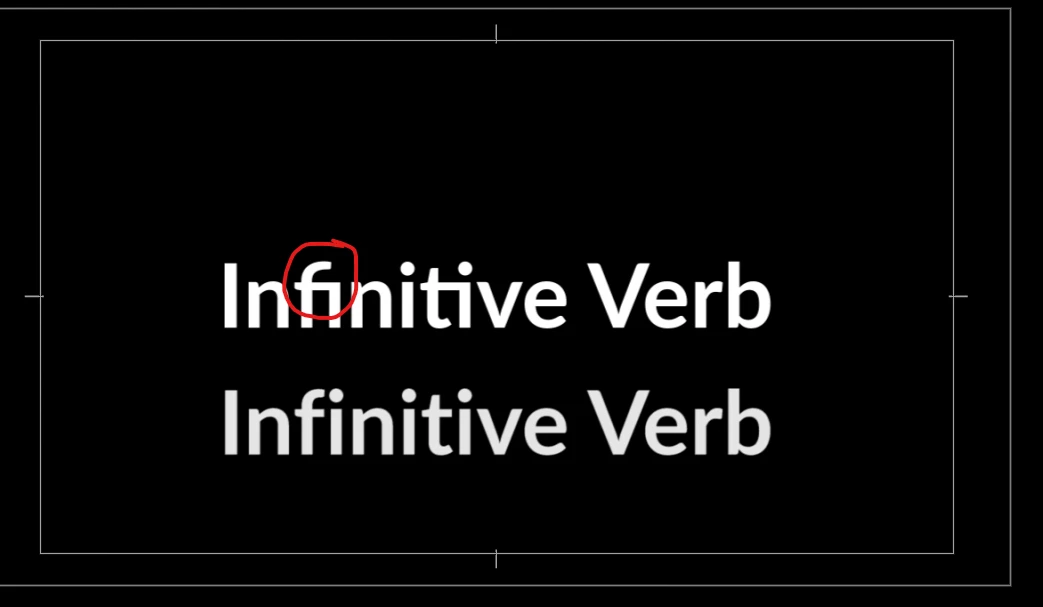
The top text is from the current text tool and the bottom one is from the legacy title tool. Notice that the "f" and "i" are connected to each other and the "i" missing its dot. Please fix the current text tool. It's a hassle to use legacy.


This topic has been closed for replies.
Correct answer Stan Jones

In the Essential Graphics Panel, in the Text section, click on the wrench icon.  Then deselect "ligatures."


Stan

2 replies

Stan Jones
Community Expert
Stan JonesCommunity ExpertCorrect answer
Community Expert
March 16, 2022

In the Essential Graphics Panel, in the Text section, click on the wrench icon.  Then deselect "ligatures."


Stan

Participant
March 16, 2022

Thank you! This works.


Cheers

Participant
March 16, 2022

The font used was Lato-Bold if you want to test it.