
Participant
April 25, 2022
Answered

Decreased video playback quality after rendering

  • April 25, 2022
  • 3 replies
  • 4145 views

Hello.


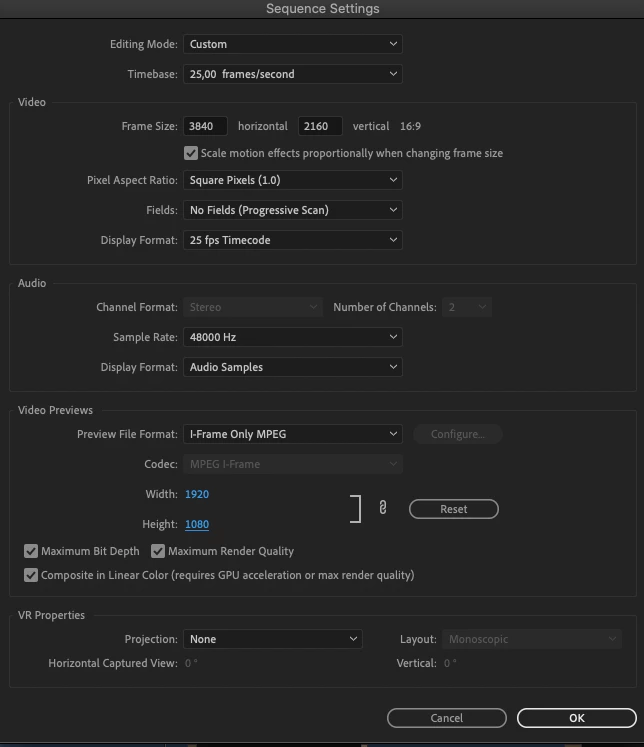
I have an issue with a significant drop in video quality after rendering my timeline before exporting. I've tried youtube/googleing the problem but can't seem to find a solution. If anybody has an idea about where such a problem could originate, it would be greatly appreciated! I'm using the following secuence settings. 
Correct answer Ann Bens

I frame mpeg only is a low quality preview codec and its set to 1080p.

You dont need to render the timeline before export if you dont use the preview codec.


3 replies

R Neil Haugen
Legend
April 25, 2022

Ann's right. IF you need to render, and want to see full quality, then you would need to set the preview codec to a UHD option, to match the timeline.


Neil

Everyone's mileage always varies ...
Jeff Bellune
Legend
April 25, 2022

What is your Program Monitor playback resolution set to? Anything less than Full will degrade playback video quality, even after rendering. 

Ann Bens
Community Expert
Ann BensCommunity ExpertCorrect answer
Community Expert
April 25, 2022

I frame mpeg only is a low quality preview codec and its set to 1080p.

You dont need to render the timeline before export if you dont use the preview codec.


Participant
April 25, 2022

Thanks a lot!