
Participant
February 4, 2021
Answered

Delete - audio previews, auto-save, captured audio, captured video

  • February 4, 2021
  • 1 reply
  • 5244 views

Hello! 


I finished a project and the below file folders have automatically saved on my computer. Can I delete them without affecting the final product? Would they be needed for future work if I ever need to edit the project?
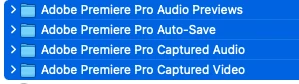
 

This topic has been closed for replies.
Correct answer R Neil Haugen

The "Captured Audio" might house the audio files if you did a voice-over audio capture in Premiere. If you didn't do any voice-over type work in Premiere, there's nothing there of use. It's not likely you "captured video" either from Premiere.


Other than that, the audio previews can be recreated on re-launching the project at a later date. Auto-saves are of no interest if you have saved and backed up working copies of the project file itself.


So yes ... those folders are normally routinely cleaned out.


Neil

1 reply

R Neil Haugen
R Neil HaugenCorrect answer
Legend
February 4, 2021

The "Captured Audio" might house the audio files if you did a voice-over audio capture in Premiere. If you didn't do any voice-over type work in Premiere, there's nothing there of use. It's not likely you "captured video" either from Premiere.


Other than that, the audio previews can be recreated on re-launching the project at a later date. Auto-saves are of no interest if you have saved and backed up working copies of the project file itself.


So yes ... those folders are normally routinely cleaned out.


Neil

Everyone's mileage always varies ...
Participant
February 4, 2021

Wonderful, thank you, Neil!