
Known Participant
November 8, 2024
Answered

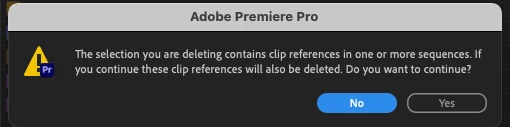
Delete empty bin/folder gives warning "…contains clip references"

  • November 8, 2024
  • 2 replies
  • 1116 views

Premiere Productions.  I'm doing some re-orgnization (in the project, not at OS level).   I've emptied out a group of nested folders.   They are empty, no clips no sequences.   But when I try to delete teh top leve folder I am given the "…contains clip references…" warning (see below).  I've narrowed it down to two folders, but they seem to be empty folders just like the others.


Why the warning?  Should I ignore it an just delete the folders?
 

This topic has been closed for replies.
Correct answer mattchristensen

@Ovidius9000 I'm sorry this is happening, it's definitely a little confusing. It's possible this is due to a bug we had in a previous version of Premiere Pro Productions that could lead to this, nothing you did wrong. The best way forward is to just leave those folders as they are. If you delete them you'll see some clips disappear from your timeline. I'm sorry I don't have a full solution to clean it up, but, it should be harmless to leave them as is.

2 replies

mattchristensen
Community Manager
mattchristensenCommunity ManagerCorrect answer
Community Manager
November 8, 2024

@Ovidius9000 I'm sorry this is happening, it's definitely a little confusing. It's possible this is due to a bug we had in a previous version of Premiere Pro Productions that could lead to this, nothing you did wrong. The best way forward is to just leave those folders as they are. If you delete them you'll see some clips disappear from your timeline. I'm sorry I don't have a full solution to clean it up, but, it should be harmless to leave them as is.

R Neil Haugen
Legend
November 8, 2024

And you don't have any way to determine which clips/sequences are involved?


The idea of having top level folders going useless but 'there' for year after year is not acceptable. So I would hope you'd have some suggestions on cleaning this up rather than just having unused folder cluttering (and confusing) the entire Production.


Don't get me wrong, I love the Productions your staff has created in general, other than the old can't match frame issue that's still haning there. But ... this wouldn't be comfortable for me.

Everyone's mileage always varies ...
R Neil Haugen
Legend
November 8, 2024

Have you tried selecting the "show hidden" option?

Everyone's mileage always varies ...
Known Participant
November 8, 2024

This is a folder in my project.  A "bin".   I don't see any "show hidden" option.  Are you referring to a folder at the OS level?

R Neil Haugen
Legend
November 8, 2024

Nope, Premiere has an option to Hide things in bins, along with naturally an un-hide option. It can be triggered at times with a keyboard shortcut, so I've seen it done without the user knowing they did it.


Right-click, show hidden in the bin, I think. Might be on a 'hamburger' three-bar menu.

Everyone's mileage always varies ...