
Participating Frequently
June 19, 2018
Answered

Deleted Proxy has attatched

  • June 19, 2018
  • 4 replies
  • 2284 views

Hi,

I started editing a 4K video on my laptop which was too slow and required proxies. While the editing was on going I upgraded to a far more powerful work station which had no problem editing the footage.

As the proxies were taking up space I deleted them, however the bars which appear on each side of the clip remained. When opening the Premiere file now the proxies were gone I clicked 'Offline all. When I clicked Link Media to replace the footage nothing changed and in the properties of each clip is a Proxy Media section linking back the folder which contain each clips proxies.

I tried to export anyway and when exporting the message 'Offline material is present in this export and will be encoded using the Offline Media graphic'. The exported sequence has black bars on each side stopping it from being wide screen.

Any help would be appreciated.

Patch
This topic has been closed for replies.
Correct answer MyerPj

I just tried it on PP 12.1.0 (Build 186)

I created some proxies in a project, turned on the proxy display and left it with a proxy showing in the program monitor. Quit PP, Renamed the Proxy folder, Started PP with that project, Got the offline message and "Offline All". Project loaded and the correct preview was shown and toggling the proxy button did nothing. IE: All seemed well.

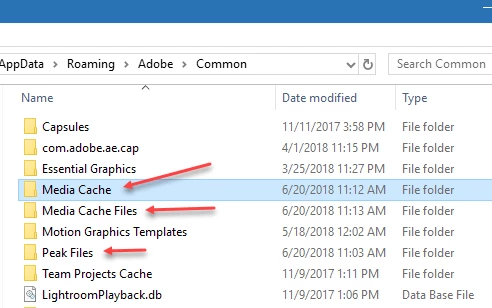
BTW: I keep a shortcut on my desktop to delete the media cache folders once in awhile, or if there is (unusually) an anomaly. I delete these three folders and PP builds them right back...

4 replies

MyerPj
Community Expert
Community Expert
June 20, 2018

Yes, I just delete those folders, but if you are 'squeamish' renaming them will suffice!

Glad that worked.

Participating Frequently
June 24, 2018

Hi,

so I deleted the folders and the footage appeared to be back to normal but once rendering or exporting it changes back to proxy format.

Any ideas why?

Thanks

MyerPj
Community Expert
Community Expert
June 24, 2018

Neil is very knowledgeable, but I think the explanation above is not correct. When a proxy is correctly made, you essentially (in the PP monitors) can not tell it apart from the actual footage. IE: When the PROXY DIMENSIONS are correct, there are no bars on the side of the video.

Here's a very recent thread where the OP couldn't tell if he was using proxies or not (ie: no bars)

how to tell if proxies are present and connected

You said you were editing 4K, usually it's one of these two

4,096 by 2,160,

3,840 by 2,160

4096 = 1.9:1 (aspect ratio)

3840 = 1.78:1

So a 1024x540 default proxy will work with the 4096 footage, but if you use that with 3840 footage you image when viewing proxies will be squished in and have bars on the side. Just from viewing the 1 frame of your guy in the grey hoodie, obviously it has the bars, but it also appears a bit squished in to me.

Best Proxy Size:

4096 = divided by 4 = 1024x540

3840 = divided by 3 = 1280x720

I don't know what the problem could be on your system. I would suggest checking the paths of everything, via File Explorer and the paths PP is using.

You might want to have a quick look at the 'scale' property of the items in your project that are appearing incorrectly, just to insure they are at 100% and not causing any problems.

If that doesn't lead you to anything, how about recreating the proxies and putting them in place again. Of course from the beginning of this, you hopefully saved a copy of the original project file under a different name but in the same folder as to original/current project, before you tried doing all these things. Recreate the proxies and try attaching them. If that would work, you might consider a different proxy size, ie: w/out the bars.

MyerPj
Community Expert
MyerPjCommunity ExpertCorrect answer
Community Expert
June 20, 2018

I just tried it on PP 12.1.0 (Build 186)

I created some proxies in a project, turned on the proxy display and left it with a proxy showing in the program monitor. Quit PP, Renamed the Proxy folder, Started PP with that project, Got the offline message and "Offline All". Project loaded and the correct preview was shown and toggling the proxy button did nothing. IE: All seemed well.

BTW: I keep a shortcut on my desktop to delete the media cache folders once in awhile, or if there is (unusually) an anomaly. I delete these three folders and PP builds them right back...

Participating Frequently
June 20, 2018

Ah ok, so should I delete these folders?

Patch

MyerPj
Community Expert
Community Expert
June 20, 2018

Yes, or rename them. I just put an 'x' in front of the name.

Legend
June 19, 2018

If the proxy media is no longer there, it's just not possible for PP to be reading them.  Your're seeing either the originals, or rendered previews.

R Neil Haugen
Legend
June 19, 2018

Just curious ... is the Toggle Proxies icon there on your program monitor, and blue?

This is an intriguing problem ... um ... sorry to say.

Neil

Everyone's mileage always varies ...
Participating Frequently
June 19, 2018

No the toggle proxies icon was switched off before even deleting the proxies.

Patch

Participating Frequently
June 20, 2018

When I use the commands within PrPro to create proxies, no matter if the proxy preset is the same size as the original media, it's always displayed on the program monitor with thin bars each side.

That's to show that you're viewing proxies.

And PrPro always uses it's export engine which is Media Encoder to make the proxies. That's the PrPro generated proxy system.

I'd love to see a screengrab of both the program monitor showing the sequence and a frame of the exported media.

Neil


Hi Neil,

thank you for all the help so far.

I just tried deleting the media cache files and that still seems to have made no difference.

Here is a screengrab of the program sequence and the exported video.

Patch