Participant
January 7, 2021
Answered

Deleting points in a mask

  • January 7, 2021
  • 4 replies
  • 26413 views

So I've read that to delete a mask point you just press control and click on the point. This is not working for me. What should I be doing? Can't seem to find anything online other than the option above. Thanks.

Correct answer Byron Cortez

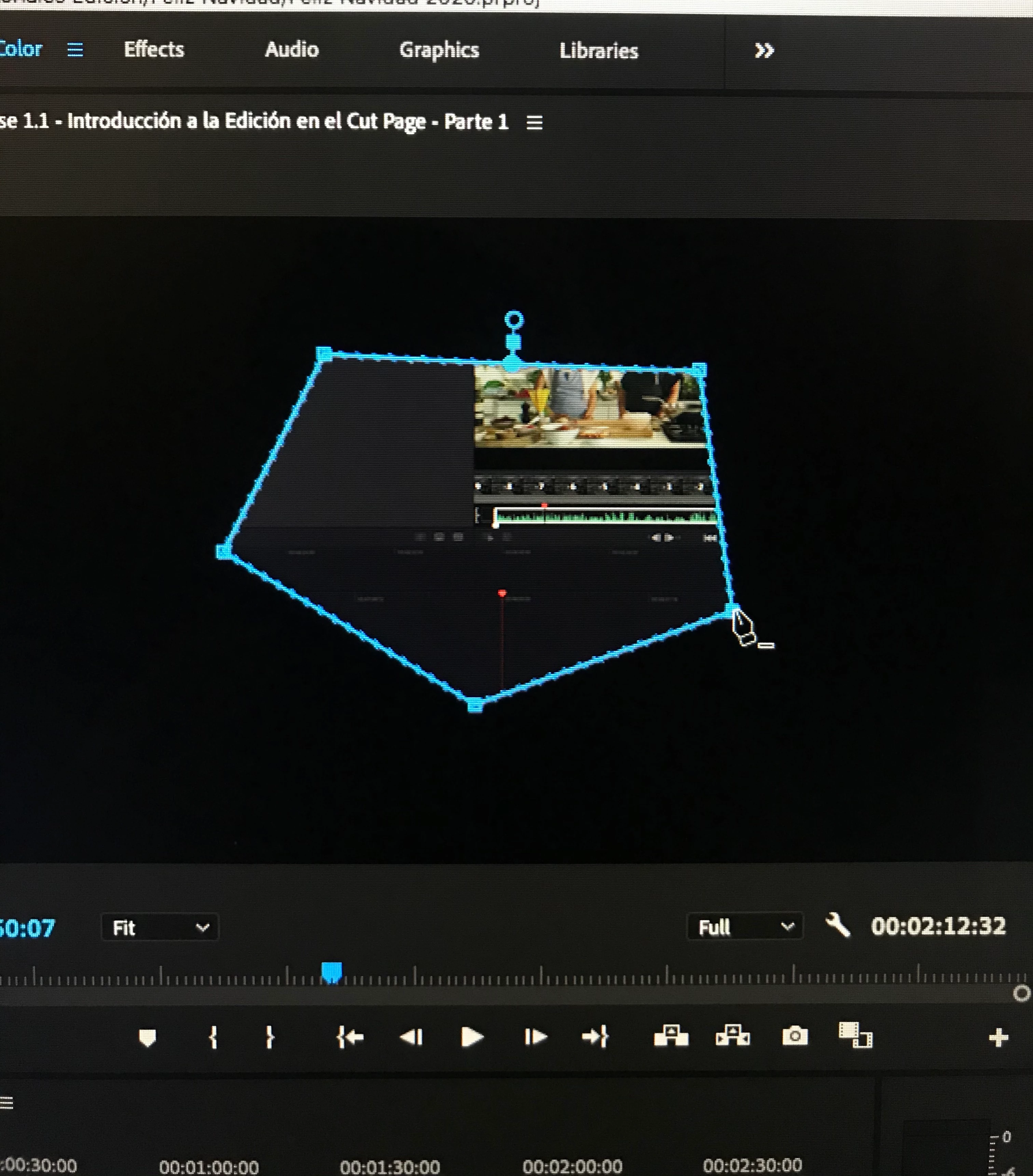
I'm replicating what you say and pressing Cmd on Mac, which is equivalent to Ctrl on Windows, works for me. Try to select the mask from the Effect Controls panel while you have the clip selected in the timeline and you get closer to the point, press Ctrl and the pen should appear with the minus (-). Look at my screenshot.
 

4 replies

gened78432486
Known Participant
June 11, 2025

I encountered this same problem when using a mask in Lumetri Color. I could not figure it out. So, I deleted the mask which was on a Lumetri effect that I had copied and pasted. I reapplied the effect and redid the mask and then I was able to delete the points. 

Daxuran
Participant
January 10, 2023

I'm having the same problem, and nothing works.  I selected the mask from my Effect Controls panel, zoomed in to the anchor point 1600%, held down control and clicked on the point I wanted to delete.  It doesn't delete the anchor point, it just creates a new one right next to it.  I can't even get the pen tool with the minus sign to appear.  I havce no idea why this tool is so janky and poorly designed, but it's making it incredibly hard to complete an already time-consuming rotoscope right now.  Ugh.

Participating Frequently
March 19, 2023

The Zoom ratio appeared, on my system, to impact the Add/Delete points behavior. Upon zooming back to say, 400%, the Add and Subtract points function was restored and, for a minute or so, even after returning to 800% or 1600%, until it fell apart again. Add one point it had become comical: I had added points with every sinbgle mouse click.

Participant
November 13, 2024

This is the correct answer

Participant
June 15, 2022

Geez, the problem was that when we press Control PLUS moving the cursor into the anchor. Nothing will happen! The pen tool is the same. There is no plus or minus below the cursor just like it should be in Illustrator, and an "expert" keeps suggesting pushing the control button over the anchor for the fix. Wow thanks, that's the problem the question has already been raised.

Participant
July 20, 2022

I could not delete any points until a shape was "done".

I.e. with the pen tool (Free Draw Bezier), I had to connect the first and the last point before I could delete a point. It would not let me delete the previous point while still making the shape. After it was "connected" it worked fine with the CMD button. 

Kevin-Monahan
Community Manager
Community Manager
July 21, 2022

Hi Giraffes,

Sorry. I believe this is expected behavior. It does not appear to be documented, however. I'll let the documentation team know.


Thanks,
Kevin

Kevin Monahan - Sr. Community and Engagement Strategist – Adobe Pro Video and Audio
Byron CortezCommunity ExpertCorrect answer
Community Expert
January 7, 2021

I'm replicating what you say and pressing Cmd on Mac, which is equivalent to Ctrl on Windows, works for me. Try to select the mask from the Effect Controls panel while you have the clip selected in the timeline and you get closer to the point, press Ctrl and the pen should appear with the minus (-). Look at my screenshot.


Byron.
Participant
August 7, 2021

I am in genuine love with you

Community Expert
August 8, 2021

Jajaja you're welcome!  

Byron.