
Participating Frequently
January 4, 2017
Answered

Depressing. Footage in Premiere/VLC looks VERY different in Quicktime/Vimeo/Youtube

  • January 4, 2017
  • 6 replies
  • 10940 views

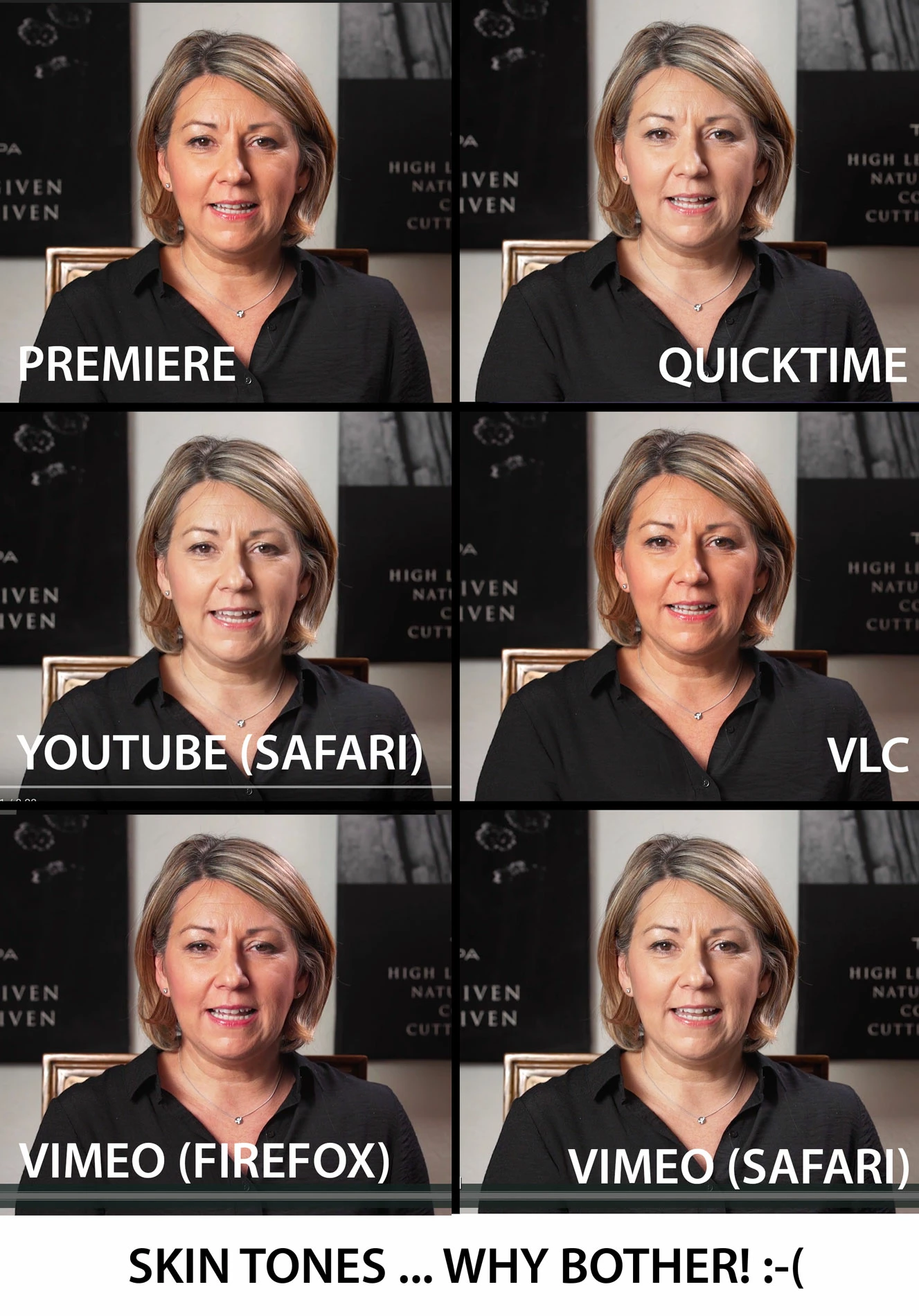
Well, this is depressing. I don't know if something is wrong with my MacBook 2016, but I've noticed that footage in the Premiere program monitor looks VERY different to the exported video in various platforms, to the extent that I don't even know why I bother color correcting! I took some screenshots of the exact same video (below). This is a H.264 export at 16mbps. I also tried various other exports (quicktime, matched source, prores etc) and got some results.

Premiere is what I want it to look like, and vlc represents this very very well. But Quicktime, Vimeo & Youtube (safari), Preview (Mac) all produce the same gamma shift and desaturation. With Firefox Vimeo going in the opposite direction and looking like the woman's face is on fire. I exported to my iPhone via dropbox and the results were somewhere in between.

THIS IS CRAZY?! I know there isn't a HUGE difference, but its enough to make me not want to bother colouring anything ever again knowing that I have no idea whether it will be played by people on Vimeo/quicktime (way more drained than what I'm editing/seeing in Premiere) or VLC (accurate to Premiere, but...so what)

Has anyone got any pointers? Give up making videos?
    This topic has been closed for replies.
    Correct answer R Neil Haugen

    Ahhh ... sending "our babies out into the wild" is very, very frustrating. There's been a TON of threads on here ever since I started in PrPro back in CS6.

    PrPro is designed to "assume" modern digital image standards ... "full" dynamic range of 0-255 for 8-bit exports, and "standard" gamma. VLC typically works the same, although on my PC I needed to go into the Nvidia control app for my GTX970 and tab to the "Video options" section, and then choose to have the Nvidia settings over-rule video player settings, and to use "full" 0-255 dynamic range.

    QuickTime uses the old tape-based dynamic range of 16-235, with a slightly different gamma ... so it lifts the blacks to 16, drops the whites to 235, and slightly raises the gamma. The result: muddy darks, muddy whites, and low-contrast/low-saturation video.

    YouTube & Vimeo ... wow. I've had some clips out of PrPro load perfectly, others try and match QuickTime's mess. Or worse.

    There's another user "around here" who's made a LUT he applies to his exports that will go to YouTube that changes the output to mostly make up for YouTube's crazyness. Others have said if they take a PrPro H.264 export into FFMPEG or one of the other specialized converter apps, they can export the "same" file but that app puts a tag in the file header so YouTube "sees" it correctly. I've not tried that.

    And of course, no matter what you do, NO ONE "out there" will ever look at that image on a screen setup to look exactly like yours. Have a nice day, and ... please don't go crazy!

    Neil

    6 replies

    Participant
    April 5, 2023
    R Neil Haugen
    Legend
    April 5, 2023

    Sorry, but that's no fix. PERIOD.


    It's only a workaround that makes the file look, on a Mac Retina set to Rec.709 in ColorSync, like it did within Premiere. Be careful abourt using it.  


    Especially because on ALL non-Mac systems, your file is now WAY too dark and oversaturated!


    How to see what others will see? Import that file with the LUT applied back into Premiere. Right. That's now what everyone else non-Mac sees of your video.


    The Problem isn't "Adobe" ... or 'Premiere" ... it's Apple's choice to misapply color standards for Rec.709 video files in their ColorSync utility.


    Apps on your Mac, that do NOT allow ColorSync to control the image, will not have this problem.


    Another option on some Macs, is if you have the option in the Mac ColorSync/Monitor settings for "HDTV" ... use that rather then the Rec.709 setting. As the HDTV option will actually use the correct full Rec.709 settings, including the correct display gamma of 2.4.


    Neil

    Everyone's mileage always varies ...
    KeithHopkin
    Inspiring
    February 6, 2018

    I've been struggling with this for the past few weeks working on a new system at a new office (I'm on a Mac Pro). I could be completely wrong about what I did but it seemed that the system display settings were using the display's profile (CS2730). From what I've read if a display comes with its own profile then that should be used. At home and a previous gig I used an iMac most likely using the default "iMac" profile.

    So what was happening for me is what a lot of folks have been describing. The image in Premiere looks more saturated and higher contrast than the image outside of Premiere. So I changed my system's display profile to sRGB IEC61966-2.1 and now the image outside of Premiere resembles what it looks like in Premiere. Is this wrong???????

    R Neil Haugen
    Legend
    February 6, 2018

    BT(Rec.709) video standard is by definition sRGB. Period. So you've now matched your monitor to what PrPro will use. Which is correct for producing/viewing Rec709 video.

    Neil

    Everyone's mileage always varies ...
    KeithHopkin
    Inspiring
    February 6, 2018

    Cool. Thanks for the thumbs up on that.

    DGolf
    Known Participant
    October 12, 2017

    Hi - I'm curious about "There's another user "around here" who's made a LUT he applies to his exports". An

    R Neil Haugen
    Legend
    October 13, 2017

    The one you're probably wanting to see about his export LUT is something like chrisw29486 ... I don't have the direct link, but he's in a LOT of the threads on YouTube and Lumetri gamma issues. Search through a few, you'll find him.

    YouTube on initial upload uses one codec for the first while, and ... may ... then move to a second one. VP9 is I think the initial, and another format for the 'final', except they don't always do the second re-encode. Which is why some users have found that if on initial upload they do things to their private channel, then edit/retouch the video but save without actually doing any retouching, within a couple hours YouTube does the second re-encode step and their video now shows with proper dynamic range & gamma.

    Another tip found very useful by many is to use the DNxHD/R in mxf format exported out of PrPro rather than say H.264, for uploading to YouTube. That seems to pass into their system as one would hope it would.

    Neil

    Everyone's mileage always varies ...
    Legend
    January 5, 2017

    rexrodall​, I've sent you a PM. WOuld love to use your image in my book.

    The Cool Stuff in Premiere Pro - PremierePro.net

    /jarle

    Legend
    January 4, 2017

    I don't even know why I bother color correcting!

    That's actually the proper attitude to take.  At least partially.

    You can't control the viewing environment of...well, anyone but yourself.  So all you can so is make it look good on the best TV you have access to (after proper calibration, of course) and let it go.  How it looks anywhere else is just not something you can control or account for.

    Having said that, I should also point out that none of the viewing methods you describe is sufficient for the task of judging the image.  You must get the video off the computer and onto a calibrated TV (with an I/O device or via export).  Judge it there, and only there.

    rexrodallAuthor
    Participating Frequently
    January 4, 2017

    most of my videos are just for Vimeo/youtube :-(

    Legend
    January 4, 2017

    Doesn't matter where they end up.  That philosophy holds for all video production.

    R Neil Haugen
    R Neil HaugenCorrect answer
    Legend
    January 4, 2017

    Ahhh ... sending "our babies out into the wild" is very, very frustrating. There's been a TON of threads on here ever since I started in PrPro back in CS6.

    PrPro is designed to "assume" modern digital image standards ... "full" dynamic range of 0-255 for 8-bit exports, and "standard" gamma. VLC typically works the same, although on my PC I needed to go into the Nvidia control app for my GTX970 and tab to the "Video options" section, and then choose to have the Nvidia settings over-rule video player settings, and to use "full" 0-255 dynamic range.

    QuickTime uses the old tape-based dynamic range of 16-235, with a slightly different gamma ... so it lifts the blacks to 16, drops the whites to 235, and slightly raises the gamma. The result: muddy darks, muddy whites, and low-contrast/low-saturation video.

    YouTube & Vimeo ... wow. I've had some clips out of PrPro load perfectly, others try and match QuickTime's mess. Or worse.

    There's another user "around here" who's made a LUT he applies to his exports that will go to YouTube that changes the output to mostly make up for YouTube's crazyness. Others have said if they take a PrPro H.264 export into FFMPEG or one of the other specialized converter apps, they can export the "same" file but that app puts a tag in the file header so YouTube "sees" it correctly. I've not tried that.

    And of course, no matter what you do, NO ONE "out there" will ever look at that image on a screen setup to look exactly like yours. Have a nice day, and ... please don't go crazy!

    Neil

    Everyone's mileage always varies ...
    rexrodallAuthor
    Participating Frequently
    January 4, 2017

    So, where is it going wrong? Something to do with the export settings? The export itself? The way my computer 'watches' Vimeo/youtube (i.e. will the same upload look 'correct' on other computers).

    I literally can't believe all the videos I have ever done looked 10-15% more washed out to 80% of people :-/