
Depressing. Footage in Premiere/VLC looks VERY different in Quicktime/Vimeo/Youtube
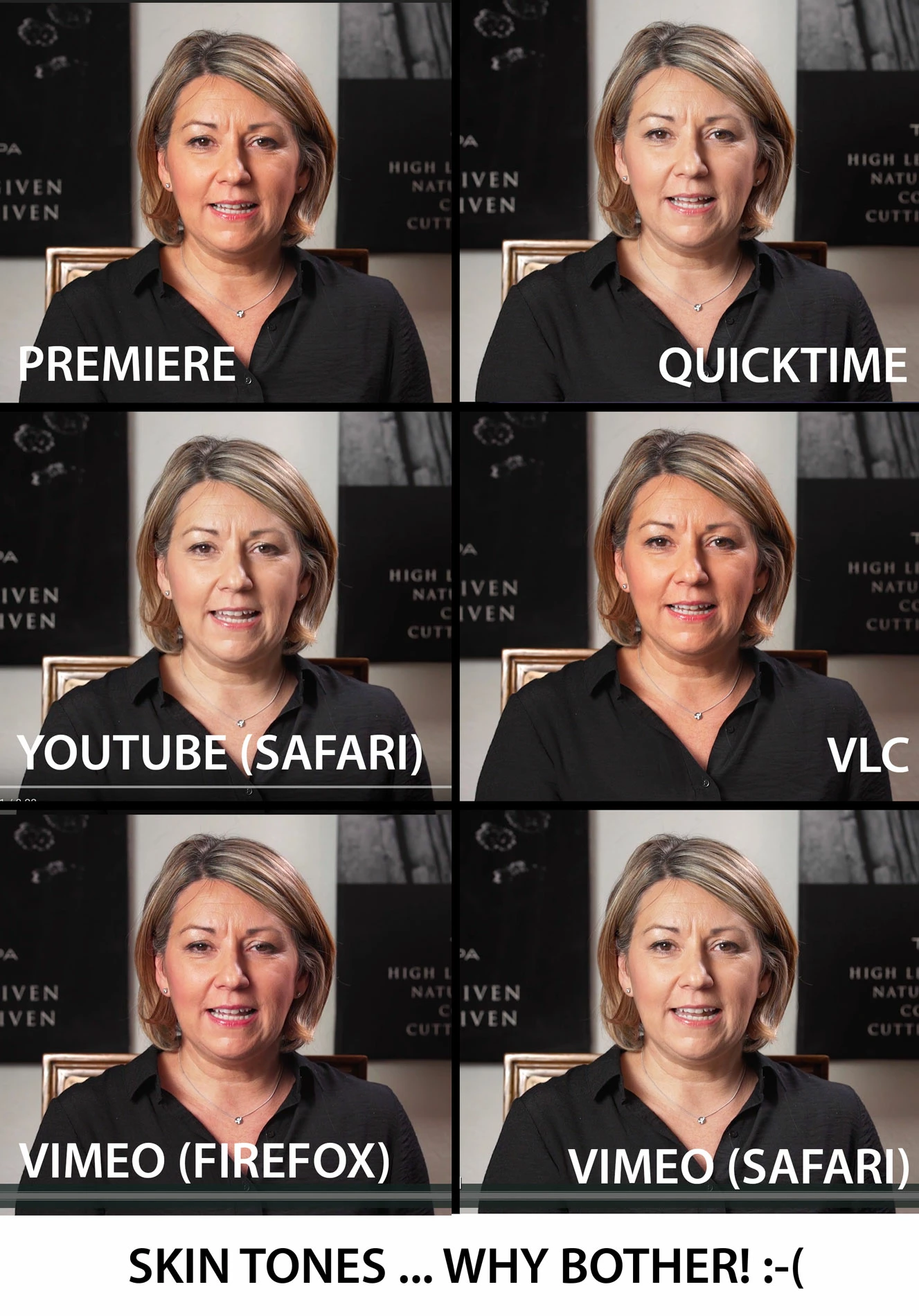
Well, this is depressing. I don't know if something is wrong with my MacBook 2016, but I've noticed that footage in the Premiere program monitor looks VERY different to the exported video in various platforms, to the extent that I don't even know why I bother color correcting! I took some screenshots of the exact same video (below). This is a H.264 export at 16mbps. I also tried various other exports (quicktime, matched source, prores etc) and got some results.
Premiere is what I want it to look like, and vlc represents this very very well. But Quicktime, Vimeo & Youtube (safari), Preview (Mac) all produce the same gamma shift and desaturation. With Firefox Vimeo going in the opposite direction and looking like the woman's face is on fire. I exported to my iPhone via dropbox and the results were somewhere in between.
THIS IS CRAZY?! I know there isn't a HUGE difference, but its enough to make me not want to bother colouring anything ever again knowing that I have no idea whether it will be played by people on Vimeo/quicktime (way more drained than what I'm editing/seeing in Premiere) or VLC (accurate to Premiere, but...so what)
Has anyone got any pointers? Give up making videos?

 AdChoices