
Participant
August 3, 2018
Answered

Dip to Black/White custom settings greyed out

  • August 3, 2018
  • 1 reply
  • 2215 views

In previous versions of Premiere I was able to use Dip to Black and set the percentages to adjust the dissolve. As of the April 2018 update I only have the option to set the alignment to start end or center. Custom alignment is greyed out. If I use it at the end of a clip (say the last clip of the video) it will begin to fade back up from black before the clip ends. At the end of a clip all alignment dropdown is unavailable. I still see the custom percentages on the standard
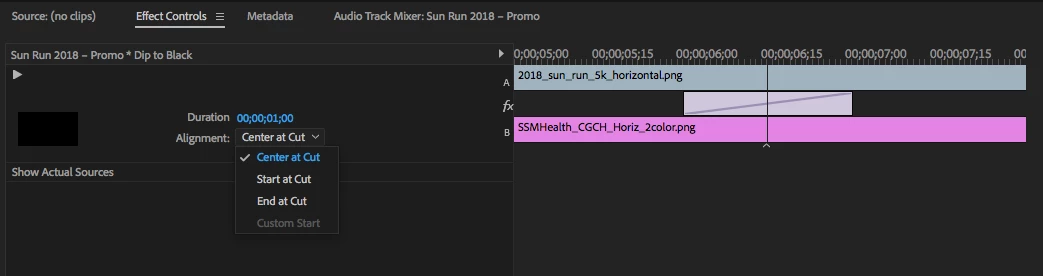
Does anyone know what could cause this?

    This topic has been closed for replies.
    Correct answer Ann Bens

    Use Opacity keyframes instead.

    Dip to black/white has been redesigned and now its not very useful anymore if you want a specific behavior.

    1 reply

    Ann Bens
    Community Expert
    Community Expert
    August 3, 2018

    Move the transition with your mouse then the custom start will be available, but actually you wont need it.

    Participant
    August 3, 2018

    Cool, but is there a way to set a custom end point when it's used at the end of a clip so that it will not start to fade back up from black?

    Ann Bens
    Community Expert
    Ann BensCommunity ExpertCorrect answer
    Community Expert
    August 3, 2018

    Use Opacity keyframes instead.

    Dip to black/white has been redesigned and now its not very useful anymore if you want a specific behavior.