
Known Participant
December 4, 2024
Question

Direct 2D Drawbot Error - Invalid Widnow Handle. HRESULT: -2147023496

  • December 4, 2024
  • 18 replies
  • 5308 views

Can someone help me with this issue? I've searched for a while on the internet and nothing to be found about this specific issue, I am getting "Direct 2D Drawbot Error - Invalid Widnow Handle. HRESULT: -2147023496
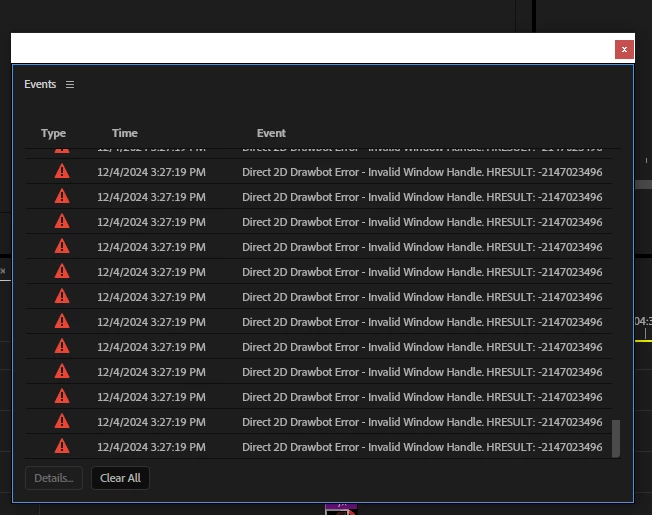
 

That's a screenshot of the Error, the timeline after a couple minutes are passed editing the project becomes completely unusable, I can only drag the playhead thru the timeline but nothing else, when I click any panel on the upper left such as "Sequence" I get all the options white, no option to be actually seen


I've been experiencing this since late 2024 builds but don't wanna downgrade back to 2024 as 2025 & Beta is running too smooth on my pc, except for this constant "crash" i get, since i have to reopen the app everytime this happens


I also have a screen recording of the bug happening on Beta, but it crashes instead of giving me any Error codes, on premiere 2025, though, if i wait after the bug happens it will give me the error code ive uploaded on the screenshot


Version I am currently using: latest premiere pro 2025 version but it would also happen on the 24.6+, including Beta versions. I can recall it didn't happen on a specific Beta build that was released a few days ago but I updated like a day later and it was back happening again


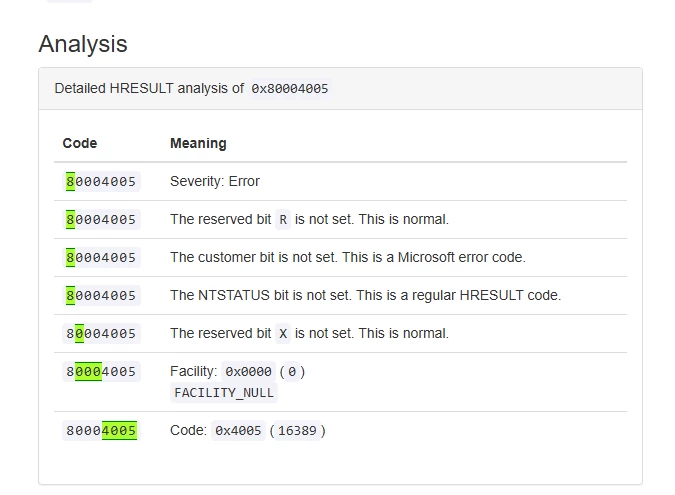
Also searched for the HRESULT value as hexadecimal and it returned me this
 

[Title edited by mod for clarity]

18 replies

PitepxAuthor
Known Participant
December 5, 2024

@Peter_Antal  I've shared the project with him via mail as he asked, hope it can help you guys. About the UI Hardware acceleration thing: it causes the timeline to flicker when zoomed in & out, so I will probably keep restarting premiere pro when the GDI objects get to around 15-20k in task manager


Also, can this quota change from 10k to 65k cause any problems on my PC?

Adobe Employee
December 5, 2024

Note: The smooth performance of 25 is due to new hardware acceleration of the underlying UI layer, and interactions with features have exposed interoperation issues causing leakage- right now the two things are directly connected. This error is connected to leaks connected to atypical way some pre-existing views were using resources. When combined with this new mode, some of those usages have enabled leaks which can use up app resources through repetitive usage.


Thank you very much for sharing the video and project. From the video and description it may be an interaction of filters on the timeline - this gets us in the ballpark, and will allow us to peel into this one, but there's still a number of moving parts we'll need to tease apart at this stage.

As Jamie has noted - the next step here is we'll be looking to isolate the specific repro action(s) which cause consistent, repeatable jumps of Windows OS GDI count, so folks know what to watch out for, and that's ultimately what we'll use for preparing fix. We'll want to capture that info next as a pre-req to the bug fix, and help other users know the repro of this bug.


In any case, Disabling UI hardware acceleration will provide stability here, with performance like releases prior to v25. Increasing the GDI object limit will merely delay how quickly the defect of GDI resource leak manifests in an app session, until the root issue on this case is isolated and fixed.

PitepxAuthor
Known Participant
December 5, 2024

@jamieclarke As of now I'm using 25.1 but am thinking of reversing to 25.0 as 25.1 brought a problem with text I was having in Beta too (I talk about it here)


I will send you a couple projects in your email

jamieclarke
Community Manager
Community Manager
December 5, 2024

Hi @Pitepx - Would you be able to send me your project at jamiec@adobe.com I don't need the media, only the project.  


If you open task manager and go to the details tab, then right click on columns and select GDI objects, While working in Premiere you can see the GDI objects rise.  Any reproducible steps where you see this would be appreciated.


Also are you using 25.1 or 25.0?  

PitepxAuthor
Known Participant
December 5, 2024

@jamieclarke Thanks for your response, in fact changing the quota to 65k actually helped and it hasn't happened since, I got to around 15k and no problem was presented, hope you guys can fix the leak soon as I looked it up on google and apparently its hell to solve as a dev


I don't know exactly what info to give to you but the effects I use most and are also present on the screen recording are:


Crop

Turbulent Displace

Posterize Time

Transform (applied to an adjustment layer)

S_Dropshadow

jamieclarke
Community Manager
Community Manager
December 5, 2024

Hi @Pitepx - Thank you for the video it is extremely helpful.  As we look to Isolate these GDI leaks.  Can you provide some more information on what effect you are using in the effect controls?  You can also isolate this by opening task manager selecting details, then right click on columns and select GDI objects, When you perform an action that you start to see the GDI objects rising is the information we need.  As soon as it hits 10,000 your system will crash unless you have changed the registry to make that number higher.  Any other reproducible steps that you can provide will help us fix it faster, so thank you for your help.  If you need to get a project out without it crashing you can go to  Preferences > General > "GPU accelerated UI rendering" checked off

PitepxAuthor
Known Participant
December 4, 2024

Update: changed the GDIProcessHandleQuota to 65k as suggested by another user in another thread about the same kind of error but did not help

R Neil Haugen
Legend
December 4, 2024

If I was still a mod, I would retitle your bug report "Direct 2D Drawbot Error" in Pr25.x


You might do that yourself, or another mod. It gets more direct relevant informationt to the devs and anyone scanning the posts. The current title is useless.

Everyone's mileage always varies ...