
April 16, 2023
Question

Disable farsi numbers and reversed fractions

  • April 16, 2023
  • 2 replies
  • 892 views

For some reason, numbers in supported fonts (Tahoma, Calibri, Segoe UI...) show as Eastern Arabic numbers instead of Western Arabic ones.
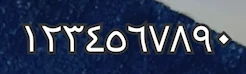
 

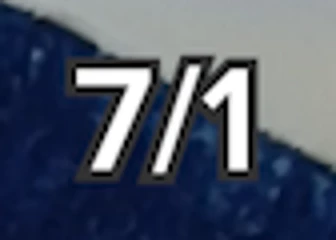
Also, fractions are inverted. Here I've written "1/7".
 

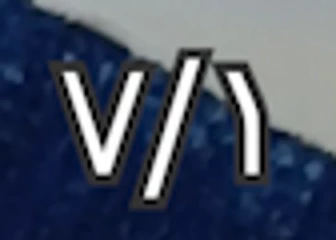
Of course, the fonts which support Eastern Arabic numbers show fractions inverted AND with Eastern Arabic numbers.
 

How can I revert those two options back to default? I've found some questions about the Eastern Arabic numbers, but they were all on Premiere Pro 2020, while I have Premiere Pro 2022.

This topic has been closed for replies.

2 replies

Community Expert
April 16, 2023

Be aware that in latest versions (I can't tell which one exactly), Adobe added the option to set Hindi numbers and Ligatures to individual text elements in the Essential Graphics panel:

April 16, 2023

This! This one was the problem: Hindi digits were enabled here. Thanks again!

Community Expert
April 16, 2023

Welcome, Glad to help

Community Expert
April 16, 2023
April 16, 2023

I had to create a new project and import everything in it and somehow it didn't have the two problems anymore. Thank a lot!