
Participant
September 7, 2013
Answered

Display Audio Waveforms in Timeline, Premiere Pro CC

  • September 7, 2013
  • 17 replies
  • 292574 views

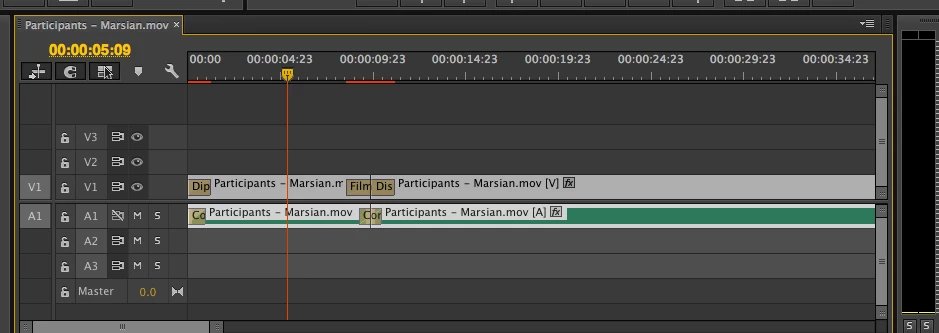
I have just started using Premiere Pro CC, watched all the turorials, and started a project. I am wondering how to display audio as waveforms in the timeline. I have tried suggestions like checking and unchecking rectify audio waveforms, but have not been able to get actual waveforms in the main timeline. It seems like there used to be disclosure triangles in a previous version, but there are none in this version.
Correct answer shooternz

You need to Expand the Audio Track (Scroll wheel in the track header or drag edge downward)

17 replies

Participant
October 11, 2020

Directly under the video there are two small icons one for video only and the other for audio only. Click on the audio only and you'll get your waveform

cam3LD
Known Participant
December 7, 2016

The problem is back in full force! Happens when I'm doing a multi-cam sequence (so the sequence is nested). Since it's nested, I can't right click and render and replace or edit in adobe audition. In the main sequence, the WAV is viewable, but not in my main edit sequence. I work with multi cam all the time and this is suddenly happening in 1/5 of all of my sequences. New solutions? Very annoying bug!

Participant
September 17, 2016

Maybe the file is not in the same sequence settings

LeoSSom
Participating Frequently
June 30, 2016

I never undestand this issue nor had a able explanation for myself ....

I was drop here in this thread, because about 10 monts ago, my wave forms stops to appear ,  like for many users . The solution to open edit in audition, works, but some time ago , this problem simply dissapear, and i really do nothing .... what a thing , is´nt it ?

Known Participant
December 10, 2015

For everyone who can't get the waveforms to appear no matter what we do - and that's a lot of us - i found a rock solid workaround.

like all weird adobe bugs, it's not a perfect solution, but it works. 

right click on the clip where the waveform isn't showing up and choose 'edit clip in adobe audition'

audition opens up and the waveforms appear back in the  premiere timeline.  you can then close out audition and keep on editing in premiere where the waveforms are now visible.

Participant
November 2, 2015

What I found for me was that clearing the Media Cache files didn't work, nor did restarting Premiere CC. I did notice a blue bar on the bottom right corner that states "Conforming 00009.MTS" or whatever your sequence file is called. As it's progressings I begin to see some of the waveforms appearing. Thank the LORD. I just have to be patient and wait. But perhaps the "Conforming" began after I cleared the Media Cache files so I'm not sure if it was caused by clearing this folder cache or not. Hope this may help someone. Father God bless<><

mjoelx
Participant
June 30, 2015

I was having issues with this and found that even after clicking the wrench and choosing "expand all" and "show audio waveform" like some commenters have suggested that the waveform was still not showing. Only after quitting the program, restarting it and reopening the project did the waveform show up... give this a try if you haven't already.

Inspiring
May 13, 2015

How do I get this to display?

Many thanks

Participant
April 19, 2015

I've been having issues seeing audio waveforms too.  Restarting the program helped once but I don't understand if the "show audio waveforms" is checked by default why they aren't showing up.  This seems like a "bug" type issue that Adobe definitely needs to address - was never an issue for me in previous versions.

Participating Frequently
April 24, 2015

I know this is frustrating, but another sort of fix, is to render the audio files from the menu. Shouldn't have to do it, but it gets them back. Except in one of my sequences yesterday, clicking render audio just played back the timeline rather than rendering. I'm simply giving up with Premiere. I'm not even going to try to understand their flaws. Just gonna work around them now and one day move on to something else. It's a shame because I really like using AE and photoshop, and i like the idea of the integration, but it's really been more trouble than it's worth lately. It's almost a joke. I now laugh instead of pulling my hair out.

Known Participant
April 27, 2015

the only thing that worked for me was to rectify waveforms from little sequence menu... but i had to set my cursor on each section of a 2 hr program and watch the little waveforms "rectify" one by one.... obviously a bug... that adobe needs to fix....??

Regards, Tom Adams, Director/owner Reelife Documentary Productions
Known Participant
April 17, 2015

same problem here. the only thing I notice is that the file that isn't showing any waveforms is a wav file and the other audio that's showing up is a .mov file. so frustrating... I need to see the waveforms. help?

Regards, Tom Adams, Director/owner Reelife Documentary Productions