
Participant
June 25, 2021
Answered

Display one area of a video in another spot in same video

  • June 25, 2021
  • 1 reply
  • 2186 views

I am hoping someone can help me with a particular scenario I am trying to figure out.   I am new to using Premiere Pro.  I am perfectly comfortable with looking up tutorials online/youtube and working with that.  The issue is I have no idea if  (a) if its possible (b) what the technique is called to in order search for tutorials.


What I am trying to do is take areas of a video and display it in another spot in the same video.


I use a super-ultrawide monitor (5120x1440 resolution) which is fantastic when playing games, however, when recording clips that resolution does not translate well to youtube viewing for anyone 'not' watching on a 32:9 display.


What i've been doing instead is cropping the video to 3440x1440 instead.  In doing so it chops off certain elements of the game (mini map, health bars) which I do want to keep displayed.  Unfortunately some games do not allow me to adjust the HUD positions so they are at edges of screen.
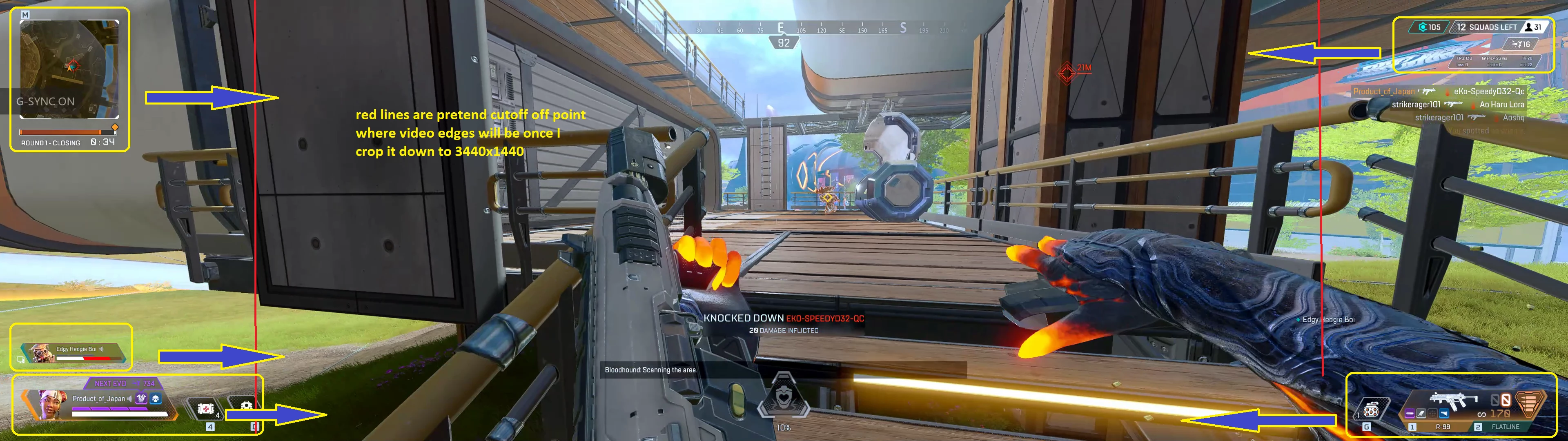


I attached a screenshot of the areas of the screen I want to play in the video .. just moved in within the area between red lines.


Any suggestions or at least what to look for in tutorials would be appreciated.


This topic has been closed for replies.
Correct answer EDK77

Tried the masking thing.  Granted it was more work than it was probably worth or probably I'm sure i was doing it is the least efficient way possible but I think i got the gist of it.


Original 5120x1440

https://www.youtube.com/watch?v=m7pdjNbMmxY


Test - video cropped to 3440x1440 with Hud elements masked and moved inside

https://www.youtube.com/watch?v=34Unu9j4-gI


I think turned out okay for a first attempt test.  Though not sure why elements disappear towards end .. im sure I goofed something somewhere (tried doing this middle of night before going to bed).


Either way at least I have something to start with. Again appreciate the original feedback/suggestion Steve!

1 reply

Inspiring
June 25, 2021

You can duplicate the video clip in your Premiere pro sequence onto (say) V2 and then use the position tool to move the elements you want into your resized area and then use the masking tool to 'cut' out the HUD icons and remove the rest of the picture.

The problem you'll have is - unless you do a lot (a LOT) of fiddly masking - you are going to have the parts of the background that the HUD original sits on now also sitting over parts of your main image.

I suspect that this method is not going to give you what you want and the better option would be to just record the gameplay from a 3440x1440 source rather than he current 32:9. I can't tell from the image you posted but some of the HUD elements may be transparent? If so, even if you carefully mask the hud - there are still going to be elements of the cropped background showing through. Which will probably look weird.

If I 'had too' do something like this, I would not attempt it in Premiere Pro (though it is possible) - Adobe After Effects would give better masking tools. But still, it would still be a 'not simple' project.

EDK77AuthorCorrect answer
Participant
June 25, 2021

Tried the masking thing.  Granted it was more work than it was probably worth or probably I'm sure i was doing it is the least efficient way possible but I think i got the gist of it.


Original 5120x1440

https://www.youtube.com/watch?v=m7pdjNbMmxY


Test - video cropped to 3440x1440 with Hud elements masked and moved inside

https://www.youtube.com/watch?v=34Unu9j4-gI


I think turned out okay for a first attempt test.  Though not sure why elements disappear towards end .. im sure I goofed something somewhere (tried doing this middle of night before going to bed).


Either way at least I have something to start with. Again appreciate the original feedback/suggestion Steve!

EDK77Author
Participant
June 28, 2021

Looking good! Seems like you've got the hang of it.


Thanks! yeah I get the idea .. your input was a great help.   I know there's ways to get the outline of the masked portions to look cleaner (I just did for practice approximate shapes).    Once I get that a bit more dialed down I think you can save the masked patterns/locations as a template which I can use later since the position will be the same going forward.

Or at least I think I saw something about templates.  Will be on my next to do list for looking up.


Definitely neat things one can do with this video editing.   Not much of a content creator myself but trying to be the cool dad making gameplay videos with my son.