Participant
May 18, 2013
Answered

DNxHD render dark

  • May 18, 2013
  • 2 replies
  • 20610 views

I'm mastering a playout with the Avid DNxHD codec, but whenever I do this, the final playout is much darker than the footage and anyother playout.  Am I missing something in the settings regarding colour space?

The footage was shot and cut at 2K, and the playout is at 1080P.

All other Quicktime etc playouts are fine. It's just the DNxHD.

Any ideas?

Thanks in advance 

This topic has been closed for replies.
Correct answer

General advice for encoding to DNxHD out of Adobe Suite so far:*

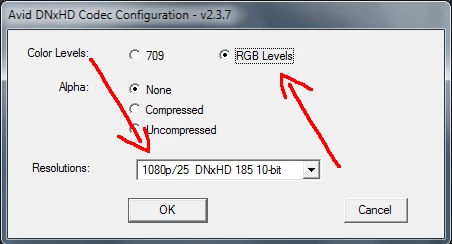
- when you encode to DNxHD 4:2:2, choose 'RGB Levels';

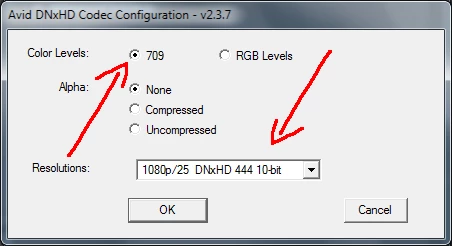
- when you encode to DNxHD 4:4:4, choose '709'.

DO NOT interfere with the Depth settings in the Export Settings dialog box.

And keep in mind that DNxHD is literally for 720 and 1080 only.

__________________________________________________________________

* Things may change in upcoming CC

2 replies

Correct answer
May 18, 2013

General advice for encoding to DNxHD out of Adobe Suite so far:*

- when you encode to DNxHD 4:2:2, choose 'RGB Levels';

- when you encode to DNxHD 4:4:4, choose '709'.

DO NOT interfere with the Depth settings in the Export Settings dialog box.

And keep in mind that DNxHD is literally for 720 and 1080 only.

__________________________________________________________________

* Things may change in upcoming CC

Participant
May 18, 2013

Many thanks, will try this now.

Participant
May 18, 2013

Yep that did int.  Many thanks

Participant
May 18, 2013

The H.264

The DNxHD

Participating Frequently
May 18, 2013

strage...

We got massiv problems every time we have a source DNXHD MOV and render out to DNXHD MOV with high bitdeep and 10Bit DNXHD Profile - this all the time results in magenta pixels in the super white areas of the video - no problems with 8bit mode so far...