Participant
May 18, 2013
Answered

DNxHD render dark

  • May 18, 2013
  • 2 replies
  • 20610 views

I'm mastering a playout with the Avid DNxHD codec, but whenever I do this, the final playout is much darker than the footage and anyother playout.  Am I missing something in the settings regarding colour space?

The footage was shot and cut at 2K, and the playout is at 1080P.

All other Quicktime etc playouts are fine. It's just the DNxHD.

Any ideas?

Thanks in advance 

This topic has been closed for replies.
Correct answer

General advice for encoding to DNxHD out of Adobe Suite so far:*

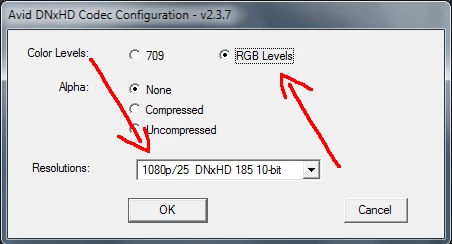
- when you encode to DNxHD 4:2:2, choose 'RGB Levels';

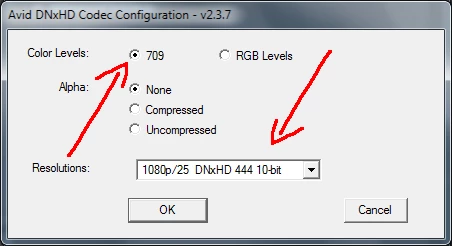
- when you encode to DNxHD 4:4:4, choose '709'.

DO NOT interfere with the Depth settings in the Export Settings dialog box.

And keep in mind that DNxHD is literally for 720 and 1080 only.

__________________________________________________________________

* Things may change in upcoming CC

2 replies

Correct answer
May 18, 2013

General advice for encoding to DNxHD out of Adobe Suite so far:*

- when you encode to DNxHD 4:2:2, choose 'RGB Levels';

- when you encode to DNxHD 4:4:4, choose '709'.

DO NOT interfere with the Depth settings in the Export Settings dialog box.

And keep in mind that DNxHD is literally for 720 and 1080 only.

__________________________________________________________________

* Things may change in upcoming CC

Participating Frequently
May 18, 2013

Hi Fuzzy Barsik,

thanks for the infos but that opens up some new questions...

1. "choose RGB Levels for export"

    --> That would make sense for non broadcast mastering purpose but confunigly I got bad export result with this route:

          I've exported 10Bit DPX full range material once as "709" and once as "RGB Levels" to check the results.

          a) after reimport of the exported footage to PP 709 export matches nearly 100% to the source footage

          b) after reimport of the exported footage to PP RGB Levels export shows quantisation glitches in the waveform monitor (If you take a look at the picture there isn't a big change, but it

              looks like the footage has suffered a bit during export)

   --> If a client asks for a broadcast save Rec.709 exported file it would be a bad Idea to present him Fullrange RGB levels instead...

2. "DO NOT interfere with the Depth settings in the Export Settings dialog box"

   --> If I got it right - first I have to set my sequence or export to Maximum Depth to switch from 8Bit to higher internal processing and then I've to select a 10Bit DNXHD mode to store to 10Bit Quicktime?

3. "And keep in mind that DNxHD is literally for 720 and 1080 only."

   --> That's right and a bad decision of AVID... if I work with Prores I can export to 2K D-Cinema Resolution - AVID DNXHD can't be used to store a Master file in such a common Format...

Participating Frequently
May 19, 2013

1. PrPro is not a colour managed (colour aware) application, it works in sRGB colour space.

2. For testing purposes I use the following technique:

- set an After Effects project to 32-bit mode and linearise working space;

- drop both original footage and a transcoded one into a composition and set blending mode of an upper layer to 'Difference'.

This test allows you to see mathematical shift in pixels values however small. With the settings above DNxHD behaves in exactly the way it should, and the result is similar to any other 4:2:2 and 4:4:4 codecs accordingly.

3. You check 'Maximum Bit Depth' flag in sequence settings so as to set your working space in 32-bit. More or less similar to setting AE project to 32-bit. Unfortunately, 'Maximum Bit Depth' flag and Depth field in the Export Settings can't properly communicate with the code inside DNxHD presets, which results into weird output like stripy image. See this thread in AE Forum.


Hi Fuzzy Barsik,

1. PrPro is not a colour managed (colour aware) application, it works in sRGB colour space.

As you wrote PP isn't color managed - that means it doesn't works in sRGB or any other "managed" color space - feed it with whatever you want (DCI P3 for instance) and it will export unchanged. For color correct monitoring you have to attach an display calibrated for the color space of the incoming footage.

2. For testing purposes I use the following technique

The quantisation glitches don't result from PP since I dont change a setting in PP - I only switch between 709 and RGB Levels in the DNXHD export dialog.

With 709 setting I get a waveform match with the source footage - with RGB levels the waveform looks distorted after DNXHD export.

I will take some screemshots and post it here - and if possible do the waveform monitoring with a Blackmagic Ultrascope for reference...

3. You check 'Maximum Bit Depth' flag in sequence settings so as to set your working space in 32-bit. More or less similar to setting AE project to 32-bit. Unfortunately, 'Maximum Bit Depth' flag and Depth field in the Export Settings can't properly communicate with the code inside DNxHD presets, which results into weird output like stripy image. See this thread in AE Forum.

Adobe states that the Maximum Depth setting in the export dialog is a option to overwrite the sequence setting.

So you can setup a sequnce without Maximum Depth and decide on export if you need high bit depth processing.

So my assumption was:

1. Create a sequence without Maximum Depth activated

2. Export to H.264 in AME without Maxium Depth activated in the export settings to get 8Bit processing for Bluray (result 8bit processing and significant faster rendering)

3. Export to DNXHD 4:2:2 10Bit with Maximum Depth activated to get PP internal high depth rendering and 10bit stored to the DNXHD file.

that seem to be really confusing to me - esp. why to set DNxHD 4:2:2 to RGB and 4:4:4 to 709??

Have to measure some export charts to see whats going on here...

Participant
May 18, 2013

The H.264

The DNxHD

Participating Frequently
May 18, 2013

strage...

We got massiv problems every time we have a source DNXHD MOV and render out to DNXHD MOV with high bitdeep and 10Bit DNXHD Profile - this all the time results in magenta pixels in the super white areas of the video - no problems with 8bit mode so far...