

glaustin
Inspiring
October 24, 2017
Answered

Does 2018 Update Offer Option to Keep 2017

  • October 24, 2017
  • 4 replies
  • 7467 views

Hi guys

From the reaction, this version seems to have a serious amount of flaws (why does Adobe rush to launch products with such basic issues???)

So my question is; does the 2018 install retain the option to keep the previous version? If it does, without losing any features needed to run 2017, I’ll download and test to see how it works on my machines.

Regards,

Graham
    This topic has been closed for replies.
    Correct answer ProDesignTools

    When upgrading, it's a good idea to keep the previous versions installed on your system – especially if you are trying to upgrade in the middle of a project.

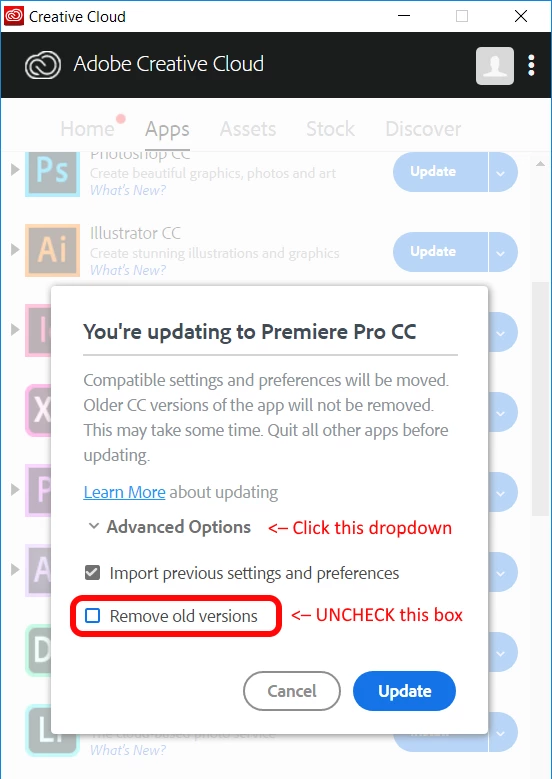
    However, you have to explicitly tell the CC Desktop app to do this by unchecking the 'Remove old versions' box under the advanced settings of the update dialogue.

    (Generally that should work, although Ann said she didn't see the "Advanced Options" dropdown menu for some reason.)

    4 replies

    Participating Frequently
    October 6, 2018

    Please note that as of 2018 the advanced dialogue box does not pop up when you click "Update" next to Premiere.

    It works for other CC apps - for instance, Photoshop provides the Advanced Dialogue popup. The latest version of Premiere 12 does not. WARNING: If you click "update" next to Pr it will automatically start updating without the option to retain previous versions.

    This has been true now for most all of 2018. Is there a way to get Adobe to fix this?

    Pr 12.0 has far far fewer bugs than the 12.1+ versions (releases that are some of the buggiest I've worked with in the past eight years). When clients are working off the latest version of Pr I'm forced to update without an ability to retain the older, more reliable versions on other projects. It's awful.

    Many of my colleagues have switched back to Final Cut because of how bad Premiere's become (and Final Cut is pretty terrible too). Other professional editors I know, including myself, are eagerly awaiting the day DaVinci Resolve becomes the new standard. Blackmagic makes some spectacular products and I have no doubt will soon outrun Adobe, at least with anything video related (editing, audio mixing and mastering, and color grading).

    Legend
    October 24, 2017

    There are checkboxes to migrate your settings and to remove older versions.  Both are checked by default under the Advanced button.

    ProDesignTools
    Community Expert
    ProDesignToolsCommunity ExpertCorrect answer
    Community Expert
    October 27, 2017

    When upgrading, it's a good idea to keep the previous versions installed on your system – especially if you are trying to upgrade in the middle of a project.

    However, you have to explicitly tell the CC Desktop app to do this by unchecking the 'Remove old versions' box under the advanced settings of the update dialogue.

    (Generally that should work, although Ann said she didn't see the "Advanced Options" dropdown menu for some reason.)

    glaustin
    glaustinAuthor
    Inspiring
    October 30, 2017

    I just moved the folder with the mts files to a different location.


    Have you tried ingesting new .mts clips yet or have you only been concerned with existing clips so far?

    Also, one thing that I’m not clear about; does this issue just affect AVCHD .mts or does it impact XAVCHD .mxf files as well?

    glaustin
    glaustinAuthor
    Inspiring
    October 24, 2017

    Thanks. Wonder why Adobe removed the ‘retain previous vesion’ option? It seems people updating then restoring back to 2017 after a poor experience, are being denied the Dolby plugin when they launch 2017. That could be a big issue as I primarily work with .mxf and .mts files and I want to be sure before.

    LL_Cool_Dave
    Participating Frequently
    October 24, 2017

    I can´t find the CC2017 and my old projects won´t load in 2018....even with save as...

    Your only option is  CC and CS 6.0

    Really Bad..especially as my customer just called me for a "last minute" change... 

    Inspiring
    October 24, 2017

    It will replace it but you can add the older version back in if you need to. Just go to the cloud and click on the menu next to the "Open" menu then choose "Other Versions" to install any version back to CS6.