
Participant
August 10, 2020
Question

Doing Sport Highlights, How Can I Make a Highlighted Area Like This?

  • August 10, 2020
  • 1 reply
  • 1473 views

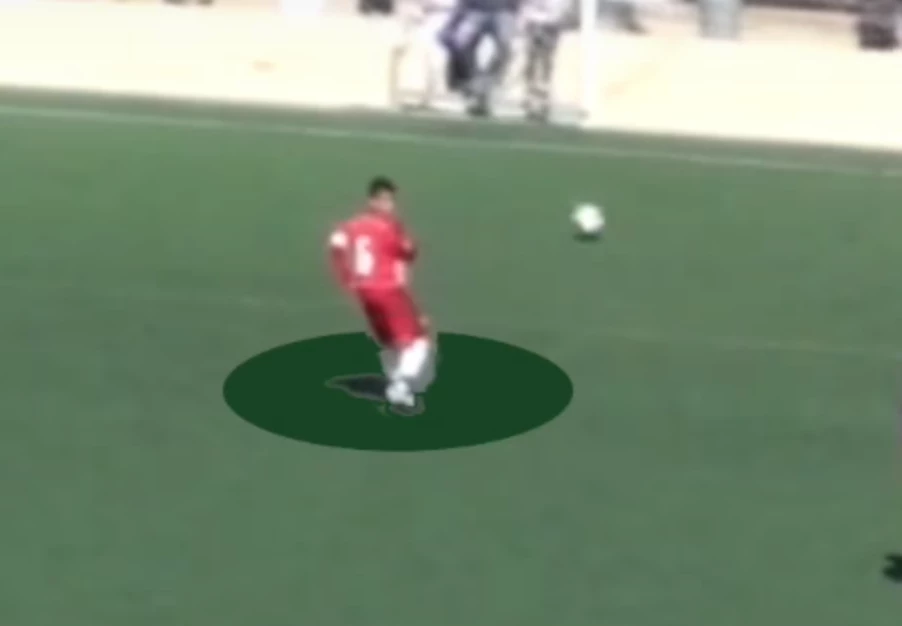
Hey guys, I'm working for a recruiting agency, and doing sport highlights is part of the job. The videos do not really require too much flair to be honest, the recipients (coaches) do not really care about that stuff, the quality of the player is the most important, but it would still look cool if I could improve this area of my video editing, especially if I would combine it with frame freezing. Anyway, picture included what I'm talking about, this is the type of editing I'm looking for, a circle around the player, but the player him/herself is not affected. Thank you for the help!
 

This topic has been closed for replies.

1 reply

@mj
Community Expert
Community Expert
August 10, 2020

Hi LukaFTW,


Let's deal with your question in teo parts.


Freeze Frame - check out this resource that explains it. It is called Frame Hold in Pr.

https://helpx.adobe.com/uk/premiere-pro/using/freeze-frame.html


Highlighting the player

This is a three step process. First you need to draw the ellipse, then you will need to mask out the player. In your example the legs,  then you will need to track the mask. Explainers below.


1. Drawing an ellipse in Pr

https://www.youtube.com/watch?v=rSlAe9OQRZs


2. Mask the player

https://helpx.adobe.com/premiere-pro/using/masking-tracking.html#MaskinginPremierePro


3. Tracking the mask

https://helpx.adobe.com/premiere-pro/using/masking-tracking.html#MasktrackinginPremierePro


Good luck

.mj