
bigteeth
Participating Frequently
February 26, 2018
Question

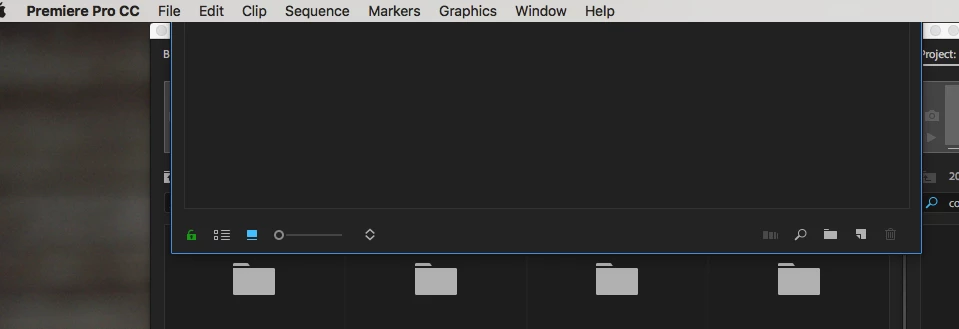
Double click project panel stuck under OS X menu bar

  • February 26, 2018
  • 2 replies
  • 1769 views

Apologies if this is covered but I couldn't find it anywhere in the forums.

When editing I want to open a bin next to my main project panel where I can view the clips in icon view instead of list view. It's how I've always worked in Premiere. The last two versions including the most up to date for some reason make my double clicked bins get stuck under the OS X menu bar. I've included an image for reference. 

This is happening in a dual monitor situation where the main one is an iMac (27-inch, Late 2013) on Sierra. 3.5 GHz Intel Core i7, 32 GB Memory.

I've tried anything I can think of and have no solution. I've seen other people post about other Adobe apps with solutions usually involving 3rd party software but this is a mega glitch that is wreaking havoc on my workflow.

Anyone know how to fix this? Thanks!
This topic has been closed for replies.

2 replies

bigteeth
bigteethAuthor
Participating Frequently
May 1, 2018

This issue is still happening. It stopped randomly and then started again when I upgraded to most recent Premiere. PLEASE can someone find a way to fix this? I have spent so many days trying to solve this instead of editing that it is killing me.

amandam67556849
Participant
July 25, 2018

I have this problem too.  Unplug your external monitor (from the HDMI out) and window should resize. Then move it lower so you can grab it when you plug second monitor back in.  Works for me–good luck!

kulpreet singh
Inspiring
February 27, 2018

Hi bigteeth,

I apologize for this annoying issue.

This is happening in a dual monitor situation where the main one is an iMac (27-inch, Late 2013) on Sierra. 3.5 GHz Intel Core i7, 32 GB Memory.

What is the resolution of your monitors?

You can try this workaround: change the double-click behavior to 'Open new tab' (in Premiere Pro preferences).

Thanks,

Kulpreet Singh

bigteeth
bigteethAuthor
Participating Frequently
February 27, 2018

Thanks for the response. Unfortunately this is not the solution. The way I work with bins (and have always worked in premiere) I don't want lots and lots of tabs because it isn't easy to find what you're looking for quickly. The pop out windows is what I need and I don't know why suddenly they pop up in a way that I can't move them anymore. This is definitely a software glitch not a workflow error.

My monitors - one is the iMac I referenced and the other is a Viewsonic 1920x1080 monitor.

bigteeth
bigteethAuthor
Participating Frequently
March 5, 2018

Hello Rameez -

  • Does it happen irrespective of the monitor on which the Premiere Pro workspace is?

I think so. But based on how my workspaces are organized and what my workflow is I think it's mostly the extra monitor and not the iMac. It's worth noting that this happened to me yesterday on a different computer at my office so it's not isolated to my one computer/monitor setup.

  • Have you customized your workspace or is it a default workspace that you're working on?

Customized. I have tried many different workspaces, resetting them, creating new ones, using old ones... eventually the problem reoccurs even if it seems fixed.

  • Is this project upgraded from a previous version of Premiere Pro?

I don't think so. Also, it has happened on multiple projects. It may be from a pre-update of cc18 if that matter?

Version 12.0.1 (Build 69)

  • Which version of macOS are you on?

Sierra 10.12.6

Any assistance would be greatly appreciated. I've lost days trying to figure this out.


Days later and still no answer. This bug is getting to pretty annoying Adobe. I'd appreciate you fixing the problems with the software a little more, and unleashing new features that nobody uses a little less.