

Thomas Hanser
Inspiring
December 5, 2018
Answered

Drag Clip to Timeline with no Audio Track

  • December 5, 2018
  • 2 replies
  • 830 views

Is there a way to do this,using a key command while I drag a clip into the timeline?

I don't always want the audio track and spend a lot of time un-linking the track, selecting the audio and then deleting it.

There must be a more efficient way of doing this.

Thanks!
This topic has been closed for replies.
Correct answer Meg The Dog

Either -

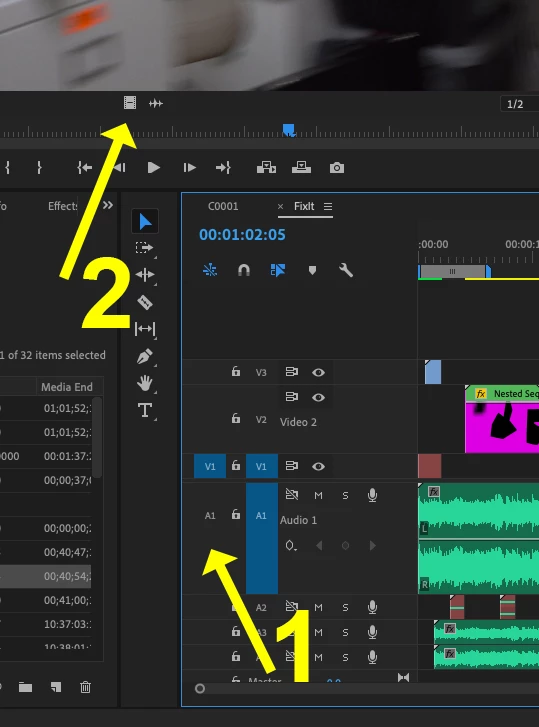
1) Turn off the audio source from entering the timeline by toggling off the audio source track in the timeline header

or

2) Load the clip to the source monitor and drag it to the timeline using the video only icon

MtD

2 replies

Meg The DogCorrect answer
Inspiring
December 5, 2018

Either -

1) Turn off the audio source from entering the timeline by toggling off the audio source track in the timeline header

or

2) Load the clip to the source monitor and drag it to the timeline using the video only icon

MtD

Thomas Hanser
Inspiring
December 5, 2018

DRAG VIDEO ONLY BUTTON.

(Sometimes it's easier to post a question and wait few minutes than to even bother to hunt around or Google the answer.)

Thanks, everyone and Happy Holidays.

Ann Bens
Community Expert
Community Expert
December 5, 2018

Did you not understand post 1?

Ann Bens
Community Expert
Community Expert
December 5, 2018

Ann Bens
Community Expert
Community Expert
December 5, 2018

Or lock the audio track when using shortcuts.