
Inspiring
June 7, 2018
Answered

dual monitors on premiere pro cc 2017

  • June 7, 2018
  • 2 replies
  • 11172 views

Hi All,

I have dual monitors enabled in my os on my windows 10 dell laptop. I can see the extended monitor with a black screen and icons in the task bar.

I set dual monitors in adobe thus:
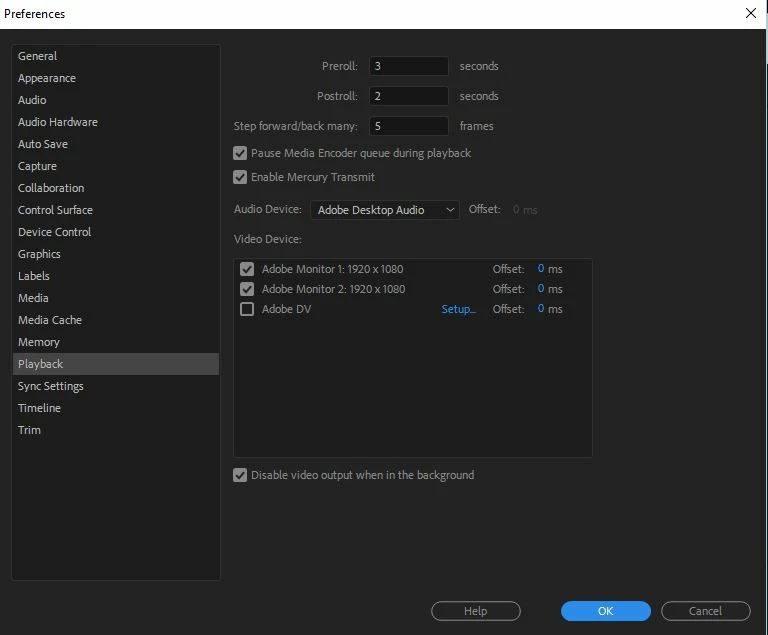
I cannot get any image on to the 2nd monitor. How do I do this ??

Thanks

Chris

    This topic has been closed for replies.
    Correct answer Jeff Bugbee

    Simply drag windows/panels from one monitor to the other.

    2 replies

    Known Participant
    June 7, 2018

    I use a dual screen configuration, but I don't click either of the monitors to use as playback devices. I use them all as Premiere windows. If you want to use both monitors with Premiere windows, unclick those check boxes. then start dragging the windows how you want (and save the workspace).

    Inspiring
    June 7, 2018

    Hi

    thanks for your reply and info. I am just about to start a major edit so getting comfy with the screen setup at moment

    Chris

    Jeff Bugbee
    Community Expert
    Jeff BugbeeCommunity ExpertCorrect answer
    Community Expert
    June 7, 2018

    Simply drag windows/panels from one monitor to the other.

    Inspiring
    June 7, 2018

    Hi Jeff

    Thanks for your reply.

    That does not work tried dragging various windows nothing happens they stay put.

    What I can do is extend the main window of premeire (the app window) wider than hald of the app is on monitor 1 and half on monitor 2 but would obviously like specific windows such as the program monitor on monitor 2.

    Chris

    Jeff Bugbee
    Community Expert
    Community Expert
    June 7, 2018

    What happens if you do what I do below?