
Participant
October 21, 2024
Answered

duplicate clip with option key not working as expected

  • October 21, 2024
  • 3 replies
  • 3177 views

Not sure if this is a bug or the feature has changed.


It used to be that when I hold the option key and duplicate by dragging a video clip to the track above, that the video clip on track 2 would be the solo clip and the clip on track 1 would be the video linked to the attached audio.


But now it's inverted? In the attached photo, I want what is on the right, but what happens is on the left.
From a programming perspective this seems like a lot more work to duplicate video to track 2, unlink video track 1, then link track 2 to the audio clip. This has gotten me several times when I'm further in the edit because I want my duplicates on top, not the source clip to be on top
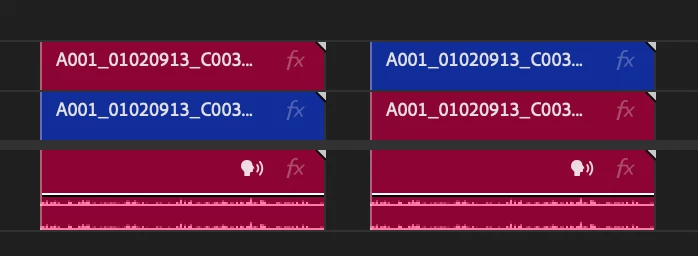

Is this a bug? and if not, can we get it to go back to the way it was? This has been going on for a few versions so I'm not sure when this change happened. 

This topic has been closed for replies.
Correct answer jamieclarke

Hi @Drew30734684r9e9 - Premiere Pro hasn't behaved like this since version 13.  I'm going to say that when creating a video copy we will link the top video layer to the audio when "linked selection" is active.

3 replies

Community Expert
October 24, 2024

If you hold Option/Alt + click on the clip and continue to hold Option/Alt while dragging up, this will create a duplicate of the video only.

Participant
October 24, 2024

That is how I would expect it to work, but it moves the linked video up to track 2 and makes the duplicate video only, on track 1

Community Expert
October 24, 2024

The first click and then the drag need to be two separate mouse clicks.

The first click selects the video only, and the click + drag will duplicate it.

jamieclarke
Community Manager
jamieclarkeCommunity ManagerCorrect answer
Community Manager
October 23, 2024

Hi @Drew30734684r9e9 - Premiere Pro hasn't behaved like this since version 13.  I'm going to say that when creating a video copy we will link the top video layer to the audio when "linked selection" is active.

Participant
October 24, 2024

I remember doing it in 2022. I wasn't using that feature enough in 2023 to notice, but now in 2024 I am using it more often again.

For me, because I like having the linked selection active and the linked video/audio on track 1, I now have to move the linked video (on track 2) to track 3, so I can move the unlinked video(on track 1) up to track 2, so I can move the already moved video track (on 3) down to track 1.

Seems like a lot of extra work. If I want to duplicate the video and have it overlaid onto of the video and I want to change the length of the video on top and add effects to it. I dont want that one connected to audio since it would also change the length of the audio or cut the audio. 

Does anyone else prefer the older way?

jamieclarke
Community Manager
Community Manager
October 23, 2024

Hi @Drew30734684r9e9 -  Checking if this is expected behavior or not.