
Participant
May 13, 2020
Answered

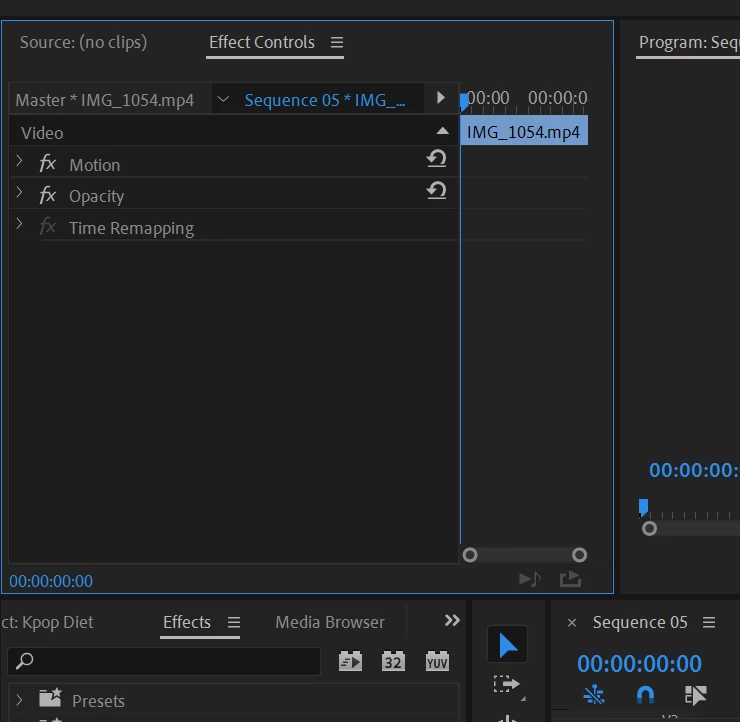
Effect Controls Panel Is Missing Effects

  • May 13, 2020
  • 1 reply
  • 3967 views

I just reset Premiere Pro because an error was popping up every time I attempted to use a Legacy Title on my timeline. That issue is fixed, but now the Effects that are usually in the Effect Controls panel are missing. Position, Opacity, etc. I cannot figure out how to retrieve them.

Only one clip is selected, the effects should be here 😕😕
 

This topic has been closed for replies.
Correct answer RobShultz

Please twirl open the arrow to the left of the FX button by the word motion/

1 reply

RobShultzCommunity ExpertCorrect answer
Community Expert
May 13, 2020

Please twirl open the arrow to the left of the FX button by the word motion/

Participant
May 13, 2020

*facepalm* thank you so much hahaha