
Participant
August 4, 2022
Answered

Effects aren't showing in preview

  • August 4, 2022
  • 3 replies
  • 3286 views

I am new to editing and watch several tutorials on topics that I am learning.

I've noticed since I started editing there are some effects that I follow the tutorials to the T on, but the effects aren't showing up in my preview window. Figured I was just doing it wrong.


As I'm getting better however, I am sure there is something I'm missing that is causing these effects to now show up while I'm editing.

In the example here, I'm working on a split screen. I've applied the Crop effect to both snips, and even though I've set the top crop numbers to 35/15, it's not cropping.

The same thing happens when I've tried to work with lightning/darkening as well. Others seem to work just fine, like changing opacity, and positioning.

Any insight on why I can't see my cropping on this project would be great.
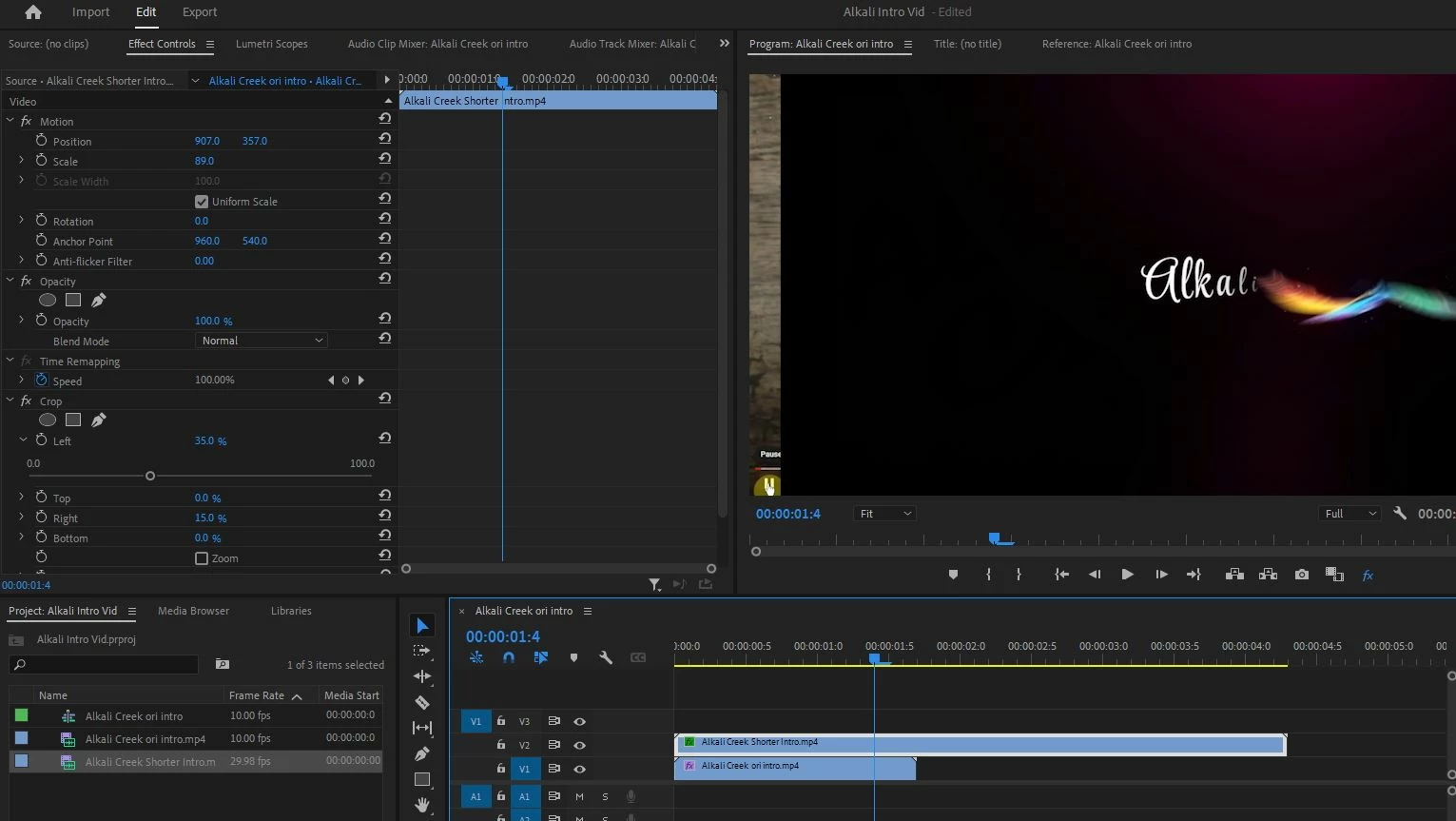
Correct answer Steve Griffiths

From the image you posted you have 'Global FX Mute' activated - which would account for effects not showing. It's the tiny blue 'fx' icon in the bottom right hand corner of your Program window. Click so it changes to white instead of blue.

3 replies

Steve GriffithsCorrect answer
Inspiring
August 6, 2022

From the image you posted you have 'Global FX Mute' activated - which would account for effects not showing. It's the tiny blue 'fx' icon in the bottom right hand corner of your Program window. Click so it changes to white instead of blue.

crzyboizAuthor
Participant
August 6, 2022

Thank you so much. It took me some time to try to replicate that screen shot as to where to find that icon, but I found it, and it worked.

Appreciate your keen eye!

Ann Bens
Community Expert
Community Expert
August 4, 2022

Might get more strange behavior: sequence 10 fps, clip 29.98.

Warren Heaton
Community Expert
Community Expert
August 4, 2022

If the Source Clip frame size is larger than the Sequence frame size, that can make it seem that the Crop Effect is not doing anything.  

To check if or how much the frame size of the Source Clip is then the Sequence Frame size, Zoom out (set the Magnification pop-up menu to a low number like 25% or 10%) and then double-click on Source Clip in the Program Panel to show the handles.  Also, try increasing the Left Crop value to something like 50% or setting all of the Crop values (Left, Top, Right, Bottom) to 45%.  Basically, anything that should be obvious.


While learning different Effects, it's easier if Source Clip frame size and Sequence frame size match.

crzyboizAuthor
Participant
August 4, 2022

It's really strange because when I make the adjustments in the effects panel, I am not getting a preview. Even after doing the suggestions you had.

But, when I export it and watch the export, the effects have taken place which doesn't help me because I can't see what the edits are looking like in the preview while I'm doing them.

This is not the only time I've had this issue as I noted earlier.

I've adjusted exposure in videos before and it never previewed, but when I exported it, all the adjustments showed in the export. This "glitch" or whatever it is I'm missing is causing me hours upon hours of redoing things.

Kevin-Monahan
Community Manager
Community Manager
August 5, 2022

Hi nicoleb,

Sorry about that. This problem can happen if your Global FX button is enabled or your system is not meeting system requirements. Can you check the button in the Program Monitor? Is it enabled? If not, what are your computer specs, especially CPU, GPU, and RAM? What kind of footage is it?


Thanks,
Kevin

Kevin Monahan - Sr. Community and Engagement Strategist – Adobe Pro Video and Audio