
Trooper Johnson
Participating Frequently
May 29, 2024
Answered

Effects panel playhead flys down timeline when moving to the end of a clip.

  • May 29, 2024
  • 2 replies
  • 1367 views

I keyframe in my work a lot, so moving the playhead in the effect controls panel is pretty common for me. The problem I have is that I can't move it all the way to the end without the playhead flying down my timeline, losing the spot I was at (and depending on how long the clip is, it can be super sensitve & touchy when moving it down to the end). 

I could deselect 'Selection Follows Playhead' in the sequence drop-down menu and "fix" this, however that deselects the clip that my playhead is on (obviously), which is super helpful as I don't have to move my playhead to the next clip AND select the clip.

I have no idea if this is intended, but I would be surprised if it was as it's so incredibly touchy. If it is, it would be great to have an option for the effect controls panel to NOT do this.
Correct answer Warren Heaton

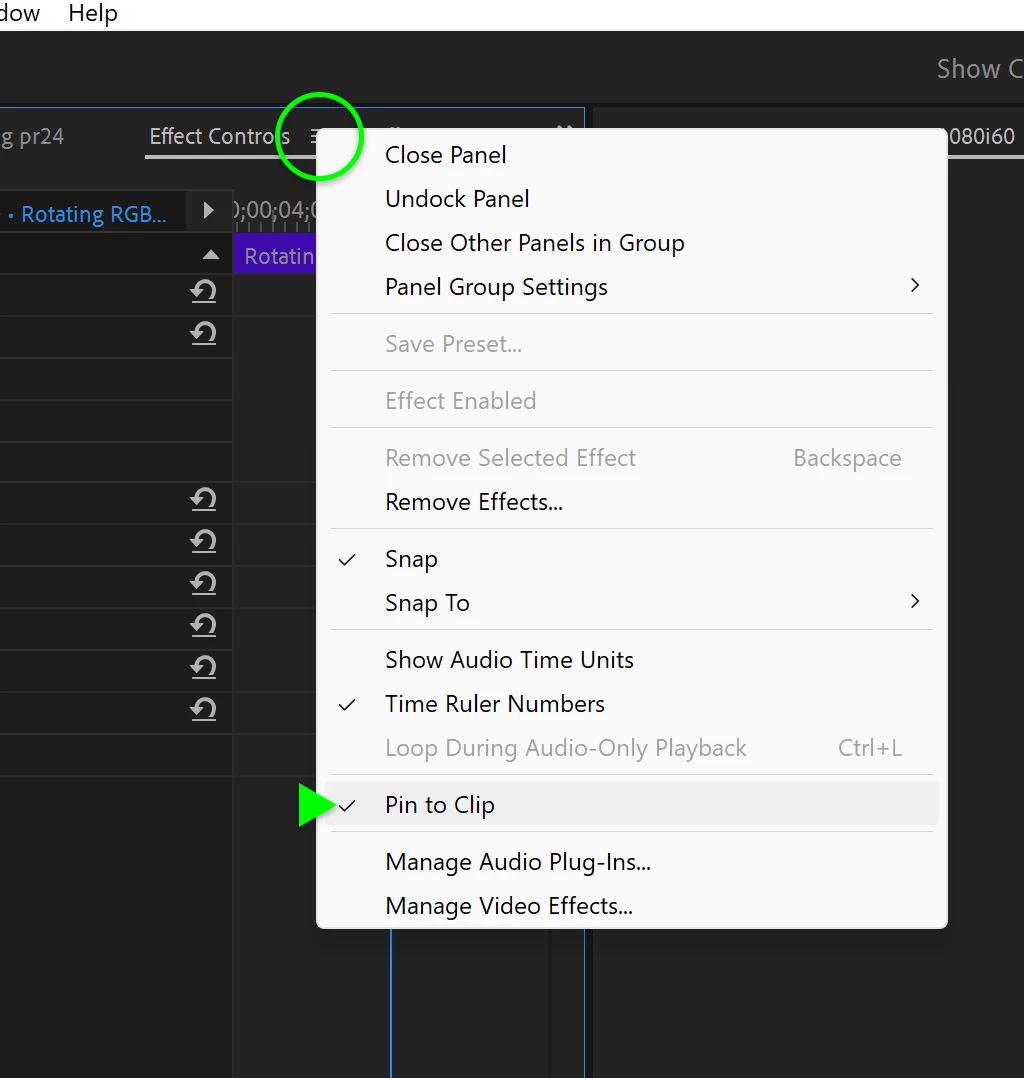
It sounds like you have Pin to Clip disabled.


Click the Effect Controls pop-up menu and check that Pin to Clip is checked.


2 replies

Community Expert
June 4, 2024

I found this frustrating as well, so I made a video about how to work around it:

https://youtu.be/oGlvJ3iruU0

Trooper Johnson
Participating Frequently
June 6, 2024

This works well, thank you! Especially explained well as MacBook keyboards as I don't have an 'End' key. 👍 Messing around with it further, I noticed that just 'Fn+ArrowKey' works while the ECP is selected, rather than 'Shift+Fn+ArrowKey' which works for the selected clip while the timeline is selected.

Would still be great to see an option in the future to "lock" onto the clip in the ECP as I mentioned in other replies, as I still scan through the clip with my mouse occasionally, but I still a good work around and I appreciate the help!

Warren Heaton
Community Expert
Warren HeatonCommunity ExpertCorrect answer
Community Expert
May 29, 2024

It sounds like you have Pin to Clip disabled.


Click the Effect Controls pop-up menu and check that Pin to Clip is checked.


Trooper Johnson
Participating Frequently
June 1, 2024

Seems I already have this enabled. Disabling it yields the same result. Happens on both my PC and MacBook Pro.

Warren Heaton
Community Expert
Community Expert
June 3, 2024

@Trooper Johnson 

What happens if Sequence > Selection Follows Playhead is disabled?