
philip.madison
Participant
March 28, 2018
Answered

Embedded Captions (Premiere Pro 14.9 and earlier)

  • March 28, 2018
  • 2 replies
  • 856 views

I am trying to put captions in a project and for some reason I don't have the option as to embed the captions in the output file...
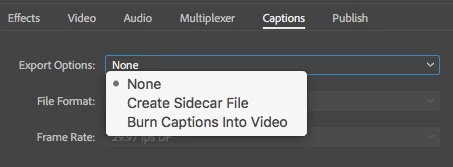
I am on a new install (Yesterday) of Creative Cloud. Premiere Pro 12.0.1


What I am looking for is in this option (taken from a screenshot of a tutorial)
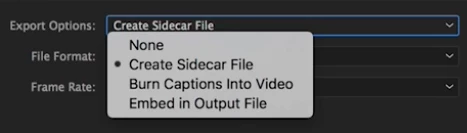
 

Any help would be greatly appreciated.

This topic has been closed for replies.
Correct answer Stan Jones

Like we watch downloaded movies there is option to turn on caption and off

and there is only file which is video file and not seprated srt file. pls help me how do that


MD,


This is an old thread about captions in PR versions 2020 and before. But the issue is the same.


The statement that embed = burned in is incorrect. Embed is a function where a closed caption (e.g. 608 or 708) is encoded into the video file and can be turned on or off. Burned in is rendered into the video appearance itself and CANNOT be turned off.


To get the srt (so that it can be turned on in VLC player and similar), you want a SIDECAR file. In the export settings, select captions and set it to sidecar and srt.


Stan


2 replies

premieregal
Community Expert
Community Expert
March 28, 2018

Hi there - The "burn captions into the video" is the same thing as embedding into the video. Did you try the "Burn captions into Video" option?

Participant
February 6, 2023

But its not showing caption or subtitle on player like mx player and vlc not showing caption option to turn it off or on

its just render with whole text like text on video

Stan Jones
Community Expert
Stan JonesCommunity ExpertCorrect answer
Community Expert
February 6, 2023

Like we watch downloaded movies there is option to turn on caption and off

and there is only file which is video file and not seprated srt file. pls help me how do that


MD,


This is an old thread about captions in PR versions 2020 and before. But the issue is the same.


The statement that embed = burned in is incorrect. Embed is a function where a closed caption (e.g. 608 or 708) is encoded into the video file and can be turned on or off. Burned in is rendered into the video appearance itself and CANNOT be turned off.


To get the srt (so that it can be turned on in VLC player and similar), you want a SIDECAR file. In the export settings, select captions and set it to sidecar and srt.


Stan


Vidya Sagar
Adobe Employee
Adobe Employee
March 28, 2018

Hi philip.madison,

It depends on the chosen export file format. Sidecar file is supported by only few video formats.

Please check this article for supported format list: Learn to work with captions in Premiere Pro

Thanks,

Vidya